




LaserJet M630dn
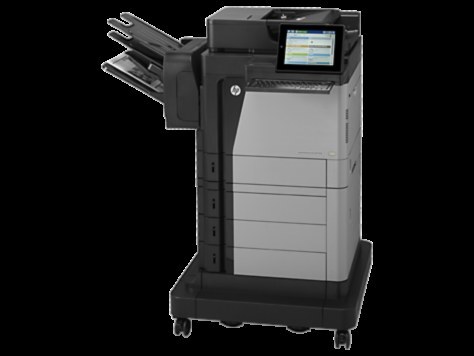
The LaserJet M630dn brought the Enterprise 600 series' speed to multifunction form in 2015: fast mono printing, scanning and copying, with duplex and networking as standard team equipment. It feeds on HP's 81A family — the CF281A as the everyday cartridge, and the high-yield CF281X, the 81X, for heavier months. The shelf below also lists the MICR build of the standard cartridge and the versions named for the M604, M605 and M606 printers in the same family.
Duplex and a network jack tell you who this machine serves: a workgroup that prints on both sides by default and shares one fast MFP instead of feeding five desktop printers. In that setting a cartridge is a team resource, and running dry is a team problem. The M630dn's family ties help — because the surrounding M604, M605 and M606 printers use the same cartridges, the office can hold one shared stock and move a spare to whichever machine asks first.
Toner Cartridges for LaserJet M630dn
| Cartridge | Color | Page Yield |
|---|---|---|
| CF281X single cartridge | Black | See product page |
| CF281X 2 Pack | Black | See product page |
| CF281X 3 Pack | Black | See product page |
| CF281X 5 Pack | Black | See product page |
| CF281X 10 Pack | Black | See product page |
| CF281A single cartridge | Black | See product page |
| CF281A 2 Pack | Black | See product page |
| CF281A 3 Pack | Black | See product page |
| CF281A 5 Pack | Black | See product page |
| CF281A 10 Pack | Black | See product page |
The standard cartridge also comes as MICR toner for check printing:
| Cartridge | Color | Page Yield |
|---|---|---|
| CF281A MICR single cartridge | Black (MICR) | See product page |
| CF281A MICR 2 Pack | Black (MICR) | See product page |
| CF281A MICR 3 Pack | Black (MICR) | See product page |
| CF281A MICR 5 Pack | Black (MICR) | See product page |
| CF281A MICR 10 Pack | Black (MICR) | See product page |
Both cartridges are also sold under listings named for the family's printers: CF281A MICR — M630z listing, CF281A MICR — M630f listing, CF281A MICR — M630dn listing, CF281A MICR — M630h listing, CF281A MICR — M604dn listing, CF281A MICR — M604n listing, CF281A MICR — M605dn listing, CF281A MICR — M605n listing, CF281A MICR — M605x listing, CF281A MICR — M606dn listing, CF281A MICR — M606x listing, CF281X — M630z listing, CF281X — M630f listing, CF281X — M630dn listing, CF281X — M630h listing, CF281X — M604dn listing, CF281X — M604n listing, CF281X — M605dn listing, CF281X — M605n listing, CF281X — M605x listing, CF281X — M606dn listing, CF281X — M606x listing.
Which cartridge should you buy?
For a networked workgroup machine, the high-yield CF281X is usually the smarter default: it lowers the cost of each page and keeps changeovers rare, which matters when a dozen people depend on the same printer. The standard CF281A still makes sense for a lightly used M630dn or as the emergency spare. Draft mode on everyday documents stretches either cartridge further. Whatever capacity you pick, buy it in the 3 or 5 packs if the machine is shared — the economics of a stopped workgroup are worse than the economics of a spare on the shelf.
Chip, toner and everyday use
Cartridge recognition on this machine is a chip handshake: if a new unit is not accepted, reseat it firmly and check that every protective seal and pull tab came off before it went in. Power-cycling the printer makes it re-detect the cartridge and clears most stubborn messages. A gentle side-to-side rock before installation levels the toner for even early pages. Remember that yield figures are measured at about 5% coverage — duplexed reports with charts and logos will consume a cartridge faster than the estimate, so plan fleet stock with a margin.
Frequently Asked Questions
What toner cartridges does the LaserJet M630dn use?
The standard CF281A and the high-yield CF281X — one family, two capacities — plus a MICR version of the standard cartridge for check printing. Cartridges from other HP families are not interchangeable with these.
How can I lower my cost per page on the M630dn?
Run the high-yield CF281X instead of the standard cartridge and more pages come out of every dollar of toner. Draft mode for internal documents stretches the cartridge further still.
Can I use a cartridge bought for a different HP printer?
No — the M630dn is built for the two codes above, and cartridges made for other HP models may not fit or register correctly. Always verify the code on the box against your exact model before installing.
What does MICR mean on some of the listings here?
It marks cartridges filled with magnetic toner, used for printing checks that bank equipment can read. The CF281A MICR listings fit this printer exactly like the regular cartridge; buy them only if check printing is part of your work.
More printers that use the same cartridges
The M630dn's cartridge family covers these models as well:
LaserJet Enterprise Flow MFP M630z, LaserJet Enterprise M604dn, LaserJet Enterprise M605dn, LaserJet Enterprise MFP M630f, LaserJet M604dn, LaserJet M604n, LaserJet M605dh, LaserJet M605dn, LaserJet M605n, LaserJet M605x, LaserJet M606dn, LaserJet M606x, LaserJet M606x MFP, LaserJet M630dn MFP, LaserJet M630f MFP, LaserJet M630h, LaserJet MFP LaserJet M630dn, LaserJet MFP M630f, LaserJet MFP M630h, LaserJet MFP M630z, LaserJet MFP M630z.