




LaserJet M630h
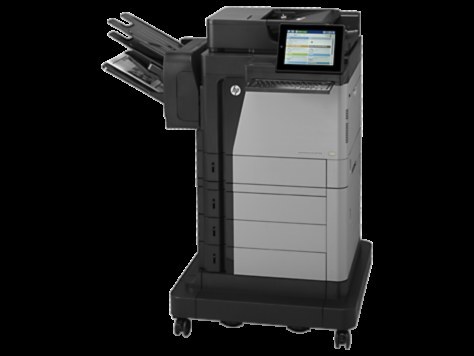
The H in the LaserJet M630h stands for its hardened brief: this is the security-minded configuration of the fast M630 mono multifunction, with advanced manageability features aimed at IT departments running controlled fleets. Its toner comes from HP's 81A family — the standard CF281A, also sold as the high-yield CF281X (81X) — and this page carries both, the MICR build of the standard cartridge, and the listings named for the M604, M605 and M606 printers on the same family.
Printers bought for managed fleets live by standardization: one cartridge family across the MFPs and the desktop printers around them, so IT stocks a single shelf and help-desk advice stays the same at every desk. The M630h fits that pattern exactly. Its supplies are shared with the whole M604-to-M630 group, which means a cartridge pulled for a failed M605 in the morning can be the spare that saves an M630h in the afternoon — fleet managers plan around exactly that kind of flexibility.
Toner Cartridges for LaserJet M630h
| Cartridge | Color | Page Yield |
|---|---|---|
| CF281A single cartridge | Black | See product page |
| CF281A 2 Pack | Black | See product page |
| CF281A 3 Pack | Black | See product page |
| CF281A 5 Pack | Black | See product page |
| CF281A 10 Pack | Black | See product page |
| CF281A MICR single cartridge | Black (MICR) | See product page |
| CF281A MICR 2 Pack | Black (MICR) | See product page |
| CF281A MICR 3 Pack | Black (MICR) | See product page |
| CF281A MICR 5 Pack | Black (MICR) | See product page |
| CF281A MICR 10 Pack | Black (MICR) | See product page |
High-yield options:
| Cartridge | Color | Page Yield |
|---|---|---|
| CF281X single cartridge | Black | See product page |
| CF281X 2 Pack | Black | See product page |
| CF281X 3 Pack | Black | See product page |
| CF281X 4 Pack (alternate listing) | Black | See product page |
| CF281X 5 Pack | Black | See product page |
| CF281X 10 Pack | Black | See product page |
Listings named for individual printers in this family:
- CF281A MICR — M630z listing
- CF281A MICR — M630f listing
- CF281A MICR — M630dn listing
- CF281A MICR — M630h listing
- CF281A MICR — M604dn listing
- CF281A MICR — M604n listing
- CF281A MICR — M605dn listing
- CF281A MICR — M605n listing
- CF281A MICR — M605x listing
- CF281A MICR — M606dn listing
- CF281A MICR — M606x listing
- CF281X — M630z listing
- CF281X — M630f listing
- CF281X — M630dn listing
- CF281X — M630h listing
- CF281X — M604dn listing
- CF281X — M604n listing
- CF281X — M605dn listing
- CF281X — M605n listing
- CF281X — M605x listing
- CF281X — M606dn listing
- CF281X — M606x listing
Which cartridge should you buy?
Fleets usually settle this once: the high-yield CF281X as the default, because it brings the cost of each page down and keeps technicians out of the cartridge bay. The standard CF281A remains the right call for a lightly loaded machine or as the sealed spare in the cabinet. Draft mode on internal documents stretches either one. The 5 and 10 packs are the fleet quantities; the MICR listings serve the separate check-printing need and should be stocked apart so a check run never grabs the wrong box.
Chip, toner and everyday use
In a managed fleet, the cartridge routine is policy: swap on quality, not on the first low warning, log the spare out of stock, and keep the next one sealed until its turn. Installation is the standard drill — seal off, cartridge rocked gently level, seated until the chip reads cleanly. If the panel questions a new cartridge, a firm reseat is the first remedy; a power cycle makes the machine re-detect it. Reported yields assume roughly 5% page coverage, so build fleet forecasts on your own monthly page counts rather than the box number.
Frequently Asked Questions
What toner cartridge does the LaserJet M630h use?
The CF281A or the high-yield CF281X — match the code to your model number before ordering. The MICR version of the standard cartridge is the third option on this page, for check printing.
How can I lower my cost per page on the M630h?
Standardize on the high-yield CF281X in place of the standard cartridge for heavy printing, and use draft mode for everyday internal documents; together they stretch every cartridge noticeably further.
Can I use a cartridge bought for a different HP printer in the M630h?
No — cartridges built for other HP models may not fit or register correctly in this machine, even when they look similar. The exception is family: cartridges listed for the M604, M605, M606 and other M630 models on this page are the same family and are sold for those printers by name.
Why are there so many listings for what looks like the same cartridge?
Because the family spans many printers, the same cartridge is listed under individual model names — an M605dn listing and the plain family listing hold the same fill. Buy by code and pack size; the model in the listing name is a signpost, not a different product.
More printers that use the same cartridges
The rest of the family that shares this shelf:
LaserJet M606dn, LaserJet M606x, LaserJet M606x MFP, LaserJet M630dn, LaserJet M630dn MFP, LaserJet M630f MFP, LaserJet MFP LaserJet M630dn, LaserJet MFP M630f, LaserJet MFP M630h, LaserJet MFP M630z, LaserJet MFP M630z, LaserJet Enterprise Flow MFP M630z, LaserJet Enterprise M604dn, LaserJet Enterprise M605dn, LaserJet Enterprise MFP M630f, LaserJet M604dn, LaserJet M604n, LaserJet M605dh, LaserJet M605dn, LaserJet M605n, LaserJet M605x.