




LaserJet M606x
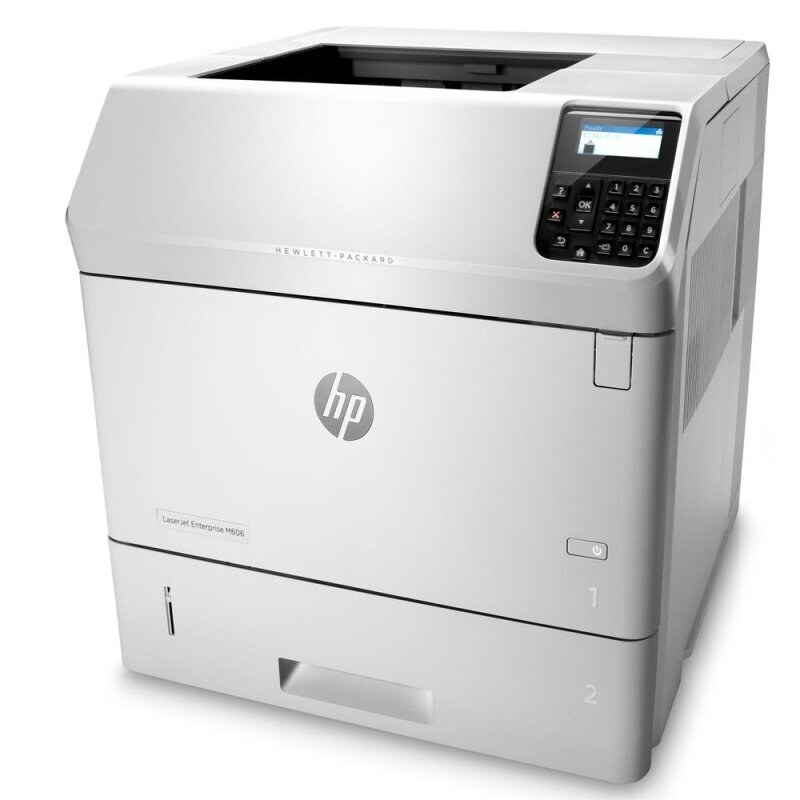
With its extended capacity, the LaserJet M606x stands at the top of the Enterprise 600 single-function line, built for the busiest print rooms. It takes the standard CF281A or the high-yield CF281X — the 81A stocked here from a single cartridge to a 10-pack with MICR versions, and the 81X as singles and multi-packs.
A print room machine is judged by throughput, and its toner supply is part of that system: cartridges arrive by the pack, sit in a known spot, and get changed on a rhythm the room can plan around. The M606x shares its two cartridges with the whole Enterprise 600 family, which lets a print room serve several models from one shelf without sorting out whose toner is whose.
Toner Cartridges for LaserJet M606x
| Cartridge | Color | Page Yield |
|---|---|---|
| CF281X single cartridge | Black | See product page |
| CF281X 2-pack | Black | See product page |
| CF281X 3-pack | Black | See product page |
| CF281X 5-pack | Black | See product page |
| CF281X 10-pack | Black | See product page |
| CF281A single cartridge | Black | See product page |
| CF281A 2-pack | Black | See product page |
| CF281A 3-pack | Black | See product page |
| CF281A 5-pack | Black | See product page |
| CF281A 10-pack | Black | See product page |
| CF281A 4-pack, alternate listing | Black | See product page |
| CF281X single, M606x listing | Black | See product page |
MICR versions of the standard cartridge, for check production:
| Cartridge | Color | Page Yield |
|---|---|---|
| CF281A MICR single cartridge | Black | See product page |
| CF281A MICR 2-pack | Black | See product page |
| CF281A MICR 3-pack | Black | See product page |
| CF281A MICR 5-pack | Black | See product page |
| CF281A MICR 10-pack | Black | See product page |
| CF281A MICR, M606x listing | Black | See product page |
Listings named for sibling models in this family are stocked here as well: M630z-MICR listing, M630f-MICR listing, M630dn-MICR listing, M630h-MICR listing, M604dn-MICR listing, M604n-MICR listing, M605dn-MICR listing, M605n-MICR listing, M605x-MICR listing, M606dn-MICR listing, M630z listing, M630f listing, M630dn listing, M630h listing, M604dn listing, M604n listing, M605dn listing, M605n listing, M605x listing, M606dn listing.
Which cartridge should you buy?
In a print room, the high-yield cartridge is the working fill: it carries more toner and keeps a top-end machine printing longer between changes. Standard cartridges earn their place as the shelf spare and for quieter periods. The larger packs — 5s and 10s in either yield — are how rooms like this actually buy. MICR stock should be kept apart and used only when checks are being produced.
Chip, toner and everyday use
Print-room discipline extends to the cartridge itself: seals off in one pull, cartridge rocked gently if it has been stored, slid home until the click, and the door closed before the next job is released. A compatible cartridge's chip identifies it to the printer; a reseat settles most recognition prompts. Rotate stored stock oldest-first and keep it sealed against the dust that print rooms generate.
Frequently Asked Questions
What toner does the LaserJet M606x use?
The standard CF281A or the high-yield CF281X, both stocked on this page as singles and multi-packs, plus MICR versions of the standard cartridge.
Will a compatible cartridge work in the M606x?
Yes — a compatible cartridge built for this model installs and prints like the original, and every compatible cartridge here is covered by a 1-year warranty with 1-year returns. If one is not recognized, reseat it firmly and confirm the seals were removed.
How should spares be stored in a busy print room?
Sealed in their packaging, flat, cool and away from direct light, used oldest first. Fit a spare only when the working cartridge actually runs out.
Is there a drum unit to replace separately?
No separate drum is sold for this printer; the drum is part of the cartridge, so each change renews it.
More printers that use the same cartridges
One cartridge family covers the whole top end of the Enterprise 600 line and the M630 multifunctions:
- LaserJet Enterprise Flow MFP M630z
- LaserJet Enterprise M604dn
- LaserJet Enterprise M605dn
- LaserJet Enterprise MFP M630f
- LaserJet M604dn
- LaserJet M604n
- LaserJet M605dh
- LaserJet M605dn
- LaserJet M605n
- LaserJet M605x
- LaserJet M606dn
- LaserJet M606x MFP
- LaserJet M630dn
- LaserJet M630dn MFP
- LaserJet M630f MFP
- LaserJet M630h
- LaserJet MFP LaserJet M630dn
- LaserJet MFP M630f
- LaserJet MFP M630h
- LaserJet MFP M630z
- LaserJet MFP M630z