




LaserJet M401DN
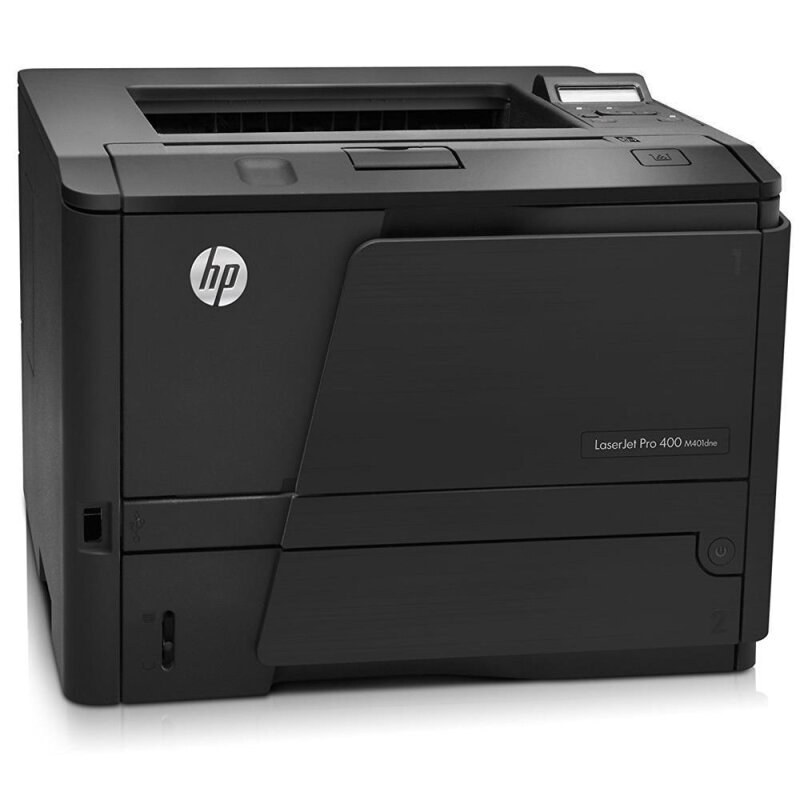
Duplex plus Ethernet made the LaserJet M401DN the network workhorse of the M401 line — automatic two-sided mono printing for shared office use, queued from every desk on the floor. Its cartridges come from the same lineup as the rest of the family: the black CF280A, HP's 80A, or the longer-running CF280X, the 80X. The compatible shelf does not stop there — a CF280XJ (80XJ) jumbo-yield version and a CF280XX (80XX) maximum-yield version give this printer two even longer-running choices.
A networked printer belongs to everyone, and its toner planning has to match. The M401DN sat on the office network taking jobs from the whole team, so its cartridge was never one person's chore: volume arrived in bursts from every direction, and a toner-out day stalled the floor, not a desk. That shared duty explains the depth of the shelf below — every yield tier in several pack sizes, so whoever manages the supply closet can standardize on a tier and a pack count and stop thinking about it.
Toner Cartridges for LaserJet M401DN
| Cartridge | Color | Page Yield |
|---|---|---|
| CF280XX — maximum-yield single | Black | See product page |
| CF280XX — maximum-yield 3 pack | Black | See product page |
| CF280XJ — jumbo-yield single | Black | See product page |
| CF280X — CS-line high-yield 10 pack | Black | See product page |
| CF280X — CS-line high-yield 5 pack | Black | See product page |
| CF280X — CS-line high-yield 3 pack | Black | See product page |
| CF280X — CS-line high-yield 2 pack | Black | See product page |
| CF280X — CS-line high-yield single | Black | See product page |
| CF280X — own-model M401DN listing | Black | See product page |
| CF280X — high-yield 5 pack | Black | See product page |
| CF280X — high-yield 3 pack | Black | See product page |
| CF280X — high-yield single | Black | See product page |
| CF280X — CS-line MICR 10 pack | Black (MICR) | See product page |
| CF280X — CS-line MICR 5 pack | Black (MICR) | See product page |
| CF280X — CS-line MICR 3 pack | Black (MICR) | See product page |
| CF280X — CS-line MICR 2 pack | Black (MICR) | See product page |
| CF280X — CS-line MICR single | Black (MICR) | See product page |
| CF280X — own-model M401DN MICR listing | Black (MICR) | See product page |
| CF280X — high-yield MICR single | Black (MICR) | See product page |
| CF280A — CS-line 10 pack | Black | See product page |
| CF280A — CS-line 5 pack | Black | See product page |
| CF280A — CS-line 3 pack | Black | See product page |
| CF280A — CS-line 2 pack | Black | See product page |
| CF280A — CS-line single | Black | See product page |
| CF280A — premium-quality 3 pack | Black | See product page |
| CF280A — standard 3 pack | Black | See product page |
| CF280A — standard single | Black | See product page |
| CF280A — CS-line MICR 10 pack | Black (MICR) | See product page |
| CF280A — CS-line MICR 5 pack | Black (MICR) | See product page |
| CF280A — CS-line MICR 3 pack | Black (MICR) | See product page |
| CF280A — CS-line MICR 2 pack | Black (MICR) | See product page |
| CF280A — CS-line MICR single | Black (MICR) | See product page |
| CF280A — MICR single for check printing | Black (MICR) | See product page |
| CF280A / CF280X — mixed-code 4 pack, alternate listing (as labeled) | Black | See product page |
| CF280X / CF280A — mixed-code 4 pack, second listing (as labeled) | Black | See product page |
The shelf also carries the high-yield build under listings named for other family models — the X cartridge listed under the M401A name, the M401D name, the M401DW name, the M401N name, the M425DN name and the M425DW name, with MICR versions under the M401A, M401D, M401DW, M401N, M425DN and M425DW names — one shared cartridge, several doorways to it.
Which cartridge should you buy?
Standardize. A shared network printer rewards picking one tier and sticking to it: the high-yield build is the natural standard for most offices, with the jumbo and maximum-yield compatibles above it for floors whose queues run from morning to close. Standard-yield cartridges suit an M401DN that only sees light duty, though on a truly shared machine that is rarer than it sounds. The deep multipacks in the table exist for supply closets feeding a small fleet — one order, one tier, months of cover. MICR rows are for check printing only. Two rows at the foot of the table are mixed-code four-packs sold under their own listings, labeled as listed. All compatibles here are covered by a 1-year warranty and 1-year returns.
Chip, toner and everyday use
Changing the cartridge on a shared machine should be a job anyone on the floor can do: open the cartridge door, pull the spent cartridge out by its handle, slide the new one in until it clicks, close the door and print a test page to confirm it seated. If a compatible cartridge is ever not recognized at first, reseating it firmly settles the great majority of cases. Keep the spare physically next to the printer — a network workhorse with its replacement in another building is downtime waiting for an address. And because jobs arrive from many desks, expect real-world cartridge life to vary with the mix: dense reports consume toner far faster than the light coverage behind published yield estimates.
Frequently Asked Questions
What toner cartridge does the LaserJet M401DN use?
It takes the CF280A as its standard cartridge, the high-yield CF280X for longer runs, and compatible jumbo and maximum-yield builds beyond those. All of them fit the same bay — the networking and duplex hardware change nothing about toner.
How do I replace the toner cartridge in the M401DN?
Open the cartridge door, pull the spent cartridge out by its handle, then slide the new one in until it clicks into place. Close the door and print a test page to confirm the seating before the queue builds up again.
Are the jumbo and maximum-yield cartridges made by HP?
They are compatible makers' extensions of the family — HP's own lineup stops at the high-yield tier. The jumbo and maximum builds are shaped for the same slot and install the same way; they simply run longer.
Why is my M401DN printing faded or streaky pages?
Most often the cartridge is running low, or its toner has settled after sitting. Rock the cartridge gently side to side to redistribute the toner inside; if output does not improve, the cartridge has reached its end and the spare should go in.
More printers that use the same cartridges
The family roll starts partway through here — read to the end and it wraps around to the beginning, complete either way: LaserJet Pro 400 M401DW, LaserJet Pro 400 M401N, LaserJet Pro 400 M425DW, LaserJet Pro 400 MFP M425DN, LaserJet Pro 400 Printer M401A, LaserJet Pro 400 Printer M401D, LaserJet Pro 400 Printer M401DN, LaserJet Pro 400 Printer M401DNE, LaserJet Pro 400 Printer M401DW, LaserJet Pro 400 Printer M401N, LaserJet Pro 400 Printer M401S, Laserjet Pro 400 M401DN, Laserjet Pro 400 M401DNE, Laserjet Pro 400 M425, Laserjet Pro 400 MFP M425, Laserjet Pro 400 MFP M425DW, Laserjet Pro 400 PRINTER M401, HP CF280A, LaserJet M401, LaserJet M401A, LaserJet M401D, LaserJet M401DNE, LaserJet M401DW, LaserJet M401N, LaserJet M401a, LaserJet M401dw,LaserJet M401n, LaserJet M425, LaserJet M425DN, LaserJet M425DW, LaserJet M425dn MFP, LaserJet PRO 400 M401A, LaserJet Pro 400 M401, LaserJet Pro 400 M401D.