




LaserJet M401DNE
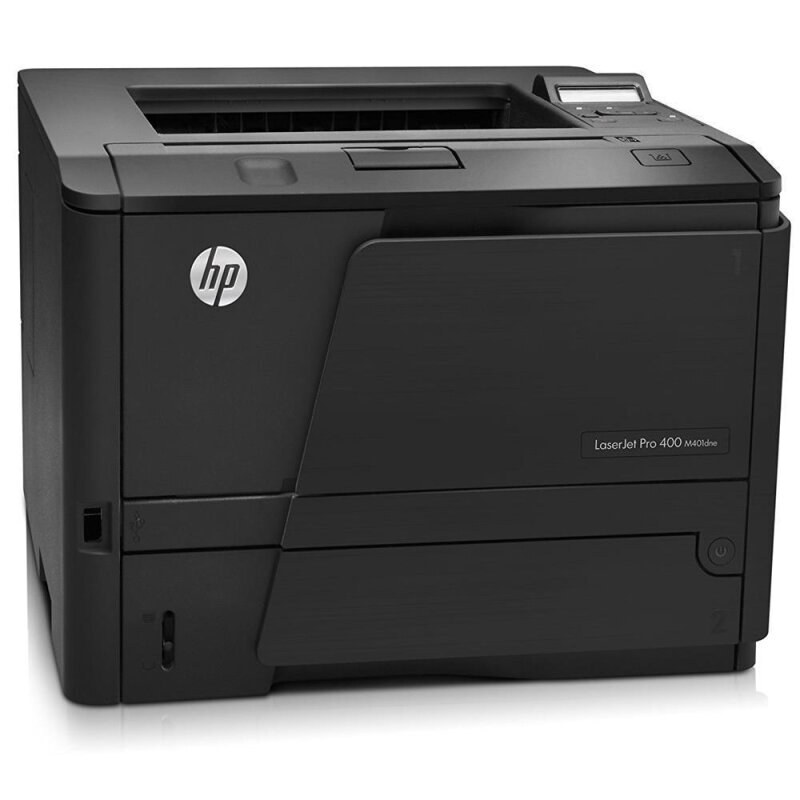
The E at the end of the LaserJet M401DNE is not decoration — HP used it for the energy-saving extras layered onto the M401DN's duplex-and-network formula, pitched at offices that count running costs as carefully as purchase prices. Its cartridge is HP's 80A line: the standard-yield CF280A and the high-yield CF280X (the 80X). Compatible makers then stretch the same design twice more, to the jumbo CF280XJ (80XJ) and finally the maximum-yield CF280XX (80XX).
A cost-conscious office buys a printer like this twice: once at the register and once again every month in power and paper. Duplexing halves the paper pile on two-sided documents, the network port lets one machine serve a whole bench of desks, and the E extras trim the electricity side of the ledger. Toner is the third line of that same budget, which is why this page's four-step yield ladder matters — every step up it is a decision to buy pages in bulk rather than one cartridge at a time.
Toner Cartridges for LaserJet M401DNE
| Cartridge | Color | Page Yield |
|---|---|---|
| CF280A Black (80A) | Black | See product page |
| CF280A MICR Black (80A) | Black | See product page |
| CF280A Black 3 Pack (80A) | Black | See product page |
| CF280X High Yield Black 5 Pack (80X) | Black | See product page |
| CF280X High Yield Black (80X) | Black | See product page |
| CF280X High Yield MICR Black (80X) | Black | See product page |
| CF280X High Yield Black 3 Pack (80X) | Black | See product page |
| CF280XJ Jumbo Yield Black (80XJ) | Black | See product page |
| CF280XX Maximum Yield Black 3 Pack (80XX) | Black | See product page |
| CF280XX Maximum Yield Black (80XX) | Black | See product page |
| CF280A Premium Quality Black 3 Pack (80A) | Black | See product page |
| 80A (CF280A CF280X) 4 Black) | Black | See product page |
| 80X (CF280X CF280A) 4 Black) | Black | See product page |
Which cartridge should you buy?
Climb the ladder only as high as your monthly volume justifies. The standard CF280A is the right buy for a desk that prints steadily but lightly, and its multipacks lower the per-unit cost without committing you to a giant fill. The high-yield CF280X is the natural office default — same slot, longer life. Busy queues belong on the CF280XJ, and the very heaviest benches on the CF280XX, each step trading a bigger cartridge for fewer interruptions. Two listings serve a different master: the MICR builds carry magnetic toner for check printing, and the two 4 Black listings bundle the standard and high-yield designs together for stocking a supply shelf in one order.
Chip, toner and everyday use
The chip in each cartridge reports its level to the printer, which is how the M401DNE warns you before a long duplex run runs dry — trust the warning as an estimate, not a countdown. Before installing a fresh unit, rock it slowly side to side so the toner lies even after shipping. Keep spares sealed and flat; a cartridge stored upright for months settles into a wedge and prints its first pages unevenly. And since this model's whole purpose is economy, remember the cheapest pages come from habits, not hardware: duplex by default, draft mode for internal copies, and a preview before anything long.
Frequently Asked Questions
What does the E in M401DNE actually stand for?
Energy savings. The E marks the version of the M401DN formula with extra power-saving features, aimed at offices watching running costs. It changes nothing about toner — the machine takes the same CF280A family as the rest of the M401 line.
How many yield steps are there above the standard cartridge?
Three. Above the standard CF280A sit the high-yield CF280X, then the compatible-only jumbo CF280XJ and maximum-yield CF280XX. All four fit the same slot; each step simply carries more toner.
What are the two 4 Black listings in the table?
They are bundled four-cartridge listings that mix the standard and high-yield designs under the family's short names. They suit an office stocking a shelf in one purchase rather than a desk buying a single replacement.
Should I shake a new cartridge before installing it?
Rock it — gently, side to side, never a hard shake. That levels the toner after its journey in a box and prevents a pale band down the first pages. Keep the cartridge level and avoid touching its roller while you handle it.
More printers that use the same cartridges
The whole Pro 400 mono family — M401 printers and M425 multifunctions alike — feeds on this same cartridge line:
- HP CF280A
- LaserJet M401
- LaserJet M401A
- LaserJet M401D
- LaserJet M401DN
- LaserJet M401DW
- LaserJet M401N
- LaserJet M401a
- LaserJet M401dw,LaserJet M401n
- LaserJet M425
- LaserJet M425DN
- LaserJet M425DW
- LaserJet M425dn MFP
- LaserJet PRO 400 M401A
- LaserJet Pro 400 M401
- LaserJet Pro 400 M401D
- LaserJet Pro 400 M401DW
- LaserJet Pro 400 M401N
- LaserJet Pro 400 M425DW
- LaserJet Pro 400 MFP M425DN
- LaserJet Pro 400 Printer M401A
- LaserJet Pro 400 Printer M401D
- LaserJet Pro 400 Printer M401DN
- LaserJet Pro 400 Printer M401DNE
- LaserJet Pro 400 Printer M401DW
- LaserJet Pro 400 Printer M401N
- LaserJet Pro 400 Printer M401S
- Laserjet Pro 400 M401DN
- Laserjet Pro 400 M401DNE
- Laserjet Pro 400 M425
- Laserjet Pro 400 MFP M425
- Laserjet Pro 400 MFP M425DW
- Laserjet Pro 400 PRINTER M401