






 See Compatible Printers
 Read more about our ink!
Hewlett Packard
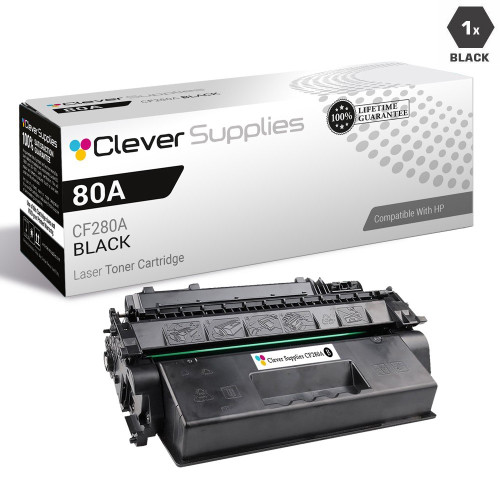
CS Compatible Replacement for HP 80A Toner Cartridges Black (CF280A)

Amazon Price:

- Page Yield:
- Black: 2700
- Availability:
- In Stock
- Shipping:
- Calculated at Checkout
- Compatible Printers
- LaserJet 400 M401a
- LaserJet 400 M401dn
- LaserJet 400 M401dne
- LaserJet 400 M401dw
- LaserJet 400 M401n
- LaserJet 400 M425dn
- LaserJet 400 MFP M425dw
- LaserJet Pro 400 M401a
- LaserJet Pro 400 M401dn
- LaserJet Pro 400 M401dne
- LaserJet Pro 400 M401dw
- LaserJet Pro 400 M401n
- LaserJet Pro 400 M425dn
- LaserJet Pro 400 MFP M425dwi>
- HP CF280A
- LaserJet M401
- LaserJet M401A
- LaserJet M401D
- LaserJet M401DN
- LaserJet M401DNE
- LaserJet M401DW
- LaserJet M401N
- LaserJet M401a
- LaserJet M401dw,LaserJet M401n
- LaserJet M425
- LaserJet M425DN
- LaserJet M425DW
- LaserJet M425dn MFP
- LaserJet Pro 400 M401
- LaserJet Pro 400 M401D
- LaserJet Pro 400 M425DW
- LaserJet Pro 400 MFP M425DN
- LaserJet Pro 400 Printer M401A
- LaserJet Pro 400 Printer M401D
- LaserJet Pro 400 Printer M401DN
- LaserJet Pro 400 Printer M401DNE
- LaserJet Pro 400 Printer M401DW
- LaserJet Pro 400 Printer M401N
- LaserJet Pro 400 Printer M401S
- Laserjet Pro 400 M425
- Laserjet Pro 400 MFP M425
- Laserjet Pro 400 PRINTER M401
- Specifications
- SKU:
- CS-HP-80A-BK
- Printer Brand:
- Hewlett Packard
- OEM Number:
- CF280A
- Ink Color:
- Black
- Page Yield:
- Black: 2700
- Printer Type:
- Laser Cartridge
- Description
- Reviews

/> 

Clever Supplies brand products are made in the USA! Why pay more for cheaper product with a high defective rate? You will end up having to send it back to the manufacturer. Your time is valuable. Get a quality product that you KNOW will work. Purchase the Clever Supplies Compatible for HP 80A (CF280A), Black Toner Cartridge and experience the difference! All Clever Supplies brand products are backed by '100% Quality Satisfaction' 1 year warranty against defects in materials and workmanship for all toner products. Free tech support for any problems for all Clever Supplies brand products. The use of Clever Supplies brand replacement laser toner cartridges and supplies does not void printer warranty. Premium Quality Replacement Toner Cartridge is made by ISO9001 Certified Factory to Meet or Exceed OEM Standards. These units are manufactured 100% brand new with all new parts including OPC drums, wiper blades, a smart chip and other internal parts, they are an economical alternative to expensive OEM CF280A, Compatible Toner Cartridges. The Compatible Toner Cartridges will produce the same amount of page yield as an OEM cartridge would. This is a Compatible for HP80A Toner Cartridges Black guaranteed to perform with HP Laser Printers. It replaces the original HP 80A toner cartridges Black. The compatible replacement for CF280A. The use of compatible replacement Cartridges and supplies does not void Printer Warranty. Our Compatible for CF280A. Cartridge is a replacement for OEM HP . We offer a 100% Quality Satisfaction Guarantee on our Compatible for CF280A Laser Toner Cartridges and supplies. For use in the following printers: LaserJet Pro 400 M401A, M401D, M401DN, M401DW, M401N, M425DN, M425DW
Frequently Asked Questions
What exactly is this cartridge?
This page sells a single black CF280A toner cartridge — the cartridge HP also markets under the shorter 80A name. The two codes describe one and the same cartridge, and this single is priced at $29.73. It runs in the LaserJet Pro 400 M401 printer family — the LaserJet 400 M401a is one of them — and in the Pro 400 M425 multifunction models.
How many pages will it print?
The CF280A is rated at up to 2,700 pages. That figure follows the industry-standard test at 5% page coverage, which is roughly a page of ordinary business text. Letters, invoices and memos land near the rating; pages heavy with tables, logos or shaded forms use more toner per sheet and bring the total down.
How do I know when it is nearly empty?
The printer raises a low-toner notice on its display and in the supplies status on your computer. On the page itself, the warning looks like print that turns gray or fades down the middle — the cartridge is asking to be changed, and the printer itself is fine.
Is fitting the replacement difficult?
No tools are needed. Open the top cover, draw the old cartridge straight out, take the new one from its packaging and remove the protective seal, then slide it in until it sits home and close the cover. The whole swap takes a couple of minutes.
I bought it as a spare — how should it wait?
Keep the cartridge sealed in its box, lying flat on a shelf in an ordinary room. Heat, damp and bright sunlight shorten a waiting cartridge's good condition, so a cupboard away from radiators and windows is the right home for it.
What comes with the purchase?
Every cartridge we sell carries a 1-year warranty and 1-year free returns. Orders are sent from warehouses in Illinois, Pennsylvania, Georgia and California, with the complete policy set out on our shipping and returns page, and our support team answers Monday through Friday, 9 AM to 5 PM CST.
What does this cartridge cost per printed page?
At $29.73 for a CF280A rated at up to 2,700 pages, the running cost is about 1.1 cents per page at standard text coverage. Dense pages — shaded forms, heavy tables, big logos — spend toner faster and push the figure up, while ordinary letters and memos track it closely. It is a useful number when a small office prices its own everyday printing.
Our office runs both an M401 printer and an M425 multifunction. Can one spare cover both?
Yes. The same CF280A serves the LaserJet Pro 400 M401 family and the Pro 400 M425 multifunction models, so a single spare on the shelf protects two different machines. Whichever one reports low toner first draws the spare, and the replacement order that follows restores the shelf for the other. One code on standby is all the cover either machine needs.
How do I judge the new cartridge once it is in?
Reprint a familiar document — one the printer produced while output was good — and compare the copies side by side. A healthy CF280A lays down even, solid black across the page. Keep the outgoing cartridge until that check is done; if the new unit prints gray or streaky from its very first pages, that comparison is exactly what support will ask about.
What should happen to the cartridge that comes out?
Slide it into the box the new CF280A arrived in and mark the box as used before it goes anywhere near a shelf. An unmarked empty is easily mistaken for the spare months later. Kept separate and clearly labeled, the old unit simply waits its turn to leave, while the shelf holds only cartridges that are genuinely ready to print.
About This CF280A Black Cartridge
Ordering by code removes the guesswork from toner buying. The empty cartridge in the printer carries CF280A on its label; this listing is that cartridge — one black 80A, rated at up to 2,700 pages, at $29.73.
There is nothing else to decide here: no bundle to configure and no second item to match. When the low-toner light shows, this single cartridge is the complete answer, and the next swap starts from the same code again.
Related Items

Hewlett Packard
CS Compatible Replacement for HP CF280A Toner Cartridge Black/ HP 80A
/>


Hewlett Packard
CS Compatible Replacement for HP 80A-MICR Toner Cartridges Black (CF280A)
/>

Hewlett Packard
CS Compatible Replacement for HP CF280A Toner Cartridge MICR Black/ HP 80A
/>


Hewlett Packard
CS Compatible Replacement for HP 80A Toner Cartridges Black 5 Pack (CF280A)
/>