




NI
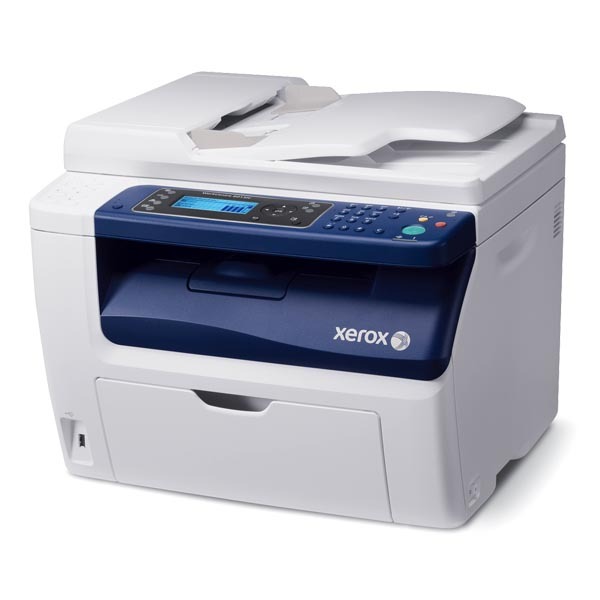
This page covers the network-interface (NI) configuration of the WorkCentre 6015V, a compact color multifunction printer that takes the 106R01630 black toner cartridge, rated at approximately 2,000 pages. Color printing draws on three further cartridges stocked individually: 106R01627 for cyan, 106R01628 for magenta and 106R01629 for yellow.
A networked multifunction tends to accumulate print jobs from everyone around it, and the NI makes that load easy to budget for: with black rated at roughly 2,000 pages, a small office can estimate how long a cartridge should last against its monthly volume instead of guessing. The colors follow their own slower rhythm and are replaced one at a time as each is spent.
Toner Cartridges for WorkCentre 6015V/NI
| Cartridge | Color | Page Yield |
|---|---|---|
| 106R01630 | Black | Approx. 2,000 pages |
| 106R01627 | Cyan | See product page |
| 106R01628 | Magenta | See product page |
| 106R01629 | Yellow | See product page |
The listings below carry the same four codes under the family names used across this cartridge line.
Phaser 6010 listings carrying these codes
- Phaser 6010 Toner Cartridges Magenta (106R1628)
- Phaser 6010 Toner Cartridges Yellow (106R1629)
- Phaser 6010 Toner Cartridges 4 Color Set (106R1630, 106R1627, 106R1628, 106R1629)
- Phaser 6010 Toner Cartridges Black (106R1630)
- Phaser 6010 Toner Cartridges Cyan (106R1627)
Listings under the shared 6000 family name
- 6000 Toner Cartridges Black 3 Pack (106R1630)
- 6000 Toner Cartridges Black 5 Pack (106R1630)
- 6000 Toner Cartridges Yellow (106R1629)
- 6000 Toner Cartridges 5 Color Set (106R1630, 106R1627, 106R1628, 106R1629)
- 6000 Toner Cartridges 6 Color Set (106R1627, 106R1628, 106R1629)
- 6000 Toner Cartridges Cyan (106R1627)
- 6000 Toner Cartridges 8 Color set (106R1630, 106R1627, 106R1628, 106R1629)
- 6000 Toner Cartridges Black (106R1630)
- 6000 Toner Cartridges Black 2 Pack (106R1630)
- 6000 Toner Cartridges 3 Color Set (106R1627, 106R1628, 106R1629)
- 6000 Toner Cartridges Magenta (106R1628)
- 6000 Toner Cartridges 4 Color Set (106R1630, 106R1627, 106R1628, 106R1629)
Phaser 6000B listings carrying these codes
- Phaser 6000B Toner Cartridges Yellow (106R1629)
- Phaser 6000B Toner Cartridges 4 Color Set (106R1630, 106R1627, 106R1628, 106R1629)
- Phaser 6000B Toner Cartridges Cyan (106R1627)
- Phaser 6000B Toner Cartridges Magenta (106R1628)
- Phaser 6000B Toner Cartridges Black (106R1630)
The same cartridges under the WorkCentre 6015 name
- WorkCentre 6015 Toner Cartridges Magenta (106R1628)
- WorkCentre 6015 Toner Cartridges 4 Color Set (106R1630, 106R1627, 106R1628, 106R1629)
- WorkCentre 6015 Toner Cartridges Black (106R1630)
- WorkCentre 6015 Toner Cartridges Yellow (106R1629)
- WorkCentre 6015 Toner Cartridges Cyan (106R1627)
Phaser 6010N listings carrying these codes
- Phaser 6010N Toner Cartridges Cyan (106R1627)
- Phaser 6010N Toner Cartridges Yellow (106R1629)
- Phaser 6010N Toner Cartridges Black (106R1630)
- Phaser 6010N Toner Cartridges 4 Color Set (106R1630, 106R1627, 106R1628, 106R1629)
- Phaser 6010N Toner Cartridges Magenta (106R1628)
Which cartridge should you buy?
Do the arithmetic on black first: at approximately 2,000 pages per cartridge, an office printing a few hundred pages a month gets months from one unit, while a heavier desk should look at the 6000 Toner Cartridges Black 3 Pack (106R1630) or the larger black packs in the listings above and stop reordering so often. Colors are the opposite case — buy them singly, only when the machine reports one low, or take the WorkCentre 6015V/NI 4 Color Set when the whole set is due together. All compatible cartridges here come with a 1-year warranty and 1-year returns.
Chip, toner and everyday use
That 2,000-page figure is measured at 5% page coverage — a typical text page. Pages carrying big graphics or dense blocks of color use noticeably more toner, so treat the rating as a comparison yardstick rather than a promise. The cartridge chip reports the remaining level to the printer; when you install a fresh unit, follow the color-coded guides until it seats firmly so the chip registers cleanly. Store spares unopened and level, away from heat, so a networked machine never waits on a bad cartridge.
Frequently Asked Questions
What does the NI configuration add to the WorkCentre 6015V?
NI is the network-interface configuration of the 6015V, built to be shared over an office network. Its toner shelf is the same four cartridges as the rest of the line: 106R01630 black and the 106R01627, 106R01628 and 106R01629 colors.
How many pages does the 106R01630 print in the NI?
The black cartridge is rated at approximately 2,000 pages at 5% coverage. Color-heavy pages will come in under that figure, plain text pages at or near it.
Are the color cartridges rated the same way?
Each color is its own cartridge with its own rating; check the individual listing for the figure on the color you are replacing, and replace colors individually rather than as a set when only one is spent.
How do I install a cartridge in the 6015V/NI?
Open the supply access area, remove the old cartridge, unpack the new one and install it following the color-coded guides until it seats firmly.
More printers that use the same cartridges
The wider 6015 family built on this cartridge set: