




Phaser 6010N
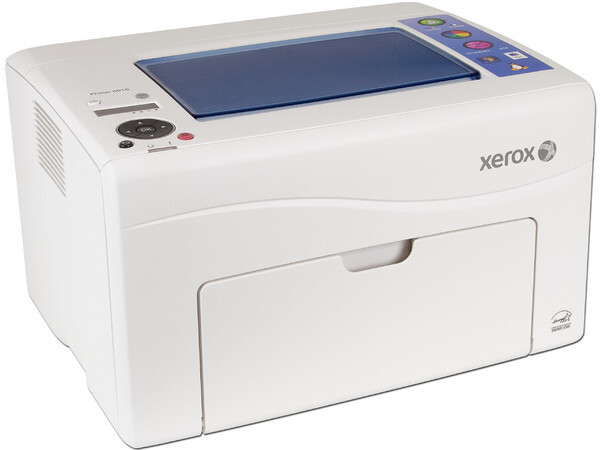
The Xerox Phaser 6010N is a color laser printer made for the office, built to join an existing network and take daily workloads in stride. It prints from four separate cartridges: cyan 106R01627, magenta 106R01628 and yellow 106R01629, each rated at about 1,000 pages, and a longer-running black cartridge, 106R01630, rated at about 2,000 pages. Since every color lives in its own cartridge, one empty color never means replacing toner that is still perfectly good.
On a shared office machine the four cartridges rarely run down evenly. Most office pages are plain text, so the black cartridge does the heavy lifting week after week, while the three colors drain at their own pace depending on how many charts, logos and highlighted documents pass through. The separate-cartridge layout suits that pattern well: you top up the one slot that is empty and leave the others to finish their rated life.
Toner Cartridges for Phaser 6010N
| Cartridge | Color | Page Yield |
|---|---|---|
| 106R01630 | Black | About 2,000 pages |
| 106R01627 | Cyan | About 1,000 pages |
| 106R01628 | Magenta | About 1,000 pages |
| 106R01629 | Yellow | About 1,000 pages |
| 106R01630 | Black | About 2,000 pages |
| 106R01627 | Cyan | About 1,000 pages |
| 106R01628 | Magenta | About 1,000 pages |
| 106R01629 | Yellow | About 1,000 pages |
| 106R01630 + 106R01627 + 106R01628 + 106R01629 | 4 Color Set | One of each cartridge |
| 106R01630 + 106R01627 + 106R01628 + 106R01629 | 4 Color Set | One of each cartridge |
| 106R01630 + 106R01627 + 106R01628 + 106R01629 | 4 Color Set, Premium | One of each cartridge |
| 106R01630 + 106R01627 + 106R01628 + 106R01629 | 4 Color Set | One of each cartridge |
Which cartridge should you buy?
Start with the slot that is actually empty. If a single color has run out, a single cartridge is the economical move, and this page carries each of the four as a code-numbered single as well as in Phaser 6010N listings. Text-heavy offices should watch the black slot most closely: at roughly 2,000 pages it lasts about twice as long as a color, yet it also feeds far more pages, so keeping one black spare on the shelf is cheap insurance against a mid-job stop. When two or three colors are nearing empty at the same time, a 4 Color Set refreshes the whole machine in one order and resets all four levels together. Either way, match the number on the box to the cartridge you removed.
Chip, toner and everyday use
Each cartridge carries a chip that the printer reads to report remaining toner, so a new cartridge should register a full level as soon as it is seated. Push it in firmly until it clicks; if the panel still shows the old low warning after a swap, open the cover and reseat the cartridge before assuming it is faulty. Before installing, rock the cartridge gently from side to side a few times — this loosens toner that has settled in transit and helps the first pages print evenly. Page ratings are estimates based on 5% coverage, so dense graphics will shorten real life. Store unopened spares flat, sealed and away from heat.
Frequently Asked Questions
Which black cartridge does the Phaser 6010N take?
It takes the 106R01630 black cartridge, rated at about 2,000 pages — roughly double the life of each color cartridge in this machine. The listings above include it both as a code-numbered single and in a Phaser 6010N listing.
One color ran out. Do I have to replace all four cartridges?
No. The 6010N uses four independent cartridges, so you replace only the color the printer reports as empty. The other three keep printing until their own levels run down.
Is there a complete set for the Phaser 6010N?
Yes. The Phaser 6010N 4 Color Set combines one black and all three colors in a single package, and a Premium Quality 4 Color Set is listed for this model as well. Sets make sense when several cartridges are running low together.
Why does the black cartridge last longer than the colors?
It is simply the higher-capacity unit of the set: black is rated around 2,000 pages while cyan, magenta and yellow are each rated around 1,000. In practice the gap narrows, because most offices print far more black text than color.
More printers that use the same cartridges
The same four cartridge numbers also fit a wider family of Xerox machines — the full list: Phaser 6000, Phaser 6000B, Phaser 6010, WorkCentre 6015, WorkCentre 6015V/B, WorkCentre 6015V/N, WorkCentre 6015V/NI, WorkCentre 6015b, WorkCentre 6015n, WorkCentre 6015ni.