




N
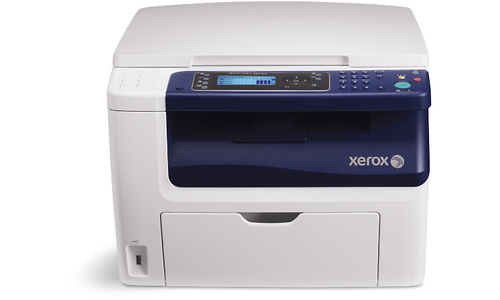
The WorkCentre 6015V/N is the N configuration of the WorkCentre 6015V, a multifunction laser printer that combines printing, scanning and copying for small workgroups. Everything it prints runs through four separate cartridges: 106R01630 in black, 106R01627 in cyan, 106R01628 in magenta and 106R01629 in yellow. Each color is its own unit, so when one runs down you replace that one cartridge and keep working.
A shared machine in a small workgroup has a particular appetite: black toner does the heavy lifting on everyday documents, while the three colors are drawn down unevenly depending on what the team prints. The 6015V/N fits that pattern well, because nobody has to retire a half-full color just because another one emptied first. Keeping a spare black on the shelf is the habit that keeps a shared printer from stalling the whole desk row.
Toner Cartridges for WorkCentre 6015V/N
| Cartridge | Color | Page Yield |
|---|---|---|
| 106R01630 | Black | See product page |
| 106R01627 | Cyan | See product page |
| 106R01628 | Magenta | See product page |
| 106R01629 | Yellow | See product page |
The same shelf of cartridges is also listed under the family names below; every listing uses the four codes above.
Listings under the shared 6000 family name
- 6000 Toner Cartridges Black (106R1630)
- 6000 Toner Cartridges Cyan (106R1627)
- 6000 Toner Cartridges Magenta (106R1628)
- 6000 Toner Cartridges Yellow (106R1629)
- 6000 Toner Cartridges Black 2 Pack (106R1630)
- 6000 Toner Cartridges Black 3 Pack (106R1630)
- 6000 Toner Cartridges Black 5 Pack (106R1630)
- 6000 Toner Cartridges 4 Color Set (106R1630, 106R1627, 106R1628, 106R1629)
- 6000 Toner Cartridges 5 Color Set (106R1630, 106R1627, 106R1628, 106R1629)
- 6000 Toner Cartridges 8 Color set (106R1630, 106R1627, 106R1628, 106R1629)
- 6000 Toner Cartridges 3 Color Set (106R1627, 106R1628, 106R1629)
- 6000 Toner Cartridges 6 Color Set (106R1627, 106R1628, 106R1629)
The same four cartridges under the WorkCentre 6015 name
- WorkCentre 6015 Toner Cartridges Black (106R1630)
- WorkCentre 6015 Toner Cartridges Cyan (106R1627)
- WorkCentre 6015 Toner Cartridges Magenta (106R1628)
- WorkCentre 6015 Toner Cartridges Yellow (106R1629)
- WorkCentre 6015 Toner Cartridges 4 Color Set (106R1630, 106R1627, 106R1628, 106R1629)
Phaser 6010 listings carrying these codes
- Phaser 6010 Toner Cartridges Black (106R1630)
- Phaser 6010 Toner Cartridges Cyan (106R1627)
- Phaser 6010 Toner Cartridges Magenta (106R1628)
- Phaser 6010 Toner Cartridges Yellow (106R1629)
- Phaser 6010 Toner Cartridges 4 Color Set (106R1630, 106R1627, 106R1628, 106R1629)
Phaser 6010N listings carrying these codes
- Phaser 6010N Toner Cartridges Black (106R1630)
- Phaser 6010N Toner Cartridges Cyan (106R1627)
- Phaser 6010N Toner Cartridges Magenta (106R1628)
- Phaser 6010N Toner Cartridges Yellow (106R1629)
- Phaser 6010N Toner Cartridges 4 Color Set (106R1630, 106R1627, 106R1628, 106R1629)
Phaser 6000B listings carrying these codes
- Phaser 6000B Toner Cartridges Black (106R1630)
- Phaser 6000B Toner Cartridges Cyan (106R1627)
- Phaser 6000B Toner Cartridges Magenta (106R1628)
- Phaser 6000B Toner Cartridges Yellow (106R1629)
- Phaser 6000B Toner Cartridges 4 Color Set (106R1630, 106R1627, 106R1628, 106R1629)
Which cartridge should you buy?
Start with how the machine is actually used. On a workgroup printer, black empties first almost every time, so the 6000 Toner Cartridges Black 2 Pack (106R1630) and its larger companions exist for exactly that rhythm — stock black ahead and let colors follow their own pace with single cartridges as each one fades. When several colors run low together, the WorkCentre 6015V/N 4 Color Set refreshes the whole set in one order instead of four separate ones. Every compatible cartridge here is covered by a 1-year warranty and 1-year returns.
Chip, toner and everyday use
When a new cartridge goes in, the printer reads its chip to track the toner level, so seat the unit fully and let the machine register it before judging the first prints. Rock a fresh cartridge gently from side to side before installing it; that loosens toner that settled in shipping and evens out the first pages. On a shared machine, swap a finished cartridge promptly rather than nursing it along — repeated shaking of an empty unit only buys a handful of pale pages and delays the inevitable.
Frequently Asked Questions
What toner does the WorkCentre 6015V/N use?
It uses four cartridges: 106R01630 for black and 106R01627, 106R01628 and 106R01629 for cyan, magenta and yellow. The singles in the table above are the listings matched to this configuration.
Can I replace just one color on the 6015V/N?
Yes. Each color is a separate cartridge, so a faded magenta never forces you to discard cyan or yellow that still have life in them. Replace the single color the machine reports as low.
Why are there 6000 and 6010 listings on this page?
Those listings carry the same four cartridge codes and are sold for this printer family, so they are stocked on this page alongside the WorkCentre 6015V/N listings. Match the code on your current cartridge to the listing and you have the right unit.
How do I install a cartridge in the 6015V/N?
Open the front cover, pull the finished cartridge straight out, unbox the replacement and rock it gently to distribute the toner, then slide it in until it clicks and close the cover.
More printers that use the same cartridges
The 6015 family shares this four-cartridge shelf across its configurations: