




MultiPass L600
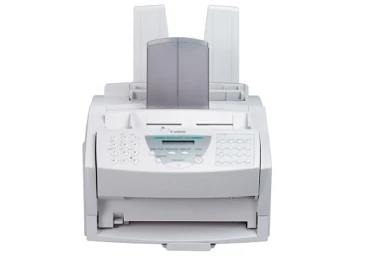
The MultiPass L600 is a compact 6 ppm laser multifunction: fax, print, scan and copy in one small unit, with a 14.4 kbps fax modem, a 100-sheet input tray and a sheet-fed scanner rather than a flatbed, and a parallel port as its only connection. Everything it produces runs on a single cartridge — the FX-3, rated for up to 2,700 pages — so one toner feeds the printer, the fax and the copier alike.
That one-cartridge design is the L600's whole economy. There is no stable of colors to manage and no second supply to stock: when output fades, the FX-3 is the answer, and the only buying decision is how many to keep on the shelf. For the small office that still sends and receives paper by fax, it is a reassuringly short shopping list.
Toner Cartridges for MultiPass L600
| Cartridge | Color | Page Yield |
|---|---|---|
| FX-3 Black | Black | 2,700 pages |
| FX-3 Black — 2 Pack | Black | 2,700 pages per cartridge |
| FX-3 Black — 3 Pack | Black | 2,700 pages per cartridge |
| FX-3 Black — 5 Pack | Black | 2,700 pages per cartridge |
| FX-3 Premium Quality Black — 5 Pack | Black | 2,700 pages per cartridge |
Which cartridge should you buy?
Light users can simply buy the single FX-3 as the old one fades — at 2,700 pages, a quiet desk takes a long while to finish one. Desks that fax and copy every day cycle cartridges faster, and for them the multipacks cut both the per-cartridge cost and the number of reorders: the 2 Pack as a standing spare, the 3 Pack or 5 Pack for a supply shelf. The shelf also carries a Premium Quality 5 Pack alongside the standard five — both listings are the same FX-3 cartridge family, so the choice between them is about the listing line, not about compatibility.
Chip, toner and everyday use
The FX-3 is a self-contained toner cartridge, so changing it is the whole maintenance routine: open the front cover, slide the old unit out, rock the new cartridge gently from side to side to distribute the toner, and slide it in until it seats. The 2,700-page rating assumes 5% coverage — dense fax pages and copy work finish a cartridge sooner. When prints first turn light near the end of a cartridge's life, removing it and rocking it again often coaxes out a few dozen extra pages while a replacement ships. Keep the spare sealed, flat and out of direct light.
Frequently Asked Questions
What toner does the MultiPass L600 use?
The FX-3 — a single black cartridge rated for up to 2,700 pages. It is the only supply the L600 takes.
Does the L600 need a separate drum unit?
No separate drum is listed for this machine; the FX-3 is a self-contained cartridge, and it is the only item on this page the L600 consumes.
How do I fit a new FX-3 in the L600?
Open the front cover, remove the old cartridge, unpack the new FX-3, rock it gently to distribute the toner, and slide it into place until it clicks.
Can the L600 scan a page from a book?
No — its scanner is sheet-fed, with no flatbed, so it takes loose sheets only. That trade is part of how the machine stays so compact.
More printers that use the same cartridges
The FX-3's working life stretches far beyond this one desktop: Canon built a generation of fax-era lasers around the same cartridge, and a spare bought for any of the machines below also fits the L600: the FaxPhone pair, FaxPhone L75, FaxPhone L80; the imageCLASS machines, ImageClass 1100, ImageClass 1100P; the L Series, L200, L250, L260, L260I, L280, L300, L350, L3500, L4000, L4500, L4500IF, L60, L75, L80; the CFX line, C100, CFX-2060, CFX-L3500, CFX-L3500IF, CFX-L4000, CFX-L4000IF, CFX-L4500, CFX-L4500IF, CFX-LC2050; the LaserClass range, LaserClass 1050, LaserClass 1060, LaserClass 1060P, LaserClass 1100, LaserClass 1300, LaserClass 2050, LaserClass 2050P, LaserClass 2060, LaserClass 2060P, LaserClass 3500, LaserClass 4000, LaserClass 4500, LaserClass 6000L, LaserClass L4000, LaserClass L4500; and its MultiPASS relatives, MultiPass L60, MultiPass L6000, MultiPass L90.