




L4500IF
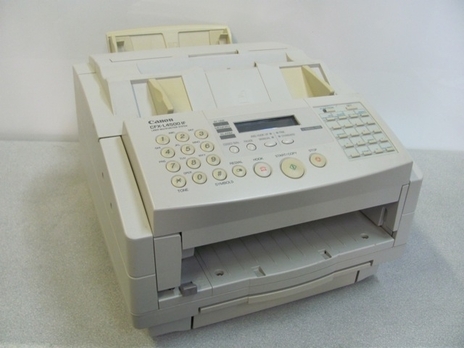
The Canon L4500IF is the Internet-fax variant of the L4500 platform, a 6 ppm laser fax that surfaces mostly in European compatibility lists, sometimes badged as the Canon FAX L4500 IF. Published specifications for this variant are scarce and it carries no Ethernet interface, yet its supply is not in any doubt: it runs the Canon FX-3 toner cartridge, rated for 2,700 pages. Whatever badge a regional listing gives the machine, the cartridge to order stays the same.
Regional naming is the main trap with this model. A unit bought in Europe may be documented under the L4500IF name while sitting in a US office next to the plainer L4500, and the paperwork rarely explains the relationship. For toner, none of that matters: the IF variant was built on the same platform and draws on the same cartridge family, so an owner searching by the badge on the front panel and an owner searching by the platform name both end up at the FX-3 shelf.
Toner Cartridges for L4500IF
| Cartridge | Color | Page Yield |
|---|---|---|
| Canon FX-3 Toner Cartridge Black | Black | 2,700 pages |
| Canon FX-3 Toner Cartridges Black 2 Pack | Black | 2,700 pages per cartridge |
| Canon FX-3 Toner Cartridges Black 3 Pack | Black | 2,700 pages per cartridge |
| Canon FX-3 Toner Cartridges Black 5 Pack | Black | 2,700 pages per cartridge |
| Canon FX-3 Premium Quality Toner Cartridges Black 5 Pack | Black | 2,700 pages per cartridge |
Which cartridge should you buy?
This shelf holds exactly one cartridge type, so the real decision is pack size rather than cartridge choice. A single FX-3 is the sensible first order for a machine that is new to you, because it confirms the fit on your exact unit before you commit to volume. Once the fit is proven, the 2, 3 and 5 packs — including the premium-quality 5 pack — cut the cost per cartridge for a fax point that works through paper steadily. Every cartridge in every pack is rated at 2,700 pages, so a busier desk should simply size the pack to how often it wants to reorder. Clever Supplies compatible cartridges carry a 1-year warranty and 1-year returns.
Chip, toner and everyday use
Swapping an FX-3 takes a minute: open the front cover, lift out the spent cartridge, rock the new one gently from side to side so the toner settles evenly, remove its sealing tape completely, and slide it in until it clicks. A fax machine earns its keep by being ready around the clock, so keep the spare sealed in its box, stored flat in a cool drawer away from sunlight, rather than discovering an empty machine when a long fax arrives overnight. Page yields are measured at 5% coverage, and dense fax pages with logos or shaded forms will finish a cartridge sooner than plain text pages do.
Frequently Asked Questions
What toner does the Canon L4500IF use?
It uses the Canon FX-3 toner cartridge, rated for 2,700 pages. The badge on the machine and the regional naming do not change the supply, so order by the FX-3 code rather than by the full model name.
Is the L4500IF the same machine as the L4500?
It is the Internet-fax variant of the same L4500 platform, which is why both names appear in the same compatibility lists. The variant's documentation is thinner, but the cartridge family is shared.
Why is so little specification information published for this model?
The L4500IF appears mainly in European lists and was never documented as heavily as the mainstream US models. Where specifications are scarce, the cartridge code is the reliable anchor, and here that code is FX-3.
How long will one cartridge last in fax use?
The rating is 2,700 pages at 5% coverage. Incoming faxes vary in density, so a desk receiving long contracts or forms will see fewer pages than one receiving short cover-sheet traffic.
More printers that use the same cartridges
The FX-3 supply is shared across a wide generation of Canon laser fax machines: C100, CFX-L3500, CFX-L3500IF, CFX-L4000, CFX-L4000IF, CFX-L4500, CFX-L4500IF, CFX-LC2050, CFX-2060, FaxPhone L75, FaxPhone L80, ImageClass 1100P, ImageClass 1100, L280, L300, L350, L3500, L4000, L4500, L60, L75, L80, L200, L250, L260, L260I, LaserClass 2050, LaserClass 2050P, LaserClass 2060, LaserClass 2060P, LaserClass 3500, LaserClass 4000, LaserClass 4500, LaserClass 6000L, LaserClass L4000, LaserClass L4500, LaserClass 1050, LaserClass 1060, LaserClass 1060P, LaserClass 1100, LaserClass 1300, MultiPass L6000, MultiPass L90, MultiPass L60, MultiPass L600