




LaserClass 2050
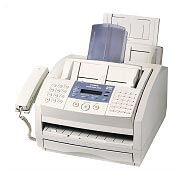
The Canon LaserClass 2050 is the specification-rich member of the small fax family on this shelf: a 6 ppm laser fax with Super G3 transmission at 33.6 kbps — about three seconds a page — up to 256 pages of fax memory, JBIG compression and UHQ VI image processing for cleaner received images. It feeds from two sources totaling 350 sheets, and everything it prints comes from the Canon FX-3 cartridge, rated for 2,700 pages.
Those numbers describe a small-office fax hub rather than an occasional-use machine. The 256-page memory lets the 2050 keep receiving while the paper path is busy, the 40-sheet automatic document feeder takes a multi-page contract in one stack, and the dual paper supply — a 100-sheet multipurpose tray over a 250-sheet cassette — keeps letter stock loaded with room for a second size. Busy reception desks, dispatch offices and clinics are its natural habitat.
Toner Cartridges for LaserClass 2050
| Cartridge | Color | Rated Yield |
|---|---|---|
| Canon FX-3 Toner Cartridge | Black | 2,700 pages |
| Canon FX-3 Toner Cartridges — 2 Pack | Black | 2,700 pages per cartridge |
| Canon FX-3 Toner Cartridges — 3 Pack | Black | 2,700 pages per cartridge |
| Canon FX-3 Toner Cartridges — 5 Pack | Black | 2,700 pages per cartridge |
| Canon FX-3 Premium Quality Toner Cartridges — 5 Pack | Black | 2,700 pages per cartridge |
Which cartridge should you buy?
One cartridge, one rating: the FX-3 gives the 2050 roughly 2,700 pages, and Canon never made a bigger version. What changes with pack size is purely how often you reorder and what each cartridge costs you. A single is fine for a quiet line. A 2050 working as an office fax hub will chew through cartridges at a pace that makes the 3 pack or 5 pack the economical default — the premium quality 5 pack being the same yield in a premium-grade build. All compatible FX-3 cartridges here include a 1-year warranty and 1-year returns.
Chip, toner and everyday use
On a busy fax, toner discipline is about never letting the machine sit empty: keep a spare FX-3 beside the 2050, and when received pages start to thin out, swap it in. Before installing, rock the fresh cartridge gently end to end so the toner inside is evenly spread, pull the sealing tape, and slide it home. The 2,700-page rating is measured at about 5% coverage, and fax traffic — especially incoming forms with shaded boxes — runs denser than that, so treat the rating as a ceiling, not a promise. Store spares sealed and flat, away from heat vents.
Frequently Asked Questions
What toner does the LaserClass 2050 use?
The Canon FX-3, rated at approximately 2,700 pages. It is the only supply item the 2050 consumes — there is no separate drum to replace.
Which trays does the LaserClass 2050 print from?
Two: a 250-sheet cassette plus a 100-sheet multipurpose tray, 350 sheets in total. Most offices leave plain letter paper in the cassette and use the multipurpose tray for the odd different size.
What happens if the 2050 runs out of toner while faxes are coming in?
Its fax memory can hold up to 256 pages, which buys time, but the right habit is prevention: keep a sealed spare on site and change the cartridge at the first sign of fading rather than after pages start coming through blank.
More printers that use the same cartridges
Its LaserClass relatives lead this list, followed by the L-series and the rest of the machines that share the 2050's FX-3 cartridge: LaserClass 1050, LaserClass 1060, LaserClass 1060P, LaserClass 1100, LaserClass 1300, LaserClass 2050P, LaserClass 2060, LaserClass 2060P, LaserClass 3500, LaserClass 4000, LaserClass 4500, LaserClass 6000L, LaserClass L4000, LaserClass L4500, L200, L250, L260, L260I, L280, L300, L350, L3500, L4000, L4500, L4500IF, L60, L75, L80, C100, CFX-2060, CFX-L3500, CFX-L3500IF, CFX-L4000, CFX-L4000IF, CFX-L4500, CFX-L4500IF, CFX-LC2050, FaxPhone L75, FaxPhone L80, ImageClass 1100, ImageClass 1100P, MultiPass L60, MultiPass L600, MultiPass L6000, MultiPass L90.