




L80
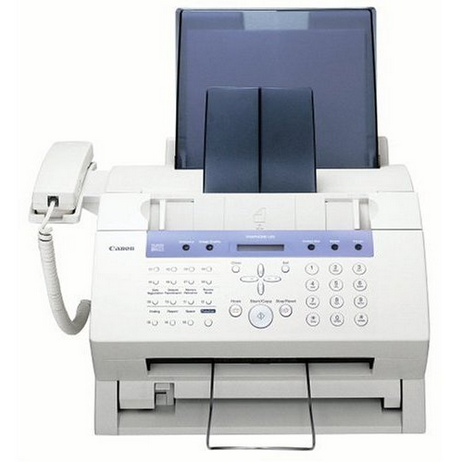
Retailers have sold this machine as the 'Canon Fax-L80' and even as the 'Canon LaserClass L80,' but under every alias it is the FaxPhone L80: a 6 ppm laser fax with Super G3 transmission, a handset and roughly 350 pages of fax memory. Its toner is the Canon FX-3, good for 2,700 pages, and that supply stays identical no matter which name is printed on the box.
Against its smaller sibling, the FaxPhone L75, the L80's step up is mostly memory — about 350 pages of stored fax traffic instead of 256 — which suits a busier line where pages arrive in bursts while someone is away from the desk. Everything else follows the same formula: one phone line shared between the handset and the fax, plain-paper output at 6 ppm, and a single cartridge doing all the work.
Toner Cartridges for L80
| Cartridge | Color | Page Yield |
|---|---|---|
| Canon FX-3 Toner Cartridges Black 5 Pack | Black | 2,700 pages per cartridge |
| Canon FX-3 Toner Cartridge Black | Black | 2,700 pages |
| Canon FX-3 Toner Cartridges Black 2 Pack | Black | 2,700 pages per cartridge |
| Canon FX-3 Premium Quality Toner Cartridges Black 5 Pack | Black | 2,700 pages per cartridge |
| Canon FX-3 Toner Cartridges Black 3 Pack | Black | 2,700 pages per cartridge |
Which cartridge should you buy?
With only the FX-3 to choose from, the buying question is how much buffer stock your fax traffic deserves. The single cartridge suits a quiet line, and its 2,700-page rating still covers months of light use. A 2 pack is the natural middle step for an office that cannot afford to discover an empty machine on a Monday morning, while the 3 and 5 packs — standard or premium-quality — serve lines that receive all day. Because the memory can hold roughly 350 pages, a busy L80 can also work through a surprising amount of toner in one unattended weekend, which argues for keeping at least one spare. Each cartridge carries a 1-year warranty and 1-year returns.
Chip, toner and everyday use
A practical habit for this model: when the print on incoming faxes starts to lighten, rock the installed cartridge gently to level the remaining toner and order the replacement the same day — the memory will keep receiving, but those stored pages all need toner when they finally print. Fit the new FX-3 with its sealing tape fully removed and press until it clicks into place. Store spares sealed, flat and away from heat; a cartridge kept beside a sunny window ages faster than one in a drawer. Yields are quoted at the standard 5% coverage.
Frequently Asked Questions
Is the Fax-L80 a different machine from the FaxPhone L80?
No — Fax-L80 and even LaserClass L80 are retail aliases for the FaxPhone L80. The hardware, the 6 ppm engine and the FX-3 cartridge are the same under each name.
What toner does the L80 take?
The Canon FX-3, rated for 2,700 pages. It is stocked here as a single and in 2, 3 and 5 packs, including a premium-quality 5 pack.
How does the L80 differ from the L75?
Chiefly in fax memory: roughly 350 pages against the smaller model's 256, on the same 6 ppm platform. Both machines use the identical FX-3 cartridge.
Can I keep printing faxes while toner is low?
Incoming pages can wait in memory, but they still need toner to print. Rocking the cartridge buys time; fitting a fresh FX-3 is the actual fix.
More printers that use the same cartridges
The FX-3 also supplies this wider family of Canon machines: L75, L200, L250, L260, L260I, L280, L300, L350, L3500, L4000, L4500, L4500IF, L60, LaserClass L4000, LaserClass L4500, LaserClass 1050, LaserClass 1060, LaserClass 1060P, LaserClass 1100, LaserClass 1300, LaserClass 2050, LaserClass 2050P, LaserClass 2060, LaserClass 2060P, LaserClass 3500, LaserClass 4000, LaserClass 4500, LaserClass 6000L, MultiPass L6000, MultiPass L90, MultiPass L60, MultiPass L600, C100, CFX-2060, CFX-L3500, CFX-L3500IF, CFX-L4000, CFX-L4000IF, CFX-L4500, CFX-L4500IF, CFX-LC2050, FaxPhone L80, FaxPhone L75, ImageClass 1100, ImageClass 1100P