




L3500
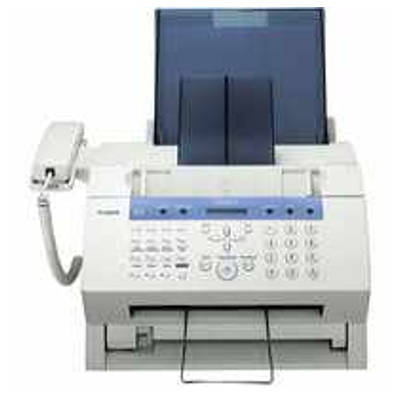
Three badges, one platform: the L3500 is the plain-name version of the CFX-L3500 and LaserClass 3500 hardware — a compact 6 ppm office machine that works as phone, fax and copier, with Super G3 faxing, 512 pages of fax memory and a 50-sheet automatic document feeder. Its toner is the family's standard black cartridge, the Canon FX-3, rated for 2,700 pages.
The specification that defines daily life with an L3500 is that memory. Five hundred and twelve pages of received faxes can wait in the machine while the tray is empty or the office is closed, then print in a burst when someone loads paper — a pattern that spends a cartridge in surges rather than steadily. One caution from the model's listings: a claim of 22 ppm printing circulates for this platform, but it contradicts the 6 ppm FX-3 engine and should be disregarded.
Toner Cartridges for L3500
| Cartridge | Color | Page Yield |
|---|---|---|
| Canon FX-3 Premium 5 Pack | Black | Approx. 2,700 pages per cartridge |
| Canon FX-3 (Single Cartridge) | Black | Approx. 2,700 pages |
| Canon FX-3 2 Pack | Black | Approx. 2,700 pages per cartridge |
| Canon FX-3 3 Pack | Black | Approx. 2,700 pages per cartridge |
| Canon FX-3 5 Pack | Black | Approx. 2,700 pages per cartridge |
Which cartridge should you buy?
Buy for the burst, not the average. Because the L3500 can hold 512 pages in memory, the day the tray is refilled after a long weekend can become a several-hundred-page print run, and a cartridge near its end will fade mid-burst. A single FX-3 is fine for a quiet installation, but any L3500 on a live fax line deserves a spare in the building: the 2 pack covers that at a lower per-cartridge cost, and offices that clear big memory backlogs regularly should step to the 3 pack or 5 pack. Whichever badge is on the front panel — L3500, CFX-L3500 or LaserClass 3500 — the cartridge ordered is the same FX-3.
Chip, toner and everyday use
The 50-sheet feeder is the copier and sender workhorse here: keep its rollers wiped and originals flat, and multi-page faxes go through unattended. For toner, the burst pattern argues for checking the spare shelf whenever a big memory backlog prints, not when output finally fades. Rock a fresh cartridge gently before fitting, seat it fully, and run one received page as a test before walking away from a machine that may print hundreds more overnight.
Frequently Asked Questions
Is the L3500 the same machine as the CFX-L3500?
Yes — L3500, CFX-L3500 and LaserClass 3500 are badges for one platform, and all three take the same FX-3 cartridge.
How many pages can the L3500 hold in fax memory?
512 pages, the largest memory in this group, backed by Super G3 faxing and a 50-sheet document feeder.
Is the L3500 a 22 ppm printer?
No. That figure appears in one listing but contradicts the platform's 6 ppm FX-3 engine; it was disregarded in preparing this page.
What toner does the Canon L3500 use?
The Canon FX-3 black toner cartridge, rated for 2,700 pages.
More printers that use the same cartridges
Whatever badge the platform wears, it orders the FX-3 — the same cartridge used by every model in this list: LaserClass 2060, LaserClass 2060P, LaserClass 3500, LaserClass 4000, LaserClass 4500, LaserClass 6000L, LaserClass L4000, LaserClass L4500, MultiPass L60, MultiPass L600, MultiPass L6000, MultiPass L90, C100, CFX-2060, CFX-L3500. Fellow FX-3 machines include: CFX-L3500IF, CFX-L4000, CFX-L4000IF, CFX-L4500, CFX-L4500IF, CFX-LC2050, FaxPhone L75, FaxPhone L80, ImageClass 1100, ImageClass 1100P, L200, L250, L260, L260I, L280. The remaining family members: L300, L350, L4000, L4500, L4500IF, L60, L75, L80, LaserClass 1050, LaserClass 1060, LaserClass 1060P, LaserClass 1100, LaserClass 1300, LaserClass 2050, LaserClass 2050P.