




LaserClass 2060
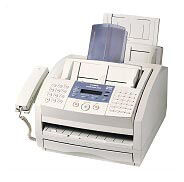
The Canon LaserClass 2060 runs the same 6 ppm engine as the LaserClass 2050 but pushes fax memory up to 340 pages — the largest buffer in this little family — and it does so as a fax-only machine: the PC printing belongs to its sibling, the LaserClass 2060P. Its supply is the Canon FX-3 cartridge, rated for 2,700 pages.
That big memory defines the 2060's role. On a line that receives around the clock — a service desk taking after-hours orders, a practice receiving referrals overnight — incoming pages can stack up safely in memory while nobody is there to feed paper or change toner. In the morning the 2060 prints its backlog on plain paper, sharp and fileable, which is precisely what a working fax is for.
Toner Cartridges for LaserClass 2060
| Cartridge | Color | Page Yield |
|---|---|---|
| Canon FX-3 Toner Cartridge — Single | Black | 2,700 pages |
| Canon FX-3 Toner Cartridges — 2 Pack | Black | 2,700 pages per cartridge |
| Canon FX-3 Toner Cartridges — 3 Pack | Black | 2,700 pages per cartridge |
| Canon FX-3 Premium Quality Toner Cartridges — 5 Pack | Black | 2,700 pages per cartridge |
| Canon FX-3 Toner Cartridges — 5 Pack | Black | 2,700 pages per cartridge |
Which cartridge should you buy?
Since every FX-3 prints the same roughly 2,700 pages, pick the pack that matches how painful an empty machine would be. For a 2060 that receives overnight, the honest answer is: fairly painful, because a drained cartridge can hold a morning's worth of received work hostage. Keep at least one spare with the machine — a 2 pack or 3 pack pattern works well — and reserve the 5 packs, standard or premium quality, for the busiest lines. Every compatible FX-3 listed here is covered by a 1-year warranty and 1-year returns.
Chip, toner and everyday use
Swapping the FX-3 takes moments: open the front, lift out the spent unit, rock the new cartridge a few times to level its toner, strip the seal and slide it in. A machine that receives in the dark deserves one extra habit — check the toner situation on a schedule instead of waiting for pale pages, because fading output on a fax usually means incoming documents are already suffering. The 2,700-page rating presumes about 5% coverage; heavy incoming forms will trim it. Spares keep best sealed, flat and away from direct light.
Frequently Asked Questions
How is the LaserClass 2060 different from the 2060P?
Memory and fax hardware match, and both take the FX-3. The LaserClass 2060P adds a PC printer function; the 2060 on this page is a dedicated fax.
What does the 340-page fax memory actually do?
It stores received pages electronically when they cannot print immediately — overnight, or while the machine is busy — up to about 340 pages. They print once the way is clear, so senders never hit a dead end.
Which cartridge does the LaserClass 2060 take?
The Canon FX-3, good for roughly 2,700 pages at 5% coverage — the same cartridge used by the whole family below.
More printers that use the same cartridges
Rotated to start mid-list, here is the complete set of Canon machines that drink from the same FX-3 well as the 2060: L280, L300, L350, L3500, L4000, L4500, L4500IF, L60, L75, L80, LaserClass 1050, LaserClass 1060, LaserClass 1060P, LaserClass 1100, LaserClass 1300, LaserClass 2050, LaserClass 2050P, LaserClass 2060P, LaserClass 3500, LaserClass 4000, LaserClass 4500, LaserClass 6000L, LaserClass L4000, LaserClass L4500, MultiPass L60, MultiPass L600, MultiPass L6000, MultiPass L90, C100, CFX-2060, CFX-L3500, CFX-L3500IF, CFX-L4000, CFX-L4000IF, CFX-L4500, CFX-L4500IF, CFX-LC2050, FaxPhone L75, FaxPhone L80, ImageClass 1100, ImageClass 1100P, L200, L250, L260, L260I.