




LaserClass 2050P
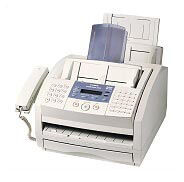
The 'P' makes the LaserClass 2050P the printer variant of the LaserClass 2050 — the same 6 ppm engine, Super G3 fax and 256-page memory, plus PC printing through a GDI driver on a parallel or USB connection. The printer variant draws on exactly the same supply as the base fax machine: the Canon FX-3 cartridge, rated for 2,700 pages.
Owners end up with the P variant when a fax machine also has to double as the desk's printer, and the GDI arrangement keeps that simple: the connected computer renders each job while the 2050P handles the paper. Meanwhile the fax side keeps its own rhythm, receiving through the day into its 256-page memory. One cartridge feeds both workloads, which makes this a busier toner consumer than the base fax-only configuration.
Toner Cartridges for LaserClass 2050P
| Cartridge | Color | Page Yield |
|---|---|---|
| Canon FX-3 Toner Cartridges Black 2 Pack | Black | 2,700 pages per cartridge |
| Canon FX-3 Premium Quality Toner Cartridges Black 5 Pack | Black | 2,700 pages per cartridge |
| Canon FX-3 Toner Cartridge Black | Black | 2,700 pages |
| Canon FX-3 Toner Cartridges Black 3 Pack | Black | 2,700 pages per cartridge |
| Canon FX-3 Toner Cartridges Black 5 Pack | Black | 2,700 pages per cartridge |
Which cartridge should you buy?
Plan pack sizes around combined fax-plus-print volume rather than fax alone. A single FX-3, rated at 2,700 pages, is a sound first order and plenty for a quiet desk, but a machine printing from a PC all week alongside its fax traffic earns the 2 or 3 packs quickly. The standard and premium-quality 5 packs suit shared setups where running dry would stall two jobs at once. There is no separate printer cartridge to budget for — the FX-3 covers everything this model produces — and each one carries a 1-year warranty with 1-year returns.
Chip, toner and everyday use
The 256-page memory gives you a small grace period when toner runs low: incoming pages have somewhere to wait while you swap cartridges, instead of the line refusing work. Swap promptly anyway — lift the old FX-3 out, rock the new one gently side to side, pull its sealing tape clear and seat it until it clicks, then print a PC test page and a copy to check both paths. Keep the spare cartridge sealed in a cool spot near the machine. Page ratings assume 5% coverage, and printed office documents usually run denser than fax traffic.
Frequently Asked Questions
What does the 'P' add to the LaserClass 2050P?
PC printing. The P variant adds a GDI driver connection — parallel or USB — to the base machine's fax feature set, on the same 6 ppm engine and 256-page memory.
Does the 2050P use a different cartridge from the 2050?
No. Both the base fax machine and the printer variant use the Canon FX-3, rated for 2,700 pages, so one cartridge type covers the whole setup.
Which connection does the printer side use?
A parallel or USB link to the computer, with rendering handled by the GDI driver on the PC. The fax side works independently over the phone line.
How many pages should I expect from one cartridge?
The rating is 2,700 pages at 5% coverage. Because this variant prints from a PC as well as faxing, combined use will usually reach that figure sooner than fax alone would.
More printers that use the same cartridges
Plenty of sibling models across the Canon fax range share this cartridge: C100, MultiPass L600, MultiPass L6000, MultiPass L90, MultiPass L60, LaserClass L4000, LaserClass L4500, LaserClass 1050, LaserClass 1060, LaserClass 1060P, LaserClass 1100, LaserClass 1300, LaserClass 2050, LaserClass 2060, LaserClass 2060P, LaserClass 3500, LaserClass 4000, LaserClass 4500, LaserClass 6000L, L80, L200, L250, L260, L260I, L280, L300, L350, L3500, L4000, L4500, L4500IF, L60, L75, ImageClass 1100, ImageClass 1100P, FaxPhone L80, FaxPhone L75, CFX-L4500IF, CFX-LC2050, CFX-2060, CFX-L3500, CFX-L3500IF, CFX-L4000, CFX-L4000IF, CFX-L4500