




CFX-L4000
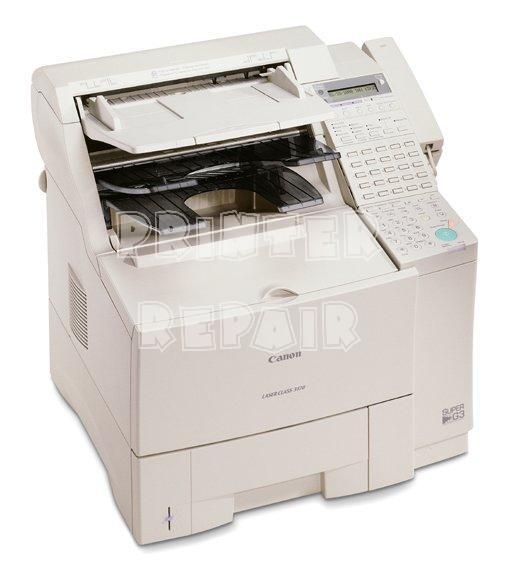
The CFX-L4000 is the Canon Fax branding of the FAX-L4000 — the same compact small-office fax machine also sold as the LaserClass 4000. It works at 6 pages per minute with a 14.4 kbps transmission speed, a 42-page memory and, per a period third-party review, about an hour of battery backup. Everything it receives lands on paper through the Canon FX-3 toner cartridge, rated at 2,700 pages and sold here as a single and in multipacks.
Those memory and battery figures are the heart of this machine's job. A fax endpoint cannot choose when work arrives: documents land overnight, during lunch, and in the middle of a power cut. The 42-page memory holds incoming faxes when paper or toner runs short, and the battery backup keeps the machine receiving through a brief outage instead of dropping the call. For a small office that still contracts, orders or refers by fax, that quiet reliability — not speed — is what the CFX-L4000 was bought for.
Toner Cartridges for CFX-L4000
| Cartridge | Color | Page Yield |
|---|---|---|
| Canon FX-3 Toner Cartridge | Black | 2,700 pages |
| Canon FX-3 — 2 Pack | Black | 2,700 pages per cartridge |
| Canon FX-3 — 3 Pack | Black | 2,700 pages per cartridge |
| Canon FX-3 — 5 Pack | Black | 2,700 pages per cartridge |
| Canon FX-3 Premium Quality — 5 Pack | Black | 2,700 pages per cartridge |
Which cartridge should you buy?
Every option above is the same FX-3 cartridge with the same 2,700-page rating, so choose by how painful an empty machine would be. Fax traffic is bursty and partly invisible — you cannot see toner being spent on incoming pages the way you notice your own printing. Offices that depend on the line should keep the multipack habit: a 3 or 5 pack in the cupboard means the 2 a.m. fax run never ends in a memory-full error and a phone call from a frustrated sender. A single cartridge is fine only where faxing is occasional and a day of downtime costs little.
Chip, toner and everyday use
On a fax machine, faded incoming pages are the classic first sign of a tiring cartridge. Take the FX-3 out and rock it gently side to side; the redistributed toner typically restores even density for the next batch of transmissions. When you fit the replacement, slide it in until it seats fully — a cartridge resting half-home prints light no matter how fresh it is. Keep spares sealed and flat, and remember the 2,700-page rating assumes about 5% coverage, which fax pages comfortably exceed whenever a sender transmits dense forms or dark letterheads.
Frequently Asked Questions
What does the battery backup do?
Per a third-party review of the machine, roughly an hour of backup keeps the CFX-L4000 receiving through short power interruptions, working alongside its 42-page memory so incoming faxes are not lost when the lights flicker.
What toner does the CFX-L4000 use?
The Canon FX-3 black toner cartridge, in the table above — sold as a single cartridge and in 2, 3 and 5 packs.
How many pages does the FX-3 print?
About 2,700 pages at 5% coverage. Dense incoming documents — contracts, forms, dark scans — will bring the real count in below that figure.
Are compatible cartridges covered by any warranty?
Yes. Compatible cartridges sold here carry a 1-year warranty and 1-year returns.
More printers that use the same cartridges
The FX-3 family is one of Canon's widest. Its LaserClass branch alone covers LaserClass 2050P, LaserClass 2060, LaserClass 2060P, LaserClass 3500, LaserClass 4000, LaserClass 4500, LaserClass 6000L, LaserClass L4000, LaserClass L4500, LaserClass 1050, LaserClass 1060, LaserClass 1060P, LaserClass 1100, LaserClass 1300, LaserClass 2050, and the L series adds L200, L250, L260, L260I, L280, L300, L350, L3500, L4000, L4500, L4500IF, L60, L75, L80. The CFX relatives are CFX-2060, CFX-L3500, CFX-L3500IF, CFX-L4000IF, CFX-L4500, CFX-L4500IF, CFX-LC2050, with C100, FaxPhone L75, FaxPhone L80, ImageClass 1100, ImageClass 1100P and the MultiPass machines — MultiPass L60, MultiPass L600, MultiPass L6000, MultiPass L90 — completing the list.