




LaserClass 1060P
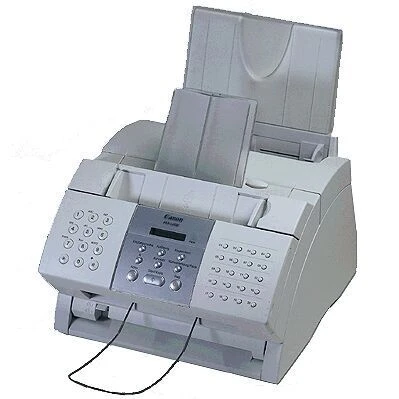
Three functions share one 1990s box in the LaserClass 1060P: 6 ppm, 600 dpi laser printing, laser fax and convenience copying, with a full-featured telephone on top. Its Super G3 modem runs at 33.6 kbps — about three seconds per page — and printing goes through a GDI driver over a parallel or USB connection. All three jobs draw on a single supply, the Canon FX-3 cartridge, rated for 2,700 pages.
That single-supply design is the 1060P's defining trait. A print-only machine meters its toner through one workload, but this unit adds every copied page and every incoming fax to the same ledger, so cartridges turn over faster than the print speed alone would suggest. For a small office of its era it was an efficient consolidation: one device by the phone, one cartridge to stock, three daily tasks covered.
Toner Cartridges for LaserClass 1060P
| Cartridge | Color | Page Yield |
|---|---|---|
| Canon FX-3 Toner Cartridge Black | Black | 2,700 pages |
| Canon FX-3 Toner Cartridges Black 5 Pack | Black | 2,700 pages per cartridge |
| Canon FX-3 Toner Cartridges Black 2 Pack | Black | 2,700 pages per cartridge |
| Canon FX-3 Toner Cartridges Black 3 Pack | Black | 2,700 pages per cartridge |
| Canon FX-3 Premium Quality Toner Cartridges Black 5 Pack | Black | 2,700 pages per cartridge |
Which cartridge should you buy?
Budget toner for all three functions, not just printing, when you choose a pack size. A single FX-3 at 2,700 pages suits a lightly used machine, yet a desk that copies and faxes daily can work through that rating quickly, which makes the 2 and 3 packs the practical middle ground. The 5 packs — standard and premium-quality — fit shared machines that several people rely on, where a stock-out stalls copying and the fax line as well as printing. Whichever size you pick, every cartridge is the same 2,700-page unit, covered by a 1-year warranty and 1-year returns.
Chip, toner and everyday use
A convenience copy is the quickest health check on this model: it exercises the cartridge without involving the computer or the GDI driver, so a clean copy tells you the toner side is healthy even if a PC print job is misbehaving. To fit a fresh FX-3, open the cover, lift the old cartridge straight out, rock the replacement gently to level the toner, remove the sealing tape, and slide it in until it clicks. Keep spares sealed and flat in a drawer near the machine. Ratings are quoted at 5% coverage; copy-heavy use, with its dense originals, consumes toner faster.
Frequently Asked Questions
Does copying on the LaserClass 1060P use the same cartridge as printing?
Yes. Printing, copying and fax reception all draw on the single FX-3 cartridge, which is why this model uses toner faster than a print-only machine of similar speed.
How fast is the 1060P's fax modem?
It is a Super G3 unit running at 33.6 kbps, roughly three seconds per page in typical conditions — quick enough that the phone line is rarely the bottleneck.
What does the GDI driver mean for connecting it?
Printing is host-based through a GDI driver, using a parallel or USB connection. The computer does the rendering work, so the driver needs to be installed and responding for PC printing.
What toner does the LaserClass 1060P take?
The Canon FX-3, rated for 2,700 pages, in singles and in 2, 3 and 5 packs.
More printers that use the same cartridges
This cartridge also serves the rest of Canon's desktop laser fax family: MultiPass L600, MultiPass L6000, MultiPass L90, MultiPass L60, LaserClass 3500, LaserClass 4000, LaserClass 4500, LaserClass 6000L, LaserClass L4000, LaserClass L4500, LaserClass 1050, LaserClass 1060, LaserClass 1100, LaserClass 1300, LaserClass 2050, LaserClass 2050P, LaserClass 2060, LaserClass 2060P, L4500, L4500IF, L60, L75, L80, L200, L250, L260, L260I, L280, L300, L350, L3500, L4000, ImageClass 1100, ImageClass 1100P, FaxPhone L80, FaxPhone L75, CFX-L3500IF, CFX-L4000, CFX-L4000IF, CFX-L4500, CFX-L4500IF, CFX-LC2050, CFX-2060, CFX-L3500, C100