




LaserClass 2060P
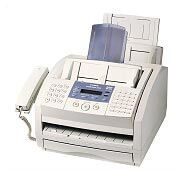
The letter at the end of the Canon LaserClass 2060P is the whole story: the P adds a PC printer function — over an 8-bit bi-directional parallel connection — to a plain-paper Super G3 fax that moves a page in about three seconds. Around that dual role it carries up to 340 pages of fax memory, a 30-sheet automatic document feeder, UHQ image processing and ECM error correction. Its cartridge is the Canon FX-3, rated for 2,700 pages.
That combination made the 2060P the desk-side two-in-one of its era: one machine that receives the signed order by fax in the morning and prints the invoice from the PC in the afternoon. For a one-person office it replaced two boxes with one, and the supply stayed simple — a single cartridge covers both the faxing and the printing, which is why these machines are still kept alive.
Toner Cartridges for LaserClass 2060P
| Cartridge | Color | Page Yield |
|---|---|---|
| Canon FX-3 Toner Cartridge | Black | 2,700 pages |
| Canon FX-3 Toner Cartridges — 2 Pack | Black | 2,700 pages per cartridge |
| Canon FX-3 Toner Cartridges — 3 Pack | Black | 2,700 pages per cartridge |
| Canon FX-3 Toner Cartridges — 5 Pack | Black | 2,700 pages per cartridge |
| Canon FX-3 Premium Quality Toner Cartridges — 5 Pack | Black | 2,700 pages per cartridge |
Which cartridge should you buy?
A 2060P spends toner on two jobs — faxes and PC printouts — but the cartridge choice is the same one FX-3 decision: a single cartridge for light mixed use, or a multipack when the machine works daily. The 2 pack and 3 pack lower the per-cartridge cost for steady users; the standard and premium quality 5 packs suit desks that print from the PC as much as they fax. There is no high-yield FX-3, so volume planning is all about pack size. Compatible cartridges here carry a 1-year warranty with 1-year returns.
Chip, toner and everyday use
Because the 2060P prints from a computer as well as a phone line, judge cartridge life by total pages, not fax count: the FX-3's 2,700-page rating is measured at about 5% coverage across everything the machine outputs. Installation is the usual front-access swap — old unit out, new unit rocked gently to distribute toner, seal pulled, cartridge seated. If PC printouts look fine but received faxes look ragged, that is a phone-line or sender issue, not toner; toner problems show up on everything the machine prints.
Frequently Asked Questions
What does the P in LaserClass 2060P stand for?
Printing. Unlike the fax-only LaserClass 2060, the 2060P connects to a PC — through a parallel port — and works as a printer as well as a fax.
Does printing from the PC use the same cartridge as faxing?
Yes — one Canon FX-3 does both jobs. There is no second supply for the printer side, which is part of the machine's appeal.
How long will an FX-3 last in a 2060P?
About 2,700 pages at 5% coverage, shared between faxes and printouts. Offices that print long documents from the PC will cycle cartridges faster than fax-only users, so a multipack is the practical default.
More printers that use the same cartridges
Leading with the MultiPass, FaxPhone and CFX lines, this is every Canon model that shares the 2060P's FX-3 cartridge: C100, CFX-2060, CFX-L3500, CFX-L3500IF, CFX-L4000, CFX-L4000IF, CFX-L4500, CFX-L4500IF, CFX-LC2050, FaxPhone L75, FaxPhone L80, ImageClass 1100, ImageClass 1100P, MultiPass L60, MultiPass L600, MultiPass L6000, MultiPass L90, L200, L250, L260, L260I, L280, L300, L350, L3500, L4000, L4500, L4500IF, L60, L75, L80, LaserClass 1050, LaserClass 1060, LaserClass 1060P, LaserClass 1100, LaserClass 1300, LaserClass 2050, LaserClass 2050P, LaserClass 2060, LaserClass 3500, LaserClass 4000, LaserClass 4500, LaserClass 6000L, LaserClass L4000, LaserClass L4500.