




CFX-L3500
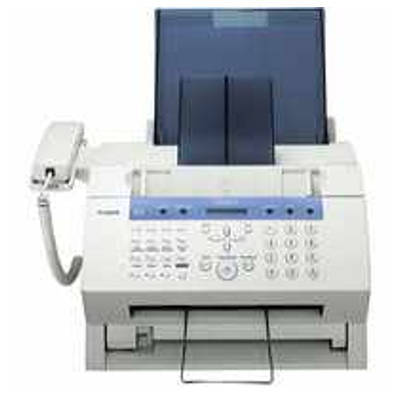
The CFX-L3500 is the Canon Fax branding of the platform also sold as the LaserClass 3500: a Super G3 laser fax with 512 pages of fax memory, a 50-sheet automatic document feeder, and phone, fax and copier functions in one compact 6-page-per-minute office machine. Everything it prints comes from a single cartridge, the FX-3, rated at 2,700 pages.
Machines like this survive in offices long after faster printers arrive, because they anchor a dedicated fax line for contracts, orders and signed forms. The 512-page memory keeps receiving even when the paper tray empties, and the 50-sheet feeder turns a stack of pages into a single unattended send. Keeping such a unit alive is mostly a toner question, and fortunately it is a simple one.
Toner Cartridges for CFX-L3500
| Cartridge | Color | Page Yield |
|---|---|---|
| Canon FX-3 Toner Cartridge — Black | Black | 2,700 pages |
| Canon FX-3 Toner Cartridges — Black 2 Pack | Black | 2,700 pages per cartridge |
| Canon FX-3 Toner Cartridges — Black 3 Pack | Black | 2,700 pages per cartridge |
| Canon FX-3 Toner Cartridges — Black 5 Pack | Black | 2,700 pages per cartridge |
| Canon FX-3 Premium Quality Toner Cartridges — Black 5 Pack | Black | 2,700 pages per cartridge |
Which cartridge should you buy?
A fax machine's appetite depends on traffic rather than print jobs you control: a quiet line might take a year to finish the 2,700 pages in a single FX-3, while a busy order line can work through one in a season. The single cartridge is the right buy for light use. Offices that cannot risk a faded incoming contract should step up to the 2 pack or 3 pack and treat the spare as insurance — a fax that prints pale pages creates real business problems. The 5 packs, including the premium-quality set, suit organizations running several FX-3 machines on one supply shelf. All compatible cartridges here include a 1-year warranty and 1-year returns.
Chip, toner and everyday use
Received faxes print the moment they arrive, so toner condition shows up first on other people's documents: if incoming pages look washed out, rock the cartridge gently to redistribute the toner before assuming the worst. Yield is rated at 5% coverage, though fax pages of dense handwriting and forms run heavier than that average. When you install a fresh cartridge, print a test page or copy a document to confirm even coverage across the sheet. Store spares sealed and flat; a cartridge kept for a quiet fax line may sit for a year and should still pour cleanly when its turn comes.
Frequently Asked Questions
What toner does the Canon CFX-L3500 use?
It uses the Canon FX-3 toner cartridge, rated at 2,700 pages. The same cartridge covers every job the machine prints — received faxes, copies and phone-line reports alike.
Is the CFX-L3500 the same machine as the LaserClass 3500?
The CFX name is Canon's fax-line branding for the same hardware platform sold as the LaserClass 3500 and the FAX-L3500. All of them run on the FX-3 cartridge.
How many pages does an FX-3 cartridge print in this machine?
About 2,700 pages at 5% coverage. Real life varies with fax traffic: pages full of signatures, logos and shaded forms use noticeably more toner than plain typed pages.
My incoming faxes are coming out faint. Is it the toner?
Usually, yes. Remove the cartridge and rock it gently from side to side to level the remaining toner, then reprint. If pages stay pale after that, the cartridge is at the end of its life and should be replaced.
More printers that use the same cartridges
The FX-3 is one of Canon's longest-serving fax cartridges, shared by dozens of LaserClass, FAX-L, CFX and MultiPASS machines: C100, CFX-2060, CFX-L3500IF, CFX-L4000, CFX-L4000IF, CFX-L4500, CFX-L4500IF, CFX-LC2050, FaxPhone L75, FaxPhone L80, ImageClass 1100, ImageClass 1100P, L200, L250, L260, L260I, L280, L300, L350, L3500, L4000, L4500, L4500IF, L60, L75, L80, LaserClass 1050, LaserClass 1060, LaserClass 1060P, LaserClass 1100, LaserClass 1300, LaserClass 2050, LaserClass 2050P, LaserClass 2060, LaserClass 2060P, LaserClass 3500, LaserClass 4000, LaserClass 4500, LaserClass 6000L, LaserClass L4000, LaserClass L4500, MultiPass L60, MultiPass L600, MultiPass L6000, MultiPass L90.