




LaserJet Pro 100 Color M175A
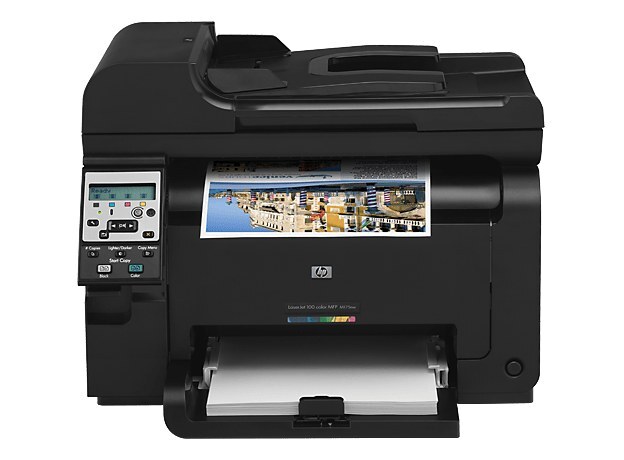
Sold as the LaserJet Pro 100 Color M175A, this is the base color printer of the M175 generation under its alternate channel naming — same chassis, same toner as the M175A line it mirrors. That toner is the HP 126A family: black CE310A, cyan CE311A, yellow CE312A and magenta CE313A. Restock it exactly like its twin: four cartridges, each replaced on its own as it empties.
The shelf under this name is the broadest in its class, and it helps to know why. Around the machine's own 126A listings — singles, color sets and multi-packs in several pack sizes — the store also gathers listings cross-referenced from neighbouring color families that share this category in the catalog: the 312A line built around CF380A and its high-yield companion, the 312X black CF380X, with the color cartridges CF381A, CF382A and CF383A beside them; the older CC530A family set with CC531A, CC532A and CC533A; and a stray CE401A cyan listing. None of those change what this printer itself takes — the four 126A codes above are its whole diet — but they explain the crowd, and every listing is linked below under its own name.
Toner Cartridges for LaserJet Pro 100 Color M175A
| Cartridge | Color | Page Yield |
|---|---|---|
| CE310A | Black | See product page |
| CE311A | Cyan | See product page |
| CE312A | Yellow | See product page |
| CE313A | Magenta | See product page |
| 126A Tri-Color | Cyan / Magenta / Yellow | See product page |
| 126A 4 Color Set | Black / Cyan / Magenta / Yellow | See product page |
Every other listing carried on this shelf, each under its own name:
- Pro 100 Color M175A Toner Cartridge Color Laserjet 4 Color Set
- Pro M175A Toner Cartridge Color Laserjet 4 Color Set
- PRO 100 COLOR MFP M175a Toner Cartridge 4 Color Set
- 100 COLOR MFP M175A (CE310A) Toner Cartridge 2 Black
- 100 COLOR MFP M175A (CE310A CE311A CE312A CE313A) Toner Cartridge 5 Color Set
- 100 COLOR MFP M175A (CE311A CE312A CE313A) Toner Cartridge 6 Color Set
- 100 COLOR MFP M175A (CE310A CE311A CE312A CE313A) Toner Cartridge 8 Color Set
- 126A (CE310A CE311A CE312A CE313A) Toner Cartridge 8 Color Set
- 126A (CE310A) Toner Cartridge Black
- 126A (CE311A) Toner Cartridge Cyan
- PRO 100 COLOR M175A (CE310A CE311A CE312A CE313A) Toner Cartridge 5 Color Set
- PRO 100 COLOR M175A (CE310A CE311A CE312A CE313A) Toner Cartridge 8 Color Set
- PRO 100 COLOR M175A (CE310A) Toner Cartridge Black
- M175A (CE310A CE311A CE312A CE313A) Toner Cartridge 4 Color Set
- 126A (CE310A CE311A CE312A CE313A) Toner Cartridge 4 Color Set
- 100 COLOR MFP M175A (CE310A) Toner Cartridge 2 Black
- 100 COLOR MFP M175A (CE310A) Toner Cartridge 3 Black
- 100 COLOR MFP M175A (CE311A CE312A CE313A) Toner Cartridge 3 Color Set
- 100 COLOR MFP M175A (CE311A CE312A CE313A) Toner Cartridge 6 Color Set
- 100 COLOR MFP M175A (CE310A CE311A CE312A CE313A) Toner Cartridge 8 Color Set
- 100 COLOR MFP M175A (CE310A) Toner Cartridge Black
- 100 COLOR MFP M175A (CE311A) Toner Cartridge Cyan
- 126A (CE310A) Toner Cartridge 2 Black
- 126A (CE310A) Toner Cartridge 5 Black
- 126A (CE310A CE311A CE312A CE313A) Toner Cartridge 5 Color Set
- 126A (CE311A CE312A CE313A) Toner Cartridge 6 Color Set
- 126A (CE310A CE311A CE312A CE313A) Toner Cartridge 8 Color Set
- 126A (CE311A) Toner Cartridge Cyan
- 126A (CE313A) Toner Cartridge Magenta
- 126A (CE312A) Toner Cartridge Yellow
- 126A (CE310A) Toner Cartridge Black
- 126A (CE311A) Toner Cartridge Cyan
- 126A (CE311A) Toner Cartridge Cyan
- 126A (CE312A) Toner Cartridge Yellow
- 126A (CE312A) Toner Cartridge Yellow
- 126A (CE313A) Toner Cartridge Magenta
- 126A (CE313A) Toner Cartridge Magenta
- PRO M175A (CE310A) Toner Cartridge 2 Black
- PRO M175A (CE310A CE311A CE312A CE313A) Toner Cartridge 5 Color Set
- PRO M175A (CE311A CE312A CE313A) Toner Cartridge 6 Color Set
- PRO M175A (CE310A CE311A CE312A CE313A) Toner Cartridge 8 Color Set
- PRO M175A (CE310A CE311A CE312A CE313A) Toner Cartridge 8 Color Set
- PRO M175A (CE310A) Toner Cartridge Black
- PRO M175A (CE310A) Toner Cartridge Black
- PRO M175A (CE311A) Toner Cartridge Cyan
- PRO M175A (CE311A) Toner Cartridge Cyan
- PRO M175A (CE313A) Toner Cartridge Magenta
- PRO M175A (CE313A) Toner Cartridge Magenta
- PRO M175A (CE310A CE311A CE312A CE313A) Toner Cartridge 4 Color Set
- 126A (CE310A CE311A CE312A CE313A) Toner Cartridge 4 Color Set
- 312A (CF380A CF381A CF382A CF383A) Toner Cartridge 5 Color Set
- 312A (CF380A CF381A CF382A CF383A) Toner Cartridge 8 Color Set
- 312X (CF380X CF380A) Toner Cartridge Black 4 Pack
Which cartridge should you buy?
For this printer, shop the four codes in the table and ignore the rest of the crowd. Black is the cartridge a small color printer spends fastest, so the multi-black listings on this shelf suit anyone who prints documents daily; a single black serves lighter use. Colors should be bought as the machine asks for them — one spent color at a time — unless a full refresh is due, in which case the four-color set or the tri-color pack for the three colors keeps every slot even. Whatever the pack size, the check that matters is the code printed on the cartridge you take out: if it is not one of the four 126A codes, it belongs to a different machine.
Chip, toner and everyday use
The M175A reads each cartridge's chip to report levels, and the low-toner message arrives well before the cartridge is truly empty — treat it as a reorder prompt, not a stop sign. Printing drafts in grayscale stretches the three color cartridges, since black does that work alone. When a color finally fades, rock its cartridge gently side to side to redistribute the toner and finish the job at hand, then swap in the replacement and let the machine calibrate before the next color-critical page. Keep one spare set sealed on the shelf and rush pricing never enters the picture.
Frequently Asked Questions
Can the LaserJet Pro 100 Color M175A use toner meant for other Color LaserJet models?
No — it takes the 126A set of four and nothing else. Compatible replacements work fine as long as they are made for that family; cartridges from other HP families will not fit, including the other families whose listings share this shelf.
Does printing in black and white save the color cartridges?
Yes. Drafts printed in grayscale draw on the black cartridge only, so the colors last longer across mixed workloads. It is the easiest habit for stretching a set on a small color machine.
What should I do when the toner-low warning appears?
Keep printing and order the named cartridge. The warning comes early by design; swap only when prints fade or the machine refuses to continue, and redistribute the toner with a gentle shake to bridge the gap.
Why do listings for other cartridge families appear on this page?
This category gathers cross-referenced listings from sibling color machines that share the catalog shelf. They are linked under their own names above for the shoppers who need them; this printer's own cartridges remain the four 126A codes in the table.
More printers that use the same cartridges
The 126A shelf is shared first by the compact color machines:
Color LaserJet CP1025nw, Color LaserJet M175nw, Color LaserJet M476, Color LaserJet M476DN, Color LaserJet M476DW, Color LaserJet M476NW, Color LaserJet Pro 100, Color LaserJet Pro 100 Color MFP M175A, Color LaserJet Pro 100 Color MFP M175NW, Color LaserJet Pro 200 M275NW, Color LaserJet Pro CP1025, Color LaserJet Pro CP1025nw, Color LaserJet Pro M175, Color LaserJet Pro M175 MFP, Color LaserJet Pro M175A, Color LaserJet Pro M175nw, Color LaserJet Pro M476, Color LaserJet Pro M476DN, Color LaserJet Pro M476DW
The same families also reach the larger color workgroup models:
Color LaserJet Pro M476NW, Color LaserJet Pro MFP M476, Color LaserJet Pro MFP M476dn, Color LaserJet Pro MFP M476dw, Color LaserJet Pro MFP M476nw, Color LaserJet TopShot LaserJet Pro M275, Color LaserJet TopShot LaserJet Pro M275NW, Color MFP M175A, HP 126A, HP 312A & 312X, LaserJet Pro 100 Color M175N, LaserJet Pro 100 Color M175W, LaserJet Pro 100 color MFP M175NW, TopShot LaserJet Pro M275 MFP, Color CP1020, Color CP1025, Color CP1025NW, Color LaserJet CP1020, Color LaserJet CP1025