




Color LaserJet Pro CP1025
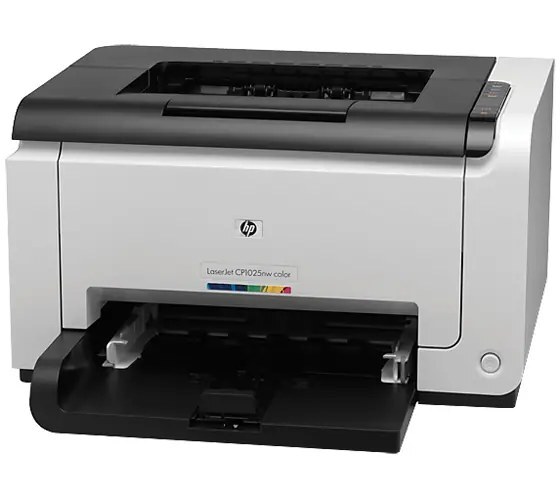
The CP1025 is the base-model color laser: no network, no wireless — just a compact early-2010s printer for the desk that needs color. Perfect for the home office or the single workstation with its own printing.
It takes HP 126A toner (CE310A, CE311A, CE312A, CE313A). Stock a spare set — compatible or genuine OEM — and this little printer keeps delivering color pages.
Toner Cartridges for Color LaserJet Pro CP1025
This printer works with the following toner cartridges:
- HP CE310A
- HP CE311A
- HP CE312A
- HP CE313A
More HP Printers
- Color CP1025
- Color CP1025NW
- Color LaserJet CP1025
- Color LaserJet CP1025nw
- Color LaserJet M175nw
- Color LaserJet Pro 100 Color MFP M175A
- Color LaserJet Pro 100 Color MFP M175NW
- Color LaserJet Pro 200 M275NW
- Color LaserJet Pro CP1025nw
- Color LaserJet Pro M175
- Color LaserJet Pro M175 MFP
- Color LaserJet Pro M175A
- Color LaserJet Pro M175nw
- Color LaserJet TopShot LaserJet Pro M275
- Color LaserJet TopShot LaserJet Pro M275NW
- Color MFP M175A
- Color MFP M175NW
- LaserJet Pro 100 Color M175A
- LaserJet Pro 100 Color M175N
- LaserJet Pro 100 Color M175W
- LaserJet Pro 100 color MFP M175NW
- TopShot LaserJet Pro M275 MFP
Frequently Asked Questions
Which toner cartridges are compatible with the Color LaserJet Pro CP1025?
Order the HP 126A set for the Color LaserJet Pro CP1025: CE310A for black, plus CE311A, CE312A and CE313A for color. Read the code on your current cartridge and match it exactly — cartridges from other HP families won't seat in the Color LaserJet Pro CP1025.
The Color LaserJet Pro CP1025 displays 'toner low' but the page still looks fine — what's going on?
The Color LaserJet Pro CP1025 estimates toner from page counts, so the warning comes early by design. You can keep printing past it; replace the cartridge when the Color LaserJet Pro CP1025 reports it empty or the print quality drops.
Is it hard to change the toner in the Color LaserJet Pro CP1025?
Changing toner on the Color LaserJet Pro CP1025 is quick: with the printer on, open the toner access door, remove the spent cartridge, unwrap the new one, and seat it firmly. Print a test page to confirm everything is crisp.