







 See Compatible Printers
 Read more about our ink!
Hewlett Packard
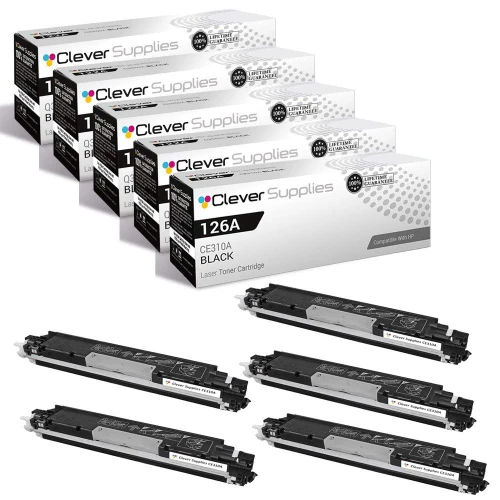
Compatible HP CP1025 (CE310A) Toner Cartridge 5 Black
- Page Yield:
- Black: 1200
- Availability:
- In Stock
- Shipping:
- Free Shipping

Amazon Price:

- Page Yield:
- Black: 1200
- Availability:
- In Stock
- Shipping:
- Free Shipping
- Compatible Printers
- Color LaserJet 100 MFP M175a
- Color LaserJet 100 MFP M175nw
- Color LaserJet CP1025nw
- Color LaserJet TopShot Pro M275
- LaserJet 100 MFP M175a
- LaserJet 100 MFP M175nw
- LaserJet Pro 100 MFP M175a
- LaserJet Pro 100 MFP M175nw
- LaserJet Pro CP1025nw
- LaserJet Pro TopShot Pro M275i>
- Color CP1020
- Color CP1025
- Color CP1025NW
- Color LaserJet CP1020
- Color LaserJet CP1025
- Color LaserJet M175nw
- Color LaserJet M476
- Color LaserJet M476DN
- Color LaserJet M476DW
- Color LaserJet M476NW
- Color LaserJet Pro 100
- Color LaserJet Pro 100 Color MFP M175A
- Color LaserJet Pro 100 Color MFP M175NW
- Color LaserJet Pro 200 M275NW
- Color LaserJet Pro CP1025
- Color LaserJet Pro M175
- Color LaserJet Pro M175 MFP
- Color LaserJet Pro M175A
- Color LaserJet Pro M175nw
- Color LaserJet Pro M476
- Color LaserJet Pro M476DN
- Color LaserJet Pro M476DW
- Color LaserJet Pro M476NW
- Color LaserJet Pro MFP M476
- Color LaserJet Pro MFP M476dn
- Color LaserJet Pro MFP M476dw
- Color LaserJet Pro MFP M476nw
- Color LaserJet TopShot LaserJet Pro M275
- Color LaserJet TopShot LaserJet Pro M275NW
- Color MFP M175A
- HP 126A
- HP 312A & 312X
- LaserJet Pro 100 Color M175A
- LaserJet Pro 100 Color M175N
- LaserJet Pro 100 Color M175W
- LaserJet Pro 100 color MFP M175NW
- TopShot LaserJet Pro M275 MFP
- Specifications
- SKU:
- CS-HP-CP1025-5BK-1
- Printer Brand:
- Hewlett Packard
- OEM Number:
- CE310A
- Ink Color:
- Black
- Page Yield:
- Black: 1200
- Printer Type:
- Laser Cartridge
- Condition:
- New Compatible
- Description
- Reviews



The HP 126A Color LaserJet Series encompasses a range of printers designed to meet various printing needs, including the PRO 100 Color MFP M175A, PRO 100 Color MFP M175NW, CP1020, CP1025, CP1025NW, PRO 100, PRO M175, PRO M175A, PRO M175NW, PRO M175 MFP, TOPSHOT LASERJET PRO M275, TOPSHOT LASERJET PRO M275NW, LASERJET PRO 100 COLOR M175A, LASERJET PRO 100 COLOR M175N, and LASERJET PRO 100 COLOR M175W. Among the compatible cartridges are the CE310A Black, CE311A Cyan, CE313A Magenta, and CE312A Yellow, known collectively as the HP 126A toner cartridge or toner cartridge. These printers offer efficient printing solutions for both personal and professional use. The PRO 100 Color MFP M175A and M175NW models provide multifunction capabilities, including printing, scanning, and copying, while the CP1020 and CP1025 series deliver high-quality color printing for small office environments. The TOPSHOT LASERJET PRO M275 and M275NW models stand out with their innovative top shot scanning feature, ideal for capturing 3D objects and documents. With the HP 126A cartridges, users can expect reliable performance and vibrant color output for their printing tasks. The CE310A Black cartridge ensures crisp and sharp text, while the CE311A Cyan, CE313A Magenta, and CE312A Yellow cartridges deliver vivid hues and accurate color reproduction for graphics and images. Whether you're printing documents, presentations, or photos, the HP 126A Color LaserJet Series printers and cartridges provide the versatility and quality needed to produce professional results. Invest in these reliable printing solutions to streamline your workflow and achieve outstanding printouts with every use.
Frequently Asked Questions
Who is a five-pack of black cartridges actually for?
For the CP1025 that has settled into a permanent role — the front-desk printer, the classroom machine, the home-office workhorse whose black changes on a predictable cycle. Five CE310A cartridges at $119.34 put the whole cycle on one shelf: each is the 126A family's black unit, rated at 1,200 pages, sealed and ready in turn.
How should five cartridges be organized so they are used sensibly?
Date each box on arrival, line them up oldest to newest, and always take the front one. That single habit — first in, first out — is the entire inventory system a five-pack needs, and it keeps the stock rotating instead of aging unevenly.
When does it make sense to place the next order?
A practical trigger is opening the final box. At that point one cartridge is in the printer and none are behind it, so a reorder placed that week restores the shelf without any risk of the CP1025 standing idle mid-job.
Does anything about a five-pack change how each cartridge is installed?
Nothing at all. Each unit is fitted exactly like a single purchase: rotate the carousel to the black position, remove the old unit, rock the new one gently, pull the seal, seat it, close the cover. The pack size changes the ordering rhythm, never the two-minute routine.
What storage conditions keep a multi-year shelf of toner happy?
Room temperature, dry air, no direct sunlight, boxes kept flat and sealed until their turn. Attics and damp basements are the enemies; an office cupboard is ideal. Treated that way, a sealed CE310A waits patiently for its rotation.
Are all five cartridges individually protected if something goes wrong?
Yes — the 1-year warranty and 1-year free returns apply per cartridge, not per order. A problem with the fourth unit out of the box is handled the same way as a problem with the first.
What does a five-pack mean in planning terms for a busy desk?
Six thousand pages of black printing, bought in one decision. For a front-desk or classroom CP1025 whose CE310A changes on a predictable cycle, that is close to a year of documents with the ordering already done. The pack converts toner from a recurring purchase into an annual one, and the dated row of boxes on the shelf shows exactly how much of the year is left.
With this many changeovers, how do I keep quality consistent from cartridge to cartridge?
Keep one reference page. File a good print of a standard document — dense text, a logo, a gray block — from the first cartridge's healthy weeks, and compare the first output of each successor against it. Five identical CE310A units should all match that page closely; a unit that prints visibly lighter from the start stands out immediately, while its packaging is still at hand and the warranty conversation is simple.
Five cartridges mean five empties over the cycle. How should they be dealt with?
With a standing routine rather than five separate decisions: each empty goes straight into the carton its replacement came from, and the cartons collect in one spot — a shelf end or a box by the door. When two or three have accumulated, they go together to a recycling collection point. The pack's rhythm makes the returns rhythm, and no spent cartridge lingers loose in the office.
If this CP1025 is replaced by another printer from the same family, is the shelf stock wasted?
No. The CE310A is the standard black across the 126A generation — the compact CP1025 and M175 class machines all draw from the same cartridge — so a replacement printer from that family steps into the existing shelf stock as if nothing happened. It is one of the quiet advantages of stocking a family cartridge deeply: the inventory belongs to the cartridge code, not to one particular machine.
About This CE310A Five-Pack for the Color LaserJet CP1025
Some Color LaserJet CP1025 printers have been on the same desk for years, changing black cartridges like clockwork. This five-pack of CE310A cartridges — the black member of the 126A family at $119.34, each rated at 1,200 pages — is the clockwork bought in advance: a dated row of sealed units that turns toner ordering into an annual errand instead of a recurring interruption.
We deliver from IL, PA, GA and CA warehouses, and the shipping & returns page covers the delivery and returns terms. Real people answer questions Monday–Friday, 9 AM–5 PM CST. The rest of this family's catalog is under HP.
Related Items


Hewlett Packard
Compatible HP CP1025 (CE310A) Toner Cartridge Black



Hewlett Packard
Compatible HP CP1025 (CE310A) Toner Cartridge Black


Hewlett Packard
Compatible HP CP1025 (CE310A) Toner Cartridge 2 Black


Hewlett Packard
Compatible HP CP1025 (CE310A) Toner Cartridge 3 Black