




Color LaserJet Pro MFP M476dn
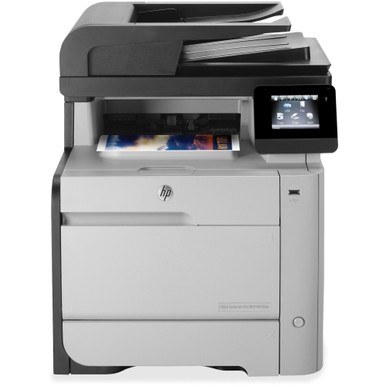
The Color LaserJet Pro MFP M476dn is a 2014-era color multifunction built for small workgroups, and it feeds from a single cartridge line: the HP 312A family. Black work runs on the CF380A cartridge, and heavier black volume can move up to the high-yield CF380X, the black sold under the 312X name. Color comes from three separate cartridges — CF381A cyan, CF382A yellow and CF383A magenta — each replaced on its own schedule as it runs down.
HP aimed the M476dn at the shared corner of a small office: one machine that prints, scans and copies for several people over a wired network connection. That duty shapes how toner gets used here. Most days are heavy on black — letters, invoices, internal reports — while color is spent in bursts on the documents clients actually see. Because the four cartridges deplete at different rates, the black cartridge is the one this machine asks for most often, and it pays to know which black fits before the low-toner warning appears mid-run.
Toner Cartridges for Color LaserJet Pro MFP M476dn
| Cartridge | Color | Page Yield |
|---|---|---|
| CF380A | Black | See product page |
| CF380X | Black, high yield | See product page |
| CF381A | Cyan | See product page |
| CF382A | Yellow | See product page |
| CF383A | Magenta | See product page |
Full-set options on this shelf: the 312A & 312X four-color set built around the high-yield black, this model's own M476dn four-color set, and a three-color set carrying the three color cartridges without black.
Which cartridge should you buy?
Start with how much black the office actually prints. The standard CF380A suits a workgroup whose color MFP mostly handles short runs and the occasional color page. If the black warning keeps arriving sooner than expected, the high-yield CF380X stretches the interval between swaps and lowers the cost of each black page, without changing anything about how the printer behaves. Color buying follows a different logic: cyan, yellow and magenta almost never empty together, so replacing the single color the panel names is cheaper than refreshing all three. Keep one spare black on the shelf either way — on a shared machine, an empty black cartridge stops everyone's work, not just one person's.
Chip, toner and everyday use
Each cartridge carries a chip the M476dn reads on installation, which is how the panel reports levels per color. Seat a new cartridge until it clicks and let the machine finish its calibration before judging output. When a color starts to fade ahead of its warning, pull that cartridge out and rock it gently from side to side; the toner settles more evenly and usually carries the job through. Store spares flat, sealed and away from heat, and remember that any yield figure is an estimate based on light page coverage — dense color pages use toner far faster.
Frequently Asked Questions
Does the M476dn use the same toner as the other M476 models?
Yes. Every M476 variant draws from the same 312A shelf listed on this page, so a cartridge bought for one configuration fits the rest of the family. The buying choice is not which code, but which black — standard or high yield.
Why does my M476dn stop for one color when the others are fine?
The machine tracks each cartridge separately and pauses when one runs out, even if the other three still hold toner. Check the supplies status on the control panel, replace only the color it names, and printing resumes.
Can the whole office print to the M476dn?
Yes — it was built to be shared over a wired network connection. Connect it by Ethernet, let it take an address, and add it on each workstation. One shared machine also means one shared toner shelf, so a spare black is worth keeping.
More printers that use the same cartridges
These models draw from the same cartridge families:
Color CP1020, Color CP1025, Color CP1025NW, Color LaserJet CP1020, Color LaserJet CP1025, Color LaserJet CP1025nw, Color LaserJet M175nw, Color LaserJet M476, Color LaserJet M476DN, Color LaserJet M476DW, Color LaserJet M476NW, Color LaserJet Pro 100, Color LaserJet Pro 100 Color MFP M175A, Color LaserJet Pro 100 Color MFP M175NW, Color LaserJet Pro 200 M275NW, Color LaserJet Pro CP1025, Color LaserJet Pro CP1025nw, Color LaserJet Pro M175, Color LaserJet Pro M175 MFP, Color LaserJet Pro M175A, Color LaserJet Pro M175nw, Color LaserJet Pro M476, Color LaserJet Pro M476DN, Color LaserJet Pro M476DW, Color LaserJet Pro M476NW, Color LaserJet Pro MFP M476, Color LaserJet Pro MFP M476dw, Color LaserJet Pro MFP M476nw, Color LaserJet TopShot LaserJet Pro M275, Color LaserJet TopShot LaserJet Pro M275NW, Color MFP M175A, HP 126A, HP 312A & 312X, LaserJet Pro 100 Color M175A, LaserJet Pro 100 Color M175N, LaserJet Pro 100 Color M175W, LaserJet Pro 100 color MFP M175NW, TopShot LaserJet Pro M275 MFP