




Color LaserJet TopShot LaserJet Pro M275
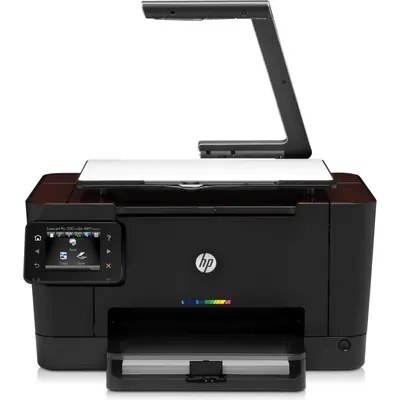
The TopShot in the name is the story: the Color LaserJet TopShot LaserJet Pro M275 scans from an overhead camera head as well as printing in color — a different take on the MFP for offices that digitize documents.
It runs on HP 126A toner: CE310A black, CE311A cyan, CE312A magenta, CE313A yellow. Compatible or genuine OEM, the TopShot M275 refills like the rest of the 126A family.
Toner Cartridges for Color LaserJet TopShot LaserJet Pro M275
This printer works with the following toner cartridges:
- HP CE310A
- HP CE311A
- HP CE312A
- HP CE313A
More HP Printers
- Color CP1025
- Color CP1025NW
- Color LaserJet CP1025
- Color LaserJet CP1025nw
- Color LaserJet M175nw
- Color LaserJet Pro 100 Color MFP M175A
- Color LaserJet Pro 100 Color MFP M175NW
- Color LaserJet Pro 200 M275NW
- Color LaserJet Pro CP1025
- Color LaserJet Pro CP1025nw
- Color LaserJet Pro M175
- Color LaserJet Pro M175 MFP
- Color LaserJet Pro M175A
- Color LaserJet Pro M175nw
- Color LaserJet TopShot LaserJet Pro M275NW
- Color MFP M175A
- Color MFP M175NW
- LaserJet Pro 100 Color M175A
- LaserJet Pro 100 Color M175N
- LaserJet Pro 100 Color M175W
- LaserJet Pro 100 color MFP M175NW
- TopShot LaserJet Pro M275 MFP
Frequently Asked Questions
Does the Color LaserJet TopShot LaserJet Pro M275 accept only genuine HP cartridges, or do compatibles work too?
Yes — the Color LaserJet TopShot LaserJet Pro M275 works with compatible HP 126A cartridges (CE310A, CE311A, CE312A, CE313A) as well as genuine HP. Just confirm the cartridge code matches, since cartridges for other HP printers will not fit the Color LaserJet TopShot LaserJet Pro M275.
Why does the Color LaserJet TopShot LaserJet Pro M275 jam more often when printing heavier paper?
Frequent jams in the Color LaserJet TopShot LaserJet Pro M275 are often about paper, not the printer: use dry, flat sheets and don't overfill the tray. If a jam occurs, remove every scrap and restart the Color LaserJet TopShot LaserJet Pro M275 before printing again.
How do I replace the toner cartridge in my Color LaserJet TopShot LaserJet Pro M275?
Open the front cover of the Color LaserJet TopShot LaserJet Pro M275, pull the empty cartridge out by its handle, slide the new one in until it clicks, and close the cover. The Color LaserJet TopShot LaserJet Pro M275 usually calibrates itself right after.