







 See Compatible Printers
 Read more about our ink!
Hewlett Packard
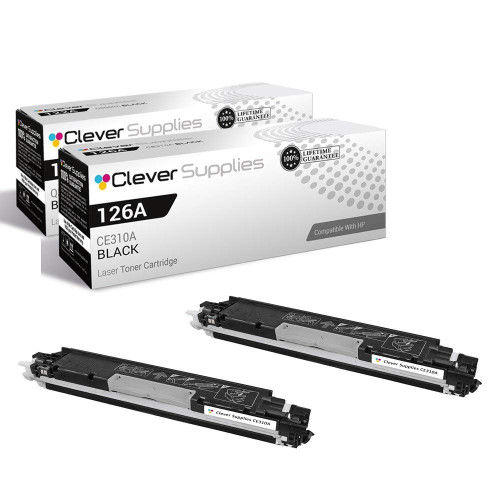
Compatible HP 126A (CE310A) Toner Cartridge 2 Black
- Page Yield:
- Black: 1200
- Availability:
- In Stock
- Shipping:
- Free Shipping

Amazon Price:

- Page Yield:
- Black: 1200
- Availability:
- In Stock
- Shipping:
- Free Shipping
- Compatible Printers
- Color LaserJet 100 MFP M175a
- Color LaserJet 100 MFP M175nw
- Color LaserJet CP1025nw
- Color LaserJet TopShot Pro M275
- LaserJet 100 MFP M175a
- LaserJet 100 MFP M175nw
- LaserJet Pro 100 MFP M175a
- LaserJet Pro 100 MFP M175nw
- LaserJet Pro CP1025nw
- LaserJet Pro TopShot Pro M275i>
- Color CP1020
- Color CP1025
- Color CP1025NW
- Color LaserJet CP1020
- Color LaserJet CP1025
- Color LaserJet M175nw
- Color LaserJet M476
- Color LaserJet M476DN
- Color LaserJet M476DW
- Color LaserJet M476NW
- Color LaserJet Pro 100
- Color LaserJet Pro 100 Color MFP M175A
- Color LaserJet Pro 100 Color MFP M175NW
- Color LaserJet Pro 200 M275NW
- Color LaserJet Pro CP1025
- Color LaserJet Pro M175
- Color LaserJet Pro M175 MFP
- Color LaserJet Pro M175A
- Color LaserJet Pro M175nw
- Color LaserJet Pro M476
- Color LaserJet Pro M476DN
- Color LaserJet Pro M476DW
- Color LaserJet Pro M476NW
- Color LaserJet Pro MFP M476
- Color LaserJet Pro MFP M476dn
- Color LaserJet Pro MFP M476dw
- Color LaserJet Pro MFP M476nw
- Color LaserJet TopShot LaserJet Pro M275
- Color LaserJet TopShot LaserJet Pro M275NW
- Color MFP M175A
- HP 126A
- HP 312A & 312X
- LaserJet Pro 100 Color M175A
- LaserJet Pro 100 Color M175N
- LaserJet Pro 100 Color M175W
- LaserJet Pro 100 color MFP M175NW
- TopShot LaserJet Pro M275 MFP
- Specifications
- SKU:
- CS-HP-126A-2BK
- Printer Brand:
- Hewlett Packard
- OEM Number:
- CE310A
- Ink Color:
- Black
- Page Yield:
- Black: 1200
- Printer Type:
- Laser Cartridge
- Condition:
- New Compatible
- Description
- Reviews



The HP 126A Color LaserJet Series encompasses a range of printers designed to meet various printing needs, including the PRO 100 Color MFP M175A, PRO 100 Color MFP M175NW, CP1020, CP1025, CP1025NW, PRO 100, PRO M175, PRO M175A, PRO M175NW, PRO M175 MFP, TOPSHOT LASERJET PRO M275, TOPSHOT LASERJET PRO M275NW, LASERJET PRO 100 COLOR M175A, LASERJET PRO 100 COLOR M175N, and LASERJET PRO 100 COLOR M175W. Among the compatible cartridges are the CE310A Black, CE311A Cyan, CE313A Magenta, and CE312A Yellow, known collectively as the HP 126A toner cartridge or toner cartridge. These printers offer efficient printing solutions for both personal and professional use. The PRO 100 Color MFP M175A and M175NW models provide multifunction capabilities, including printing, scanning, and copying, while the CP1020 and CP1025 series deliver high-quality color printing for small office environments. The TOPSHOT LASERJET PRO M275 and M275NW models stand out with their innovative top shot scanning feature, ideal for capturing 3D objects and documents. With the HP 126A cartridges, users can expect reliable performance and vibrant color output for their printing tasks. The CE310A Black cartridge ensures crisp and sharp text, while the CE311A Cyan, CE313A Magenta, and CE312A Yellow cartridges deliver vivid hues and accurate color reproduction for graphics and images. Whether you're printing documents, presentations, or photos, the HP 126A Color LaserJet Series printers and cartridges provide the versatility and quality needed to produce professional results. Invest in these reliable printing solutions to streamline your workflow and achieve outstanding printouts with every use.
Frequently Asked Questions
I shop by the '126A' name — what exactly is this 2-pack?
Two black cartridges from the 126A family. The family's part number for black is CE310A, so this pair at $58.82 is two CE310A units — one to fit now, one sealed in reserve. If your printer's manual or your shelf says 126A, this is the black half of that family, doubled.
Which printers take these?
The compact color LaserJets of the 126A generation: the LaserJet Pro CP1025 series and the LaserJet Pro 100 M175 MFPs. The check that never fails is the code on the cartridge you remove — CE310A out, CE310A in.
Is there any difference between a '126A cartridge' and a 'CE310A cartridge'?
None that exists in the physical world. 126A names the family of four cartridges; CE310A names the black one specifically. Ordering either name for black lands on this same unit.
Why does the pair make sense under the family name?
Because black is the family's working cartridge. The documents a CP1025 or M175 prints are overwhelmingly black-only, so the black unit cycles two or three times while its shelf-mates wait. Stocking it in pairs matches the machine's real appetite.
How is the spare best kept?
Sealed in its bag, flat, in a cool dark place — the same shelf the 126A box came from is fine. Write the month on the carton and the rotation will manage itself.
What if my two machines are different models in the family?
Then the pair is even more useful: the CE310A does not belong to a model, it belongs to the family. Either cartridge can serve either printer, whichever runs dry first.
When the first cartridge of the pair is fitted, what happens to its empty predecessor?
It goes into the new cartridge's bag and carton, code side up, and out to a recycling point — office-supply counters and toner programs take them. Bagging the empty immediately keeps residue off the shelf where the sealed spare waits, and keeps the two from ever being confused: one labeled empty leaving, one labeled CE310A staying. The pair's rhythm stays clean when the empty leaves the same day.
The spare has waited months. How do I fit it when its turn comes?
Give it a gentle rock side to side first — toner settles in storage, and a few rocks level it so the first pages draw evenly. Pull the sealing tape out straight in one motion until it clears, seat the CE310A, and print a test page: expect the first sheet or two to settle, with text crisp and even by the third or fourth page.
The spare is in, but text still looks pale. What do I check before blaming it?
The seal, first of all: a tape only half pulled is the classic cause of pale output from a healthy cartridge. Open the machine and confirm the strip came out completely. Then reseat the cartridge firmly and print the printer's status page. If text is still pale after a full seal removal and a firm reseat, try the page again on fresh paper before concluding the unit is at fault.
What ordering rhythm does a 2-pack naturally settle into?
Order the next pair the day the spare goes in. At that moment the printer holds a full CE310A and the replacement pair has that cartridge's entire working life — around 1,200 standard pages — to arrive. The pair then rotates: one running, one sealed, indefinitely. Desks that wait until the running cartridge fades before ordering give up the very insurance the 2-pack was bought to provide.
About This 126A (CE310A) 2-Pack
Shopping by the 126A name is how many owners of HP's compact color LaserJets know their supplies, and this 2-pack is built for them: two CE310A black cartridges — the family's black, each rated at 1,200 pages — for the CP1025 and M175 machines. One installs today; the other waits sealed, because in this family the black cartridge is the one the documents actually consume.
The pair is covered by a 1-year warranty with 1-year free returns. Parcels leave warehouses in IL, PA, GA and CA; the shipping & returns page describes delivery and returns fully. If the family-versus-part-number naming ever needs untangling, our team will do it with you Monday–Friday, 9 AM–5 PM CST. More for these printers — the Color LaserJet CP1025nw page included — is gathered under HP.
Related Items

Hewlett Packard
Compatible HP 126A (CE310A) Toner Cartridge Black


Hewlett Packard
Compatible HP 126A (CE310A) Toner Cartridge Black


Hewlett Packard
Compatible HP 126A (CE310A) Toner Cartridge 5 Black

Hewlett Packard
CS Compatible Replacement for HP CE310A Toner/ HP 126A Toner Cartridge Black
/>