




Color LaserJet Pro M175A
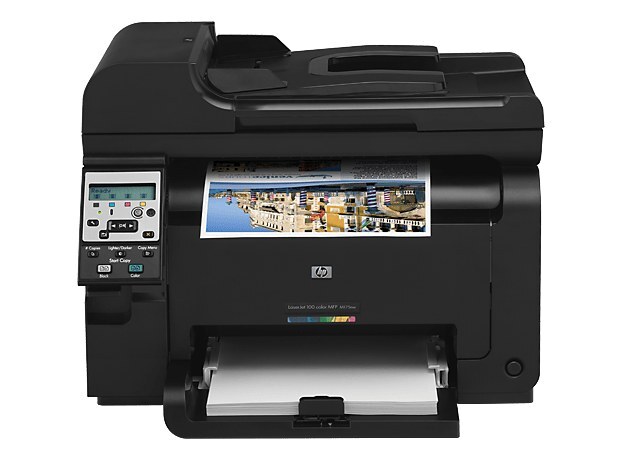
The Color LaserJet Pro M175A is the base configuration of HP's compact M175 color line — a single-function color laser printer that connects to one computer by USB and lives on a single desk. Base trim does not mean a different toner bay. The M175A prints with the HP 126A family: black CE310A, cyan CE311A, yellow CE312A and magenta CE313A, each sold here in compatible form, with genuine HP cartridges stocked as well.
That shared family is the quiet advantage of the entry model. The M175A asks nothing of a network and supports no extra trays or finishers, yet it draws from exactly the same cartridge pool as its better-equipped relatives, so a household or solo office that later adds a networked M175 is not left holding orphaned toner. For a desk that prints letters, invoices and the occasional color handout, the buying question is never which family — it is how many cartridges to keep within reach.
Toner Cartridges for Color LaserJet Pro M175A
| Cartridge | Color | Page Yield |
|---|---|---|
| CE310A | Black | See product page |
| CE311A | Cyan | See product page |
| CE312A | Yellow | See product page |
| CE313A | Magenta | See product page |
| 126A 4 Color Set | Black / Cyan / Yellow / Magenta | See product page |
| 126A Tri Color Set | Cyan / Yellow / Magenta | See product page |
| M175A 4 Color Set | Black / Cyan / Yellow / Magenta | See product page |
Which cartridge should you buy?
The 126A family comes in a single yield tier on this shelf, so the real choice is packaging. If the printer mostly produces black text with color now and then, buy the colors one at a time and put the savings into a multi-pack of black — the CE310A empties long before its partners in document work. If color pages are half of what you print, the four-color set replaces everything in one stop and keeps the colors aging together. The tri-color set suits owners whose black is already fresh. Every compatible cartridge here carries a 1-year warranty and 1-year returns, so there is little reason to stockpile beyond one spare set.
Chip, toner and everyday use
Each 126A cartridge carries a chip the printer reads for identification and level reporting. When a new cartridge goes in, pull the sealing tape fully clear, rock the cartridge gently from side to side to even out the toner, and slide it home until it seats with a click. If the printer questions a cartridge, remove and reseat it before anything else — most recognition complaints are seating, not chips. Yields are estimates at 5% page coverage, so a cartridge under heavy graphics work finishes sooner than the number suggests. Store spares upright, sealed, away from sunlight.
Frequently Asked Questions
Does the Color LaserJet Pro M175A use the same toner as the M175nw?
Yes. The whole M175 line — base, networked and MFP versions alike — runs on the same 126A family, CE310A through CE313A. A cartridge bought for one M175 model fits the others.
Is there a high-yield version of the 126A cartridges?
Not on this shelf: the 126A listings here are one standard tier per color. Owners who print heavily in black cut their cost per page with the multi-packs of CE310A rather than with an XL cartridge.
One color has run out. Do I have to replace all four cartridges?
No. Black, cyan, yellow and magenta are four separate cartridges in this printer, and each can be swapped on its own as it empties. Only the empty color needs to come out.
Are the compatible 126A cartridges on this page covered by a warranty?
Yes — the compatible cartridges sold here carry a 1-year warranty with 1-year returns. Genuine HP cartridges carry HP's own warranty instead.
More listings on this shelf
A few listings stocked on this page belong to neighboring HP families rather than to the M175A itself. The M476 machines' family, 312A, appears here as a 4 Color Set and multi-packs built around black CF380A and its high-yield partner CF380X, the pair sold under the 312X name. A four-color set built on CC530A black covers a different CP generation, and a lone CE401A cyan listing comes from HP's enterprise range. All are linked underneath for anyone cross-checking part numbers; none of them fits the M175A, which takes 126A cartridges only.
- HP Pro M175A Toner Cartridge Color Laserjet 4 Color Set
- HP PRO 100 COLOR MFP M175a Toner Cartridge 4 Color Set
- HP 100 COLOR MFP M175A (CE310A) Toner Cartridge 2 Black
- HP 100 COLOR MFP M175A (CE310A CE311A CE312A CE313A) Toner Cartridge 5 Color Set
- HP 100 COLOR MFP M175A (CE311A CE312A CE313A) Toner Cartridge 6 Color Set
- HP 100 COLOR MFP M175A (CE310A CE311A CE312A CE313A) Toner Cartridge 8 Color Set
- HP 126A (CE310A CE311A CE312A CE313A) Toner Cartridge 8 Color Set
- HP 126A (CE310A) Toner Cartridge Black
- HP 126A (CE311A) Toner Cartridge Cyan
- HP PRO 100 COLOR M175A (CE310A CE311A CE312A CE313A) Toner Cartridge 5 Color Set
- HP PRO 100 COLOR M175A (CE310A CE311A CE312A CE313A) Toner Cartridge 8 Color Set
- HP PRO 100 COLOR M175A (CE310A) Toner Cartridge Black
- HP M175A (CE310A CE311A CE312A CE313A) Toner Cartridge 4 Color Set
- HP 126A (CE310A CE311A CE312A CE313A) Toner Cartridge 4 Color Set
- HP 100 COLOR MFP M175A (CE310A) Toner Cartridge 2 Black
- HP 100 COLOR MFP M175A (CE310A) Toner Cartridge 3 Black
- HP 100 COLOR MFP M175A (CE311A CE312A CE313A) Toner Cartridge 3 Color Set
- HP 100 COLOR MFP M175A (CE311A CE312A CE313A) Toner Cartridge 6 Color Set
- HP 100 COLOR MFP M175A (CE310A CE311A CE312A CE313A) Toner Cartridge 8 Color Set
- HP 100 COLOR MFP M175A (CE310A) Toner Cartridge Black
- HP 100 COLOR MFP M175A (CE311A) Toner Cartridge Cyan
- HP 126A (CE310A) Toner Cartridge 2 Black
- HP 126A (CE310A) Toner Cartridge 5 Black
- HP 126A (CE310A CE311A CE312A CE313A) Toner Cartridge 5 Color Set
- HP 126A (CE311A CE312A CE313A) Toner Cartridge 6 Color Set
- HP 126A (CE310A CE311A CE312A CE313A) Toner Cartridge 8 Color Set
- HP 126A (CE311A) Toner Cartridge Cyan
- HP 126A (CE313A) Toner Cartridge Magenta
- HP 126A (CE312A) Toner Cartridge Yellow
- HP 126A (CE310A) Toner Cartridge Black
- HP 126A (CE311A) Toner Cartridge Cyan
- HP 126A (CE311A) Toner Cartridge Cyan
- HP 126A (CE312A) Toner Cartridge Yellow
- HP 126A (CE312A) Toner Cartridge Yellow
- HP 126A (CE313A) Toner Cartridge Magenta
- HP 126A (CE313A) Toner Cartridge Magenta
- HP PRO M175A (CE310A) Toner Cartridge 2 Black
- HP PRO M175A (CE310A CE311A CE312A CE313A) Toner Cartridge 5 Color Set
- HP PRO M175A (CE311A CE312A CE313A) Toner Cartridge 6 Color Set
- HP PRO M175A (CE310A CE311A CE312A CE313A) Toner Cartridge 8 Color Set
- HP PRO M175A (CE310A CE311A CE312A CE313A) Toner Cartridge 8 Color Set
- HP PRO M175A (CE310A) Toner Cartridge Black
- HP PRO M175A (CE310A) Toner Cartridge Black
- HP PRO M175A (CE311A) Toner Cartridge Cyan
- HP PRO M175A (CE311A) Toner Cartridge Cyan
- HP PRO M175A (CE313A) Toner Cartridge Magenta
- HP PRO M175A (CE313A) Toner Cartridge Magenta
- HP PRO M175A (CE310A CE311A CE312A CE313A) Toner Cartridge 4 Color Set
- HP 126A (CE310A CE311A CE312A CE313A) Toner Cartridge 4 Color Set
- HP 312A (CF380A) Toner Cartridge 2 Black
- HP 312A (CF380A CF381A CF382A CF383A) Toner Cartridge 5 Color Set
- HP 312A (CF380A CF381A CF382A CF383A) Toner Cartridge 8 Color Set
- HP 312X (CF380X CF380A) Toner Cartridge Black 4 Pack
- HP CP2025 (CC530A/ CC531A/ CC532A/ CC533A) Toner Cartridge 4 Color Set
More printers that use the same cartridges
Everything in the 126A pool — the CP1025 printers, the rest of the M175 range and the M476 line that shares this shelf's wider family group — is listed here: Color CP1020, Color CP1025, Color CP1025NW, Color LaserJet CP1020, Color LaserJet CP1025, Color LaserJet CP1025nw, Color LaserJet M175nw, Color LaserJet M476, Color LaserJet M476DN, Color LaserJet M476DW, Color LaserJet M476NW, Color LaserJet Pro 100, Color LaserJet Pro 100 Color MFP M175A, Color LaserJet Pro 100 Color MFP M175NW, Color LaserJet Pro 200 M275NW, Color LaserJet Pro CP1025, Color LaserJet Pro CP1025nw, Color LaserJet Pro M175, Color LaserJet Pro M175 MFP, Color LaserJet Pro M175nw, Color LaserJet Pro M476, Color LaserJet Pro M476DN, Color LaserJet Pro M476DW, Color LaserJet Pro M476NW, Color LaserJet Pro MFP M476, Color LaserJet Pro MFP M476dn, Color LaserJet Pro MFP M476dw, Color LaserJet Pro MFP M476nw, Color LaserJet TopShot LaserJet Pro M275, Color LaserJet TopShot LaserJet Pro M275NW, Color MFP M175A, HP 126A, HP 312A & 312X, LaserJet Pro 100 Color M175A, LaserJet Pro 100 Color M175N, LaserJet Pro 100 Color M175W, LaserJet Pro 100 color MFP M175NW, TopShot LaserJet Pro M275 MFP.