






 See Compatible Printers
 Read more about our ink!
Hewlett Packard
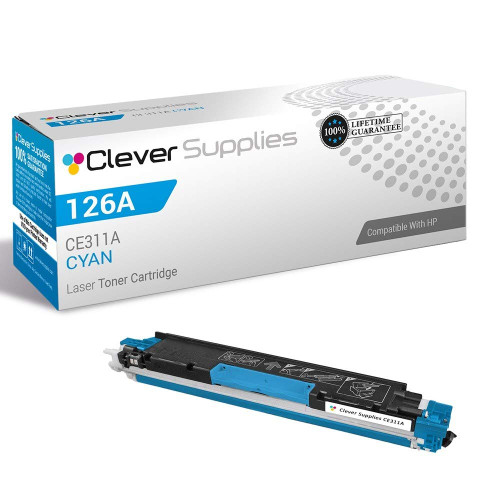
Compatible HP 100 COLOR MFP M175A (CE311A) Toner Cartridge Cyan

Amazon Price:

- Page Yield:
- Color: 1000
- Availability:
- In Stock
- Shipping:
- Calculated at Checkout
- Compatible Printers
- Color LaserJet 100 MFP M175a
- Color LaserJet 100 MFP M175nw
- Color LaserJet CP1025nw
- Color LaserJet TopShot Pro M275
- LaserJet 100 MFP M175a
- LaserJet 100 MFP M175nw
- LaserJet Pro 100 MFP M175a
- LaserJet Pro 100 MFP M175nw
- LaserJet Pro CP1025nw
- LaserJet Pro TopShot Pro M275i>
- Color CP1020
- Color CP1025
- Color CP1025NW
- Color LaserJet CP1020
- Color LaserJet CP1025
- Color LaserJet M175nw
- Color LaserJet M476
- Color LaserJet M476DN
- Color LaserJet M476DW
- Color LaserJet M476NW
- Color LaserJet Pro 100
- Color LaserJet Pro 100 Color MFP M175A
- Color LaserJet Pro 100 Color MFP M175NW
- Color LaserJet Pro 200 M275NW
- Color LaserJet Pro CP1025
- Color LaserJet Pro M175
- Color LaserJet Pro M175 MFP
- Color LaserJet Pro M175A
- Color LaserJet Pro M175nw
- Color LaserJet Pro M476
- Color LaserJet Pro M476DN
- Color LaserJet Pro M476DW
- Color LaserJet Pro M476NW
- Color LaserJet Pro MFP M476
- Color LaserJet Pro MFP M476dn
- Color LaserJet Pro MFP M476dw
- Color LaserJet Pro MFP M476nw
- Color LaserJet TopShot LaserJet Pro M275
- Color LaserJet TopShot LaserJet Pro M275NW
- Color MFP M175A
- HP 126A
- HP 312A & 312X
- LaserJet Pro 100 Color M175A
- LaserJet Pro 100 Color M175N
- LaserJet Pro 100 Color M175W
- LaserJet Pro 100 color MFP M175NW
- TopShot LaserJet Pro M275 MFP
- Specifications
- SKU:
- CS-HP-100 COLOR MFP M175A-C
- Printer Brand:
- Hewlett Packard
- OEM Number:
- CE311A
- Ink Color:
- Cyan
- Page Yield:
- Color: 1000
- Printer Type:
- Laser Cartridge
- Condition:
- New Compatible
- Description
- Reviews



The HP 126A Color LaserJet Series encompasses a range of printers designed to meet various printing needs, including the PRO 100 Color MFP M175A, PRO 100 Color MFP M175NW, CP1020, CP1025, CP1025NW, PRO 100, PRO M175, PRO M175A, PRO M175NW, PRO M175 MFP, TOPSHOT LASERJET PRO M275, TOPSHOT LASERJET PRO M275NW, LASERJET PRO 100 COLOR M175A, LASERJET PRO 100 COLOR M175N, and LASERJET PRO 100 COLOR M175W. Among the compatible cartridges are the CE310A Black, CE311A Cyan, CE313A Magenta, and CE312A Yellow, known collectively as the HP 126A toner cartridge or toner cartridge. These printers offer efficient printing solutions for both personal and professional use. The PRO 100 Color MFP M175A and M175NW models provide multifunction capabilities, including printing, scanning, and copying, while the CP1020 and CP1025 series deliver high-quality color printing for small office environments. The TOPSHOT LASERJET PRO M275 and M275NW models stand out with their innovative top shot scanning feature, ideal for capturing 3D objects and documents. With the HP 126A cartridges, users can expect reliable performance and vibrant color output for their printing tasks. The CE310A Black cartridge ensures crisp and sharp text, while the CE311A Cyan, CE313A Magenta, and CE312A Yellow cartridges deliver vivid hues and accurate color reproduction for graphics and images. Whether you're printing documents, presentations, or photos, the HP 126A Color LaserJet Series printers and cartridges provide the versatility and quality needed to produce professional results. Invest in these reliable printing solutions to streamline your workflow and achieve outstanding printouts with every use.
Frequently Asked Questions
Which cyan fits the 100 Color MFP M175A?
This one: the CE311A, cyan member of the 126A family. One cartridge at $38.12, rated at 1,000 pages. The M175A is the USB-connected member of the platform, and it shares supplies with networked siblings like the Color LaserJet CP1025nw.
A classroom prints worksheets in bursts. How does that treat cyan?
Bursts are kind to toner in one way — no warm-up waste worth counting — but classroom color is saturated color: maps, charts, reward certificates. A term of heavy color handouts can spend a cyan cartridge's 1,000 pages faster than steady office printing spends them.
How does a teacher check the level without IT help?
Through the printer software on the classroom computer: the supplies view shows one bar per color. When the cyan bar runs low and the blues on the board-work look thin, both witnesses agree — order this cartridge.
Will the swap interrupt a lesson?
It takes about two minutes and no tools. Most teachers do it between classes; the machine calibrates itself and the next worksheet prints with its skies restored.
Should a school office hold a spare?
One spare of the color that empties first is cheap insurance, and in most classrooms that color is cyan. The cartridge keeps sealed on a shelf for as long as needed.
What warranty terms apply?
A 1-year warranty and 1-year free returns stand behind the cartridge, spare or fitted.
Where should a classroom keep its spare CE311A until the day it is needed?
On a shelf, still sealed in its carton — the cartridge keeps that way for as long as needed without losing any of its 1,000 pages. Choose a spot out of direct sunlight and away from radiators or warm cupboards, lying flat rather than on end, and write nothing more complicated than 'cyan spare' on the box if other hands use the same shelf. Kept so, the spare simply waits out the term until the fitted cyan's bar runs low and the skies on the board-work start to thin.
How can a teacher make sure the new school year does not start with an empty cyan?
Read the supplies bars in the last week of term, on the classroom computer the M175A is attached to. If the cyan bar is low, order this CE311A before the break so the replacement is sitting on the shelf when classes resume — September is busy enough without a supply hunt in the first week. The check takes a minute, and it converts the cartridge from an emergency purchase into a planned one, which is the entire secret of classroom printing that never interrupts a lesson.
CE311A and CE313A differ by one digit — how do I avoid ordering magenta by mistake?
Read the code off the cartridge you are replacing, not from memory and not from the color of a picture. In the 126A family the last digits carry the color: CE311A is this cyan, CE312A is yellow and CE313A is magenta. They are easy to transpose when ordering in a hurry between classes, and the label on the outgoing unit settles the question in seconds. Match the code character for character and the cartridge that arrives is the one the machine asked for.
Why replace cyan on its own instead of buying all three colors at once?
Because the stations run on separate cycles. Each color empties on its own schedule, and in most classrooms cyan — the carrier of skies, maps and chart blues — is the one that goes first. Ordering the single CE311A replaces exactly what is spent while the yellow and magenta keep working through their own pages. A full set has its place when several stations run low together; when only one bar is down, the single cartridge is the proportionate purchase.
About This CE311A Cyan for the 100 Color MFP M175A
The M175A is the straightforward USB all-in-one of the 126A family — the one that lands in classrooms, small offices and home workstations. This CE311A is its cyan: $38.12 for a 1,000-page rating, carrying the blues in every map, chart and handout the machine produces.
Orders are sent from warehouses in IL, PA, GA and CA; the shipping & returns page holds delivery and returns details. Questions are answered Monday–Friday, 9 AM–5 PM CST, and the range continues under HP.
Related Items


Hewlett Packard
Compatible HP PRO M175A (CE311A) Toner Cartridge Cyan



Hewlett Packard
Compatible HP PRO M175A (CE311A) Toner Cartridge Cyan


Hewlett Packard
Compatible HP 100 COLOR MFP M175A (CE311A CE312A CE313A) Toner Cartridge 6 Color Set

Hewlett Packard
Compatible HP 100 COLOR MFP M175A (CE311A CE312A CE313A) Toner Cartridge 3 Color Set