






 See Compatible Printers
 Read more about our ink!
Hewlett Packard
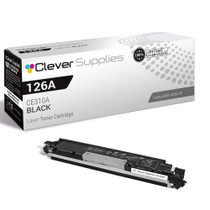
Compatible HP PRO M175A (CE310A) Toner Cartridge Black

Amazon Price:

- Page Yield:
- Black: 1200
- Availability:
- In Stock
- Shipping:
- Calculated at Checkout
- Compatible Printers
- Color LaserJet 100 MFP M175a
- Color LaserJet 100 MFP M175nw
- Color LaserJet CP1025nw
- Color LaserJet TopShot Pro M275
- LaserJet 100 MFP M175a
- LaserJet 100 MFP M175nw
- LaserJet Pro 100 MFP M175a
- LaserJet Pro 100 MFP M175nw
- LaserJet Pro CP1025nw
- LaserJet Pro TopShot Pro M275i>
- Color CP1020
- Color CP1025
- Color CP1025NW
- Color LaserJet CP1020
- Color LaserJet CP1025
- Color LaserJet M175nw
- Color LaserJet M476
- Color LaserJet M476DN
- Color LaserJet M476DW
- Color LaserJet M476NW
- Color LaserJet Pro 100
- Color LaserJet Pro 100 Color MFP M175A
- Color LaserJet Pro 100 Color MFP M175NW
- Color LaserJet Pro 200 M275NW
- Color LaserJet Pro CP1025
- Color LaserJet Pro M175
- Color LaserJet Pro M175 MFP
- Color LaserJet Pro M175A
- Color LaserJet Pro M175nw
- Color LaserJet Pro M476
- Color LaserJet Pro M476DN
- Color LaserJet Pro M476DW
- Color LaserJet Pro M476NW
- Color LaserJet Pro MFP M476
- Color LaserJet Pro MFP M476dn
- Color LaserJet Pro MFP M476dw
- Color LaserJet Pro MFP M476nw
- Color LaserJet TopShot LaserJet Pro M275
- Color LaserJet TopShot LaserJet Pro M275NW
- Color MFP M175A
- HP 126A
- HP 312A & 312X
- LaserJet Pro 100 Color M175A
- LaserJet Pro 100 Color M175N
- LaserJet Pro 100 Color M175W
- LaserJet Pro 100 color MFP M175NW
- TopShot LaserJet Pro M275 MFP
- Specifications
- SKU:
- CS-HP-PRO M175A-BK-1
- Printer Brand:
- Hewlett Packard
- OEM Number:
- CE310A
- Ink Color:
- Black
- Page Yield:
- Black: 1200
- Printer Type:
- Laser Cartridge
- Condition:
- New Compatible
- Description
- Reviews



The HP 126A Color LaserJet Series encompasses a range of printers designed to meet various printing needs, including the PRO 100 Color MFP M175A, PRO 100 Color MFP M175NW, CP1020, CP1025, CP1025NW, PRO 100, PRO M175, PRO M175A, PRO M175NW, PRO M175 MFP, TOPSHOT LASERJET PRO M275, TOPSHOT LASERJET PRO M275NW, LASERJET PRO 100 COLOR M175A, LASERJET PRO 100 COLOR M175N, and LASERJET PRO 100 COLOR M175W. Among the compatible cartridges are the CE310A Black, CE311A Cyan, CE313A Magenta, and CE312A Yellow, known collectively as the HP 126A toner cartridge or toner cartridge. These printers offer efficient printing solutions for both personal and professional use. The PRO 100 Color MFP M175A and M175NW models provide multifunction capabilities, including printing, scanning, and copying, while the CP1020 and CP1025 series deliver high-quality color printing for small office environments. The TOPSHOT LASERJET PRO M275 and M275NW models stand out with their innovative top shot scanning feature, ideal for capturing 3D objects and documents. With the HP 126A cartridges, users can expect reliable performance and vibrant color output for their printing tasks. The CE310A Black cartridge ensures crisp and sharp text, while the CE311A Cyan, CE313A Magenta, and CE312A Yellow cartridges deliver vivid hues and accurate color reproduction for graphics and images. Whether you're printing documents, presentations, or photos, the HP 126A Color LaserJet Series printers and cartridges provide the versatility and quality needed to produce professional results. Invest in these reliable printing solutions to streamline your workflow and achieve outstanding printouts with every use.
Frequently Asked Questions
How do you read the end-of-life signs of the M175a's black cartridge?
Three signs arrive together near the end: overall fading that returns days after a shake, a pale band developing down one side of the page, and the software gauge sitting at the bottom. Any one alone can mislead; together they mean the CE310A is spent. This single cartridge at $38.66 — the 126A family's black, rated at 1,200 pages — is what the signs are pointing to.
What is the shake test, and what does its result actually tell you?
Remove the cartridge, rock it gently, refit it, and print. Pages that darken briefly prove the mechanism works and the toner is nearly gone — the improvement fades because there is little left to redistribute. A cartridge that prints no better after rocking may have a different problem entirely.
Streaks down the page — is that the same story?
Not always. A repeating streak at regular intervals often lives in the cartridge and a fresh CE310A cures it; random smudging or paper-path marks are machine matters. The economical order is cartridge first — it is the consumable, the common culprit, and on the M175a a two-minute test by replacement.
Why confirm with the gauge before ordering?
Because 'looks faded' has other authors — a dirty scanner glass dulls copies, and an economode setting lightens prints on purpose. Thirty seconds with the supplies gauge separates a $38.66 cartridge decision from a wild goose chase: if the black reads low, this is the fix.
Once confirmed, how quick is the remedy?
As fast as any job on this machine: spent black out by its handle, the new unit rocked and unsealed, seated in the black position, cover closed. Copies and prints both return to full contrast on the very next page.
What if a fresh cartridge still prints pale?
Check the seal came out whole and the economode setting is off — then lean on the cover: this unit carries a 1-year warranty with 1-year free returns, so a genuinely faulty cartridge is exchanged rather than endured.
Can one spare black cartridge cover both this M175a and a CP1025nw?
Yes. The two machines draw from the same 126A supply list, and the CE310A that feeds the M175a's black station is the same cartridge the CP1025nw takes. An office running both can keep a single spare black on the shelf and fit it to whichever machine flags first, instead of stocking two blacks that may sit for months. The colors follow the same shared list, which keeps the whole shelf simple.
How long can a sealed cartridge wait on the shelf before it is used?
A long time, provided it stays sealed, flat, and in a cool, dry place out of direct sunlight. Toner is a dry powder, not a liquid ink, so a CE310A bought as a spare does not dry out while it waits; when its day comes it fits and prints like the one bought yesterday. Rotate by purchase date if you keep more than one, using the older stock first.
Do the copies this machine makes draw on the same black cartridge as prints?
They do. Every page that comes out of the M175a with black toner on it — a printed letter, a photocopied form, a received document — is paid for from the same CE310A. Only scanning, which produces a file rather than a page, spends nothing. That is why a machine used heavily as a copier can reach the end of a cartridge sooner than its print count alone would predict.
Should the old cartridge and its box go straight in the trash after a swap?
Hold on to both for a few days. Run the new CE310A through your normal work first; once a run of pages has printed clean, the old unit can go. If the replacement misbehaves instead, the 1-year warranty and 1-year free returns make exchanging it straightforward, and having the carton makes packing it back up simple. Keeping the spent cartridge briefly costs a shelf corner and buys certainty.
About This CE310A Black Cartridge for the Pro M175a
A Pro M175a announces a tired black cartridge in stages — a fade, a band, a warning — and each stage is answered by the same supply: the CE310A, the black cartridge of the 126A family, a single at $38.66 rated at 1,200 pages. It is the machine's print-and-copy lifeblood, and recognizing its end-of-life signs is the only diagnostic skill this printer ever asks of its owner.
We dispatch from IL, PA, GA and CA warehouses, and the shipping & returns page has delivery and returns in full. Support hours run Monday–Friday, 9 AM–5 PM CST. The family listing for this cartridge is carried by pages such as the Color LaserJet CP1025nw, and the complete range is under HP.
Related Items

Hewlett Packard
Compatible HP PRO M175A (CE310A) Toner Cartridge Black



Hewlett Packard
Compatible HP PRO M175A (CE310A) Toner Cartridge 2 Black


Hewlett Packard
Compatible HP PRO 100 COLOR M175A (CE310A) Toner Cartridge Black


Hewlett Packard
Compatible HP 100 COLOR MFP M175A (CE310A) Toner Cartridge Black