






 See Compatible Printers
 Read more about our ink!
Hewlett Packard
Compatible HP TOPSHOT LASERJET PRO M275 (CE310A CE311A CE312A CE313A) Toner Cartridge 4 Color Set

Amazon Price:

- Page Yield:
- Black: 1200 Color: 1000
- Availability:
- In Stock
- Shipping:
- Free Shipping
- Compatible Printers
- Color LaserJet 100 MFP M175a
- Color LaserJet 100 MFP M175nw
- Color LaserJet CP1025nw
- Color LaserJet TopShot Pro M275
- LaserJet 100 MFP M175a
- LaserJet 100 MFP M175nw
- LaserJet Pro 100 MFP M175a
- LaserJet Pro 100 MFP M175nw
- LaserJet Pro CP1025nw
- LaserJet Pro TopShot Pro M275i>
- Color CP1020
- Color CP1025
- Color CP1025NW
- Color LaserJet CP1020
- Color LaserJet CP1025
- Color LaserJet M175nw
- Color LaserJet M476
- Color LaserJet M476DN
- Color LaserJet M476DW
- Color LaserJet M476NW
- Color LaserJet Pro 100
- Color LaserJet Pro 100 Color MFP M175A
- Color LaserJet Pro 100 Color MFP M175NW
- Color LaserJet Pro 200 M275NW
- Color LaserJet Pro CP1025
- Color LaserJet Pro M175
- Color LaserJet Pro M175 MFP
- Color LaserJet Pro M175A
- Color LaserJet Pro M175nw
- Color LaserJet Pro M476
- Color LaserJet Pro M476DN
- Color LaserJet Pro M476DW
- Color LaserJet Pro M476NW
- Color LaserJet Pro MFP M476
- Color LaserJet Pro MFP M476dn
- Color LaserJet Pro MFP M476dw
- Color LaserJet Pro MFP M476nw
- Color LaserJet TopShot LaserJet Pro M275
- Color LaserJet TopShot LaserJet Pro M275NW
- Color MFP M175A
- HP 126A
- HP 312A & 312X
- LaserJet Pro 100 Color M175A
- LaserJet Pro 100 Color M175N
- LaserJet Pro 100 Color M175W
- LaserJet Pro 100 color MFP M175NW
- TopShot LaserJet Pro M275 MFP
- Specifications
- SKU:
- CLS-TOPSHOT LASERJET PRO M275-4PK-1
- Printer Brand:
- Hewlett Packard
- OEM Number:
- CE310A CE311A CE312A CE313A
- Ink Color:
- Black, Cyan, Magenta, Yellow
- Page Yield:
- Black: 1200 Color: 1000
- Printer Type:
- Laser Cartridge
- Condition:
- New Compatible
- Description
- Reviews



The HP 126A Color LaserJet Series encompasses a range of printers designed to meet various printing needs, including the PRO 100 Color MFP M175A, PRO 100 Color MFP M175NW, CP1020, CP1025, CP1025NW, PRO 100, PRO M175, PRO M175A, PRO M175NW, PRO M175 MFP, TOPSHOT LASERJET PRO M275, TOPSHOT LASERJET PRO M275NW, LASERJET PRO 100 COLOR M175A, LASERJET PRO 100 COLOR M175N, and LASERJET PRO 100 COLOR M175W. Among the compatible cartridges are the CE310A Black, CE311A Cyan, CE313A Magenta, and CE312A Yellow, known collectively as the HP 126A toner cartridge or toner cartridge. These printers offer efficient printing solutions for both personal and professional use. The PRO 100 Color MFP M175A and M175NW models provide multifunction capabilities, including printing, scanning, and copying, while the CP1020 and CP1025 series deliver high-quality color printing for small office environments. The TOPSHOT LASERJET PRO M275 and M275NW models stand out with their innovative top shot scanning feature, ideal for capturing 3D objects and documents. With the HP 126A cartridges, users can expect reliable performance and vibrant color output for their printing tasks. The CE310A Black cartridge ensures crisp and sharp text, while the CE311A Cyan, CE313A Magenta, and CE312A Yellow cartridges deliver vivid hues and accurate color reproduction for graphics and images. Whether you're printing documents, presentations, or photos, the HP 126A Color LaserJet Series printers and cartridges provide the versatility and quality needed to produce professional results. Invest in these reliable printing solutions to streamline your workflow and achieve outstanding printouts with every use.
Frequently Asked Questions
What is in this set for the TopShot LaserJet Pro M275?
The complete 126A printing row: CE310A black, CE311A cyan, CE312A yellow and CE313A magenta, each cartridge boxed and sealed on its own, $97.58 for the four. It is everything the print engine of the M275 uses, in a single purchase.
I bought the M275 for its see-through overhead scanner. Does that feature change the toner I need?
No. The scanner that photographs objects from above is independent of the print engine underneath, and the engine is a standard 126A design. Scanning consumes no toner; only printed pages do.
How are the page ratings divided?
CE310A black is rated at 1,200 pages, while CE311A, CE312A and CE313A are each rated at 1,000 pages. A studio printing mostly black text on packing slips will live off the black rating; color proofs will lean on the three colors.
My color prints sell the products I scan. Will a full fresh row keep colors consistent?
Starting all three colors together is the surest way to keep output balanced, because no single aging cartridge drags one channel off tone. The sealed spares also mean a mid-shoot swap never mixes a brand-new color with tired ones unless you choose to.
Do the four have to be installed together?
Not at all. Replace whichever station the printer flags and shelve the rest. Each cartridge waits in its sealed carton without losing quality.
What if one cartridge in the set is faulty?
Every set is covered by a 1-year warranty with 1-year free returns. A unit that streaks or fails to register is handled under that cover — you are not stuck with three good cartridges and one bad one and no remedy.
Does fitting the set involve any setup in the printer or its software?
None. The M275 reads each cartridge as it seats, and the supplies levels update on their own — there is nothing to register, pair or configure after a change. Fit the four units, close up, and print a test page: the status readings will show the full row, and the machine carries on with its existing settings, network identity and queue exactly as before the swap.
One color is outpacing the others. How do I keep just that station fed?
Order that color as a single, by its code. If reds are drifting because magenta is working hardest, the cartridge to buy is the CE313A on its own; the same logic serves CE311A cyan and CE312A yellow. Singles exist precisely for the mid-cycle gap, so there is no need to retire three healthy cartridges — or buy a second set — to cure one hungry station.
Any handling routine that protects a fresh cartridge during fitting?
Three habits cover nearly everything. Keep the unit in its light-proof bag until the moment it goes in. Rock it gently a few times so the toner lies level, then pull the sealing tape out straight, in one motion, until it clears completely. And hold the cartridge by its shell — fingers on the roller print as marks that outlast the cartridge's first hundred pages.
Our studio prints proofs one week and packing slips the next. How do the ratings bend?
In opposite directions. Packing slips are text, and text is what the CE310A's 1,200-page rating was measured on, so the black often outlasts its figure. Proofs are the reverse: rich color across most of the sheet spends the CE311A, CE312A and CE313A far faster than the standard coverage behind their 1,000-page ratings. A mixed studio should watch the supplies levels, not the calendar.
About This Set — 126A Cartridges for the TopShot LaserJet Pro M275
The M275 earned its following with the overhead scanner, but its printed output comes from the same 126A family shared with the Color LaserJet CP1025nw: CE310A black at 1,200 pages and CE311A cyan, CE312A yellow, CE313A magenta at 1,000 pages each. This set stocks the whole row for $97.58, so the studio shelf always holds a complete change.
Shipping runs from our IL, PA, GA and CA warehouses; times and the returns process are set out on the shipping & returns page. Support answers Monday–Friday, 9 AM–5 PM CST, and single HP 126A cartridges are stocked for one-station emergencies.
Related Items

Hewlett Packard
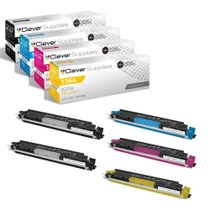
Compatible HP TOPSHOT LASERJET PRO M275 (CE310A CE311A CE312A CE313A) Toner Cartridge 5 Color Set



Hewlett Packard
Compatible HP TOPSHOT LASERJET PRO M275 (CE310A CE311A CE312A CE313A) Toner Cartridge 5 Color Set


Hewlett Packard
Compatible HP TOPSHOT LASERJET PRO M275 (CE311A CE312A CE313A) Toner Cartridge 6 Color Set


Hewlett Packard
Compatible HP TOPSHOT LASERJET PRO M275 (CE311A CE312A CE313A) Toner Cartridge 3 Color Set