




Xpress M2670
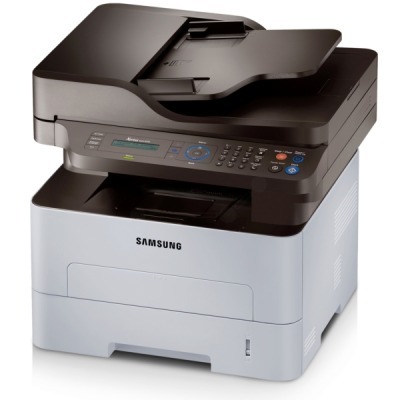
Samsung's Xpress M2670 is the multifunction take on the workgroup 2620 platform, offering print, scan and copy from one office-ready unit, so small teams get three functions without three machines. It runs on the MLT-D115S standard cartridge or the MLT-D115L high-yield, and the listings below are the high-yield line, stocked under the shared SL-M2820DW family name with two singles sold under the M2830 name.
A shared multifunction empties its cartridge on other people's work. Your own printing may be modest, but the M2670 also spends toner on every copy a colleague makes and every document run off for a meeting, so its cartridge life is a team statistic, not a personal one. Teams that accept this — and give one person ownership of reordering — stop having the conversation about whose job emptied the printer.
Toner Cartridges for Xpress M2670
- MLT-D115L high-yield, single cartridge (SL-M2820DW listing) — a single box for a measured reorder.
- MLT-D115L high-yield, 2-pack (SL-M2820DW listing) — the team rotation: one working, one waiting.
- MLT-D115L high-yield, 3-pack (SL-M2820DW listing) — a quarter of steady office printing.
- MLT-D115L high-yield, 5-pack (SL-M2820DW listing) — for teams that copy as much as they print.
- MLT-D115L high-yield, 10-pack (SL-M2820DW listing) — bulk stock for the busiest shared machines.
- MLT-D115L high-yield, single cartridge (M2830 listing) — the same cartridge under the M2830 name.
- MLT-D115L high-yield, single cartridge (second M2830 listing) — a duplicate listing of that same single.
Which cartridge should you buy?
Think in team months. A small team printing and copying daily will walk through standard-yield cartridges quickly, which is why this page stocks the high-yield MLT-D115L: longer runs between swaps, fewer interruptions mid-meeting-prep. Keep the rotation honest — a 2-pack as the minimum, a 5-pack if the machine serves a whole department — and assign the spare's location so everyone knows where it lives. The M2830-named singles are the identical cartridge under a sibling name, handy for a one-box top-up. The standard MLT-D115S fits this model too, but shared duty is precisely the case the high-yield fill exists for.
Chip, toner and everyday use
A hard-working multifunction breathes dust, and dust eventually shows on prints. The M2670 benefits from a light interior cleaning every few cartridge changes — nothing aggressive, just loose dust and stray toner removed with a dry, lint-free cloth while the machine is off and cool. If you use compressed air, keep it to short bursts from a distance and hold the can upright so no propellant sprays inside. Paired with a clean swap — seals off, chip seated, unit clicked home — that small routine keeps pages consistently clean.
Frequently Asked Questions
I am buying toner for the Xpress M2670. Which code should I look for?
The MLT-D115L high-yield or its standard-yield partner MLT-D115S — match the code printed on the cartridge you are replacing, not the shape of the printer, because similar Samsung models use different families. The listings here are the high-yield line. Getting the code right is all it takes to get the right toner the first time.
My M2670 leaves a faint gray film on every page. Will a new cartridge fix it?
Probably not, and knowing that saves a purchase. An all-over gray background usually means the drum's cleaning blade is worn and is leaving stray toner behind on each pass. Check whether the gray is worse on one side of the page; uneven backgrounding points even more firmly at drum wear. The fix belongs at the drum level, after which the output returns to the crisp white this machine is capable of.
How often does the M2670 need cleaning inside?
Every few cartridge changes is a good rhythm for a shared machine — often enough to stop dust build-up from reaching prints, gentle enough to do no harm. Power down, let the unit cool, and remove dust rather than scrubbing parts. Offices that tie the wipe-down to the cartridge swap never have to remember it separately.
More printers that use the same cartridges
The platform family is listed here in reverse, from the fax models back through the workgroup singles — all of them run on this cartridge: Xpress SL-M2620, Xpress M2880FW, Xpress M2870, Xpress M2830 DW, Xpress M2820, Xpress M2620, Samsung-MLTD115L, SL-ML2830DW, SL-M2880FW, SL-M2880, SL-M2870FW, SL-M2870FD, SL-M2870, SL-M2830DW, SL-M2830, SL-M2820ND, SL-M2820DW, SL-M2820, SL-M2670N, SL-M2670FN, SL-M2670, SL-M2620D, SL-M2620, SL-M2620, SL-2830DW, SL-2820DW, ML2830DW.