




SL-M2670N
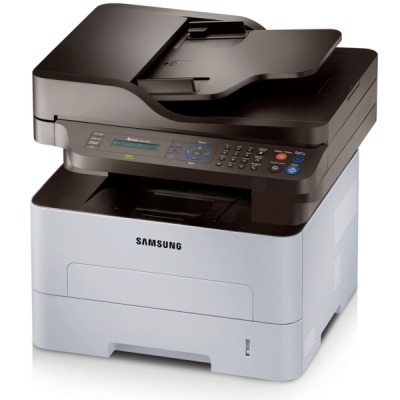
The SL-M2670N brings wired networking to Samsung's 2670 multifunction, turning a print-scan-copy unit into a shared office resource — one machine on the network serving every desk. It runs on the MLT-D115S standard cartridge or the MLT-D115L high-yield, and this page stocks the high-yield line in single and multi-pack form, alongside cartridges carrying the SL-M2670N name itself.
Sharing changes the toner question from "when do I reorder?" to "who noticed first?". On a personal printer, the owner watches the fade begin; on a networked multifunction, the cartridge is a commons — everyone prints, nobody owns the level, and the empty lands mid-job on the busiest morning. The SL-M2670N's owners learn to keep a sealed spare beside the machine and to treat the swap as a thirty-second office ritual rather than a support ticket.
Toner Cartridges for SL-M2670N
| Cartridge | Color | Page Yield |
|---|---|---|
| MLT-D115L High Yield Toner Cartridge Black | Black | See product page |
| MLT-D115L High Yield Toner Cartridge Black — Pack of 3 | Black | See product page |
| MLT-D115L Premium Quality High Yield Toner Cartridge Black — Pack of 5 | Black | See product page |
| SL-M2670N High Yield Toner Cartridge Black | Black | See product page |
| SL-M2670N High Yield Toner Cartridges Black — Pack of 5 | Black | See product page |
Which cartridge should you buy?
Shared machines burn shared cartridges faster than any one user expects, which is why the high-yield MLT-D115L is the sensible standard here and the standard-fill MLT-D115S the exception for genuinely quiet offices. Both fit and print identically; the L simply survives more of the office's collective month. Buy the single if the panel is warning today; buy the three- or five-pack if you are tired of that warning arriving as a surprise. The SL-M2670N-named listings hold the same cartridge under the model's own label — quantity is the only real variable. A 1-year warranty and 1-year returns stand behind every compatible cartridge listed.
Chip, toner and everyday use
Learn to separate two symptoms that offices constantly confuse. Overall background haze — text prints fine, but the whole page looks faintly dirty — is a drum symptom far more often than a toner one: the cartridge supplies powder, the drum decides where it lands. Degraded toner in a very old cartridge can contribute, so a fresh MLT-D115L is a fair test; haze that survives the swap belongs to the drum. Separately, when the panel reports low toner near a deadline, gently rolling the cartridge levels what remains and can clear the stop long enough to finish the job at hand.
Frequently Asked Questions
My SL-M2670N prints text fine but the page looks dirty gray. Toner or drum?
Bet on the drum. Background haze means toner is landing where no image exists, and placement is the drum's job. Rule out the cheap causes first — fresh, dry paper, and the correct paper-type setting — then try a new cartridge only if the installed one is very old. If the haze persists through a cartridge change, the imaging surface is the answer and replacing it restores the crisp output this machine is capable of.
How can I tell when the drum, not the toner, is finished?
The drum in the SL-M2670N is designed to outlast several toner cartridges, so most purchases will be toner alone. The definitive drum sign is a pattern defect that repeats in step with the drum's rotation — measure the distance between repeats and it will match the drum's circumference. Symptom-based timing like that extracts the full value from every imaging unit instead of replacing it on a guess.
The panel says toner is low but I need a few more pages. What is the right move?
Take the cartridge out and roll it gently back and forth; the motion levels the leftover toner and can clear the low-toner stop long enough to finish a job. Expect the trick to work once or twice per cartridge — after that the toner is genuinely gone, and the honest fix is the spare you kept by the machine. A gentle rock now, a fresh cartridge right after: that sequence keeps a shared machine from holding the office hostage.
One cartridge serves our whole office. How do we avoid running dry?
Standardize on the high-yield MLT-D115L, keep one sealed spare at the machine, and make the person who installs the spare the person who orders the next one. That single habit — swap triggers reorder — is worth more than any monitoring routine, because on a shared SL-M2670N the empty otherwise announces itself in the middle of somebody's deadline.
More printers that use the same cartridges
The MLT-D115 family is shared across this Samsung range:
.