





 See Compatible Printers
 Read more about our ink!
Samsung
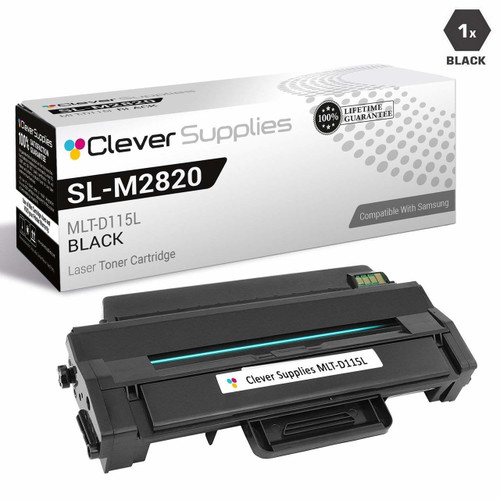
Compatible Samsung SL-M2670N High Yield Laser Toner Cartridge Black

Amazon Price:

- Page Yield:
- 3,000 Pages
- Availability:
- In Stock
- Shipping:
- Calculated at Checkout
- Compatible Printers
- SL-M2820DW
- SL-M2830DW
- SL-M2870FW
- SL-M2880FW
- SL-ML2830DW
- Xpress M2620
- Xpress M2670
- Xpress M2820
- Xpress M2870
- Xpress M2880FW
- Xpress M2830 DW
- Xpress SL-M2620i>
- ML2830DW
- SL-2820DW
- SL-2830DW
- SL-M2620
- SL-M2620
- SL-M2620D
- SL-M2670
- SL-M2670FN
- SL-M2670N
- SL-M2820
- SL-M2820ND
- SL-M2830
- SL-M2870
- SL-M2870FD
- SL-M2880
- Samsung-MLTD115L
- Xpress SL-M2620
- Specifications
- SKU:
- SL-M2670N
- Printer Brand:
- Samsung
- OEM Number:
- MLT-D115L
- Ink Color:
- High Yield Black
- Page Yield:
- 3,000 Pages
- Printer Type:
- Laser Cartridge
- Condition:
- New Compatible
- Description
- Yields up to 3000 pages
- Trust compatible Samsung Black toner cartridges SL-M2670N to provide outstanding print quality for all your important photos and documents
- Unlike bargain replacement inks Samsung Toner Cartridge are designed specifically to work with Samsung printers for exceptional reliability and performance
- Replace your printer’s mono toner cartridge with ease
- Maximise performance with compatible Samsung supplies
- Packaging: Each
- Compatible with: Samsung SL M2620 SL M2670 SL M2820 SL M2870 SL M2880 Xpress series: M2620 M2820 M2830 M2870 etc. series laser printers
- Easy toner change
- Reviews

/> 

Compatible Samsung SL-M2670N High Yield Laser Toner Cartridge Black offers vibrant print quality exceptional reliability and performance for your photos and documents.
Samsung SL-M2670N Black toner cartridge is ideally designed to deliver superior and professional quality prints for both texts/images. Cartridge is compatible with Samsung SL M2620 SL M2670 SL M2820 SL M2870 SL M2880 Xpress series: M2620 M2820 M2830 M2870 etc. series laser printers and yields up to 3000 pages.
Features:
Frequently Asked Questions
What yield should I plan around for the SL-M2670N?
Plan on the MLT-D115L's rated 3,000 pages for a normal office mix. The rating assumes standard test pages at about 5% coverage; heavy documents pull the real figure down and light text pushes it toward or past the rating. For budgeting, 3,000 is the honest middle.
How can I check the page count on my SL-M2670N to plan the next cartridge?
The printer's configuration report - printable from its menu or through the network interface - shows the total pages printed and an estimated toner level. Checking it monthly turns cartridge changes from surprises into schedule: divide recent monthly pages into 3,000 and you know roughly when the next swap falls due.
What running cost does this cartridge give the SL-M2670N?
The cartridge costs $37.06, which is about 1.24 cents of toner per page. On a networked machine shared by several desks, that number scales quietly - at 1,000 pages a month it is roughly $12.40 of toner a month, and the five-pack version of this cartridge trims it to about $7.40.
Which other Samsung printers use this cartridge?
The same MLT-D115L serves the Xpress M2620, Xpress M2670, Xpress M2820, Xpress M2870 and Xpress M2880FW, and the SL-M2820DW, SL-M2830DW, SL-M2870FW, SL-M2880FW, SL-ML2830DW and Xpress M2830 DW. A department standardising on this platform needs only one cartridge type on the shelf.
High yield or standard yield for a network printer?
The MLT-D115S fits the same bay with a smaller fill. For a shared network machine, the high-yield L is almost always the right default: changes are less frequent, the per-page cost is lower, and nobody has to remember whose turn it is to order. The S suits only very light, single-user duty.
What cover backs this purchase?
A warranty of a year and free returns for a year - if this cartridge leaks, streaks or fails early, it comes straight back and the replacement or refund follows. The terms are set out on the shipping and returns page, and our support team is on hand Monday to Friday, 9 AM to 5 PM CST. Orders are sent from our warehouses in IL, PA, GA and CA.
Who should change the cartridge on a printer shared over the network?
Whoever meets the fade. The swap on the SL-M2670N is a quick, tool-free job, and a shared machine stalls when everyone assumes someone else owns it. The workable arrangement is a spare kept at the printer and a simple house rule: the person whose job finds the MLT-D115L empty fits the spare and notes that a reorder is due.
How should a spare be stored so it is ready months later?
Sealed, flat, cool and dry. Toner is a stable dry powder with no use-by clock ticking on the shelf, so an MLT-D115L bought ahead will print like a fresh cartridge when the network printer finally calls for it. Store it at the machine it serves, not across the building — a spare you have to fetch is a delay you chose.
A large shared job is due and the cartridge is near its end — change it early?
Yes, if the counter suggests the job could outlast the fill. A long run that fades halfway means reprinted pages and a queue of colleagues waiting; changing the MLT-D115L between jobs costs a couple of minutes at a moment of your choosing. Network printers reward planned swaps, because their failures are never private.
How do we make sure the next order is the high-yield version again?
Read the code off the cartridge you remove and order by it. The MLT-D115L is the high-yield fill this listing sells; the standard-yield MLT-D115S fits the same bay with fewer pages, and the two are easy to confuse by model name alone. Standardizing a shared office on the L keeps changes infrequent, and the code is how that standard survives staff changes and reorders.
About This Cartridge for the Samsung SL-M2670N
For a networked SL-M2670N, the sensible default: a compatible MLT-D115L high-yield cartridge, 3,000 pages at $37.06. It is covered by a one-year warranty and one year of free returns, and it is dispatched from our IL, PA, GA or CA warehouses. One spare beside the printer keeps a shared machine out of trouble. The Samsung range at Clever Supplies covers the rest of the family on the same footing.
Related Items

Samsung
Compatible Samsung SL-M2670N High Yield Laser Toner Cartridges Black 5 Pack
/>


Samsung
Compatible Samsung SL-M2885FW High Yield Laser Toner Cartridge Black
/>

Samsung
Compatible Samsung SL-M2670 High Yield Laser Toner Cartridge Black
/>

Samsung
Compatible Samsung SL-M2826 High Yield Laser Toner Cartridge Black
/>