




SL-M2820ND
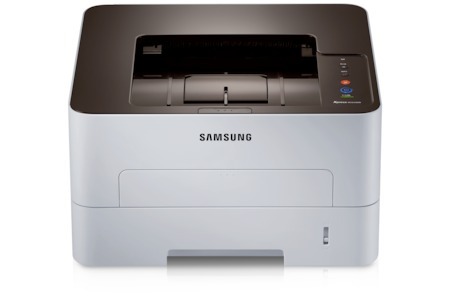
Samsung's SL-M2820ND is a workgroup monochrome laser built to be shared: wired networking puts it on the office network and automatic duplexing makes two-sided printing the default for everyone who uses it. It accepts two cartridge sizes, the standard MLT-D115S and the high-yield MLT-D115L. Every listing on this page is the high-yield L cartridge — some sold under the cartridge code, others under this printer's own model name; both are the same cartridge inside.
A printer like this lives or dies by team habits. Set two-sided output as the network default and the duplex unit quietly halves paper use across the whole office. Choose the high-yield cartridge and the supply closet trips drop too. The SL-M2820ND is the configuration for a workgroup that prints steadily all week and wants one machine, plugged into the LAN, that simply keeps up.
Toner Cartridges for SL-M2820ND
| Cartridge | Color | Page Yield |
|---|---|---|
| MLT-D115L — high-yield cartridge, single | Black | See product page |
| MLT-D115L — high-yield cartridges, 3 pack | Black | See product page |
| MLT-D115L Premium — high-yield cartridges, 5 pack | Black | See product page |
| SL-M2820ND high-yield cartridge — model-named listing, single | Black | See product page |
| SL-M2820ND high-yield cartridges — model-named listing, 5 pack | Black | See product page |
Which cartridge should you buy?
Start with the size question. The standard MLT-D115S is the smaller fill; the MLT-D115L holds more toner, costs less per page, and suits a shared machine whose queue never really empties — which is why it is the version stocked here. Between the listings, pick by name preference: code-named and model-named versions are the same high-yield cartridge, and the 3 pack and 5 pack simply reduce how often anyone has to think about toner. For a workgroup printer, the multipacks are usually the sensible default.
Chip, toner and everyday use
When the low-toner warning appears midweek, you can usually buy a little time: take the cartridge out, hold it level, and rock it gently side to side — never up and down, never vigorously — to redistribute the toner settled inside, then reinstall and print a test page. Treat that as a bridge, not a fix, and keep the replacement order moving. Quoted yields assume roughly 5% coverage per page, so graphics-heavy team output will land lower. On a shared printer, the cheapest habit is a spare on the shelf before the warning, not after it.
Frequently Asked Questions
My SL-M2820ND says toner is low but I need a few more pages. Will rocking the cartridge damage anything?
No — done gently, it is a safe temporary measure. Removing the cartridge and rocking it side to side redistributes the remaining toner and often buys the extra pages you need. Hold it level throughout, reinstall, and print a test page to confirm. It buys time only; the cartridge is still nearly empty.
What is the difference between the drum and the toner cartridge in this printer?
They are separate parts with very different replacement intervals. The cartridge holds the toner powder; the imaging drum is the surface that puts it on paper. If print quality drops right after a cartridge swap, suspect the cartridge; if it degrades slowly over months, look at the drum. Keeping the two roles straight makes troubleshooting much simpler.
Why does my SL-M2820ND leave dark spots scattered across the page?
When the same mark repeats at regular intervals down the sheet, the drum surface is usually damaged or worn. Measure the distance between the repeating marks and compare it with the drum circumference noted in the printer manual; a match confirms the drum as the cause, so you replace the right part the first time.
More printers that use the same cartridges
The MLT-D115 family is shared across Samsung's Xpress workgroup line, so offices running several of these models keep a single cartridge code on the shelf: ML2830DW, SL-2820DW, SL-2830DW, SL-M2620, SL-M2620, SL-M2620D, SL-M2670, SL-M2670FN, SL-M2670N, SL-M2820, SL-M2820DW, SL-M2830, SL-M2830DW, SL-M2870, SL-M2870FD, SL-M2870FW, SL-M2880, SL-M2880FW, SL-ML2830DW, Samsung-MLTD115L, Xpress M2620, Xpress M2670, Xpress M2820, Xpress M2830 DW, Xpress M2870, Xpress M2880FW, Xpress SL-M2620.