




MC562
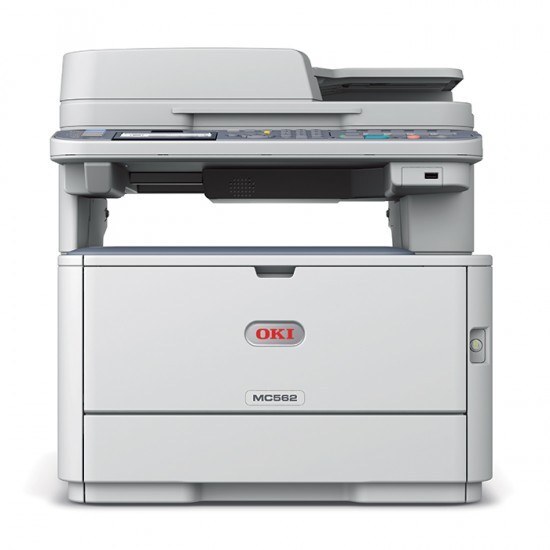
Designed for workgroups that need more than basic output, the Okidata MC562 color multifunction printer combines printing, copying, scanning and faxing in a single unit. It draws from the OKI Type C17 cartridge family in two capacities: the standard set — black 44469801 with cyan 44469703, magenta 44469702 and yellow 44469701 — and a high-yield set for heavier workloads, black 44469802 alongside cyan 44469721, magenta 44469720 and yellow 44469719. Keeping a compatible set on hand is the simple way to run this office MFP without interruption.
Because the MC562 is a true multifunction machine, its cartridges feed two appetites: the print jobs sent from desks and the copies made at the glass, both drawing on the same four slots. Workgroups often underestimate the copying side when they plan supplies. The other planning point is the drum: it is a separate consumable from the toner cartridges, on its own longer schedule, and it should not be confused with a toner warning when the machine starts asking for attention.
Toner Cartridges for MC562
| Cartridge | Color | Page Yield |
|---|---|---|
| 44469801 | Black | See product page |
| 44469802 | Black, high yield | See product page |
| 44469703 | Cyan | See product page |
| 44469721 | Cyan, high yield | See product page |
| 44469702 | Magenta | See product page |
| 44469720 | Magenta, high yield | See product page |
| 44469701 | Yellow | See product page |
| 44469719 | Yellow, high yield | See product page |
- Compatible Okidata MC562 Laser Toner Cartridges 4 Color Set
- Compatible Okidata MC562 Premium Quality Laser Toner Cartridges 4 Color Set
- Compatible Okidata Type C17 Laser Toner Cartridges 4 Color Set (44469801/ 44469703/ 44469702/ 44469701)
- Compatible Okidata Type C17 Premium Quality Laser Toner Cartridges 4 Color Set(44469801/ 44469703/ 44469702/ 44469701)
- Compatible Okidata Type C17 Laser Toner Cartridges High Yield 4 Color Set (44469802/ 44469721/ 44469720/ 44469719)
Which cartridge should you buy?
The standard-versus-high-yield choice is really a question about how often you want to open the machine. Light, intermittent use is served fine by the standard set, and the cartridges will not sit half-used for years. A workgroup printing and copying daily will feel the standard set's shorter intervals as a chore, and the high-yield set exists precisely for them — fewer swaps, fewer interruptions, one spare set lasting the season. Within either capacity, replace colors individually as they empty rather than as a block, unless a full set change is simply more convenient for a shared machine. Whichever capacity you pick, keep the two families straight when reordering: standard and high-yield cartridges carry different part numbers.
Chip, toner and everyday use
Type C17 cartridges are chipped so the MC562 can track levels per color; install each new unit firmly and let it register before running a job. If a cartridge fades near its end, removing it and rocking it gently from side to side redistributes the remaining toner and often recovers even output for a while. Keep unopened spares in their bags, stored flat away from heat and sunlight, and write the install date on the box end — with two capacities in the same family, labeled shelves prevent the classic mix-up of a standard cartridge going in where a high-yield came out.
Frequently Asked Questions
What toner set does the Oki MC562 use?
The Type C17 family: standard black 44469801, cyan 44469703, magenta 44469702 and yellow 44469701, with high-yield counterparts numbered 44469802, 44469721, 44469720 and 44469719. As an MFP, it consumes the same cartridges for printing and copying alike.
Is there a high-yield option for the MC562?
Yes — every color has a high-yield version, and there is a high-yield four color set as well. It suits workgroups that would rather not think about toner every month; light users are equally well served by the standard set.
The MC562 shows a drum warning along with low toner. Which do I replace?
They are separate consumables. Replace the low toner cartridge now, and replace the drum only when print defects like streaks appear — the drum typically outlasts several toner cartridges before it needs attention.
How can I reduce toner costs on the MC562 in a small office?
Set the driver defaults to black-and-white and duplex, so routine jobs skip the color cartridges entirely and use less paper. Reserve full color for the client-facing documents that genuinely need it.
More printers that use the same cartridges
The same toner set also fits these models: MC351, MC351DN, MC361 MFP, MC361DN, MC362, MC362w MFP, MC362W, MC561 Color MFP, MC561 MFP, MC561DN, MC562dn, MC562dnw, MC562W MFP, MC562W, MC890, MC950 MFP, MC950, C17, C310, C310DN, C330, C330DN, C331 C530dn, C331, C331DN, C510, C510DN, C511DN, C530, C530DN, C531, C531d, C531DN.