




LaserJet M125NW
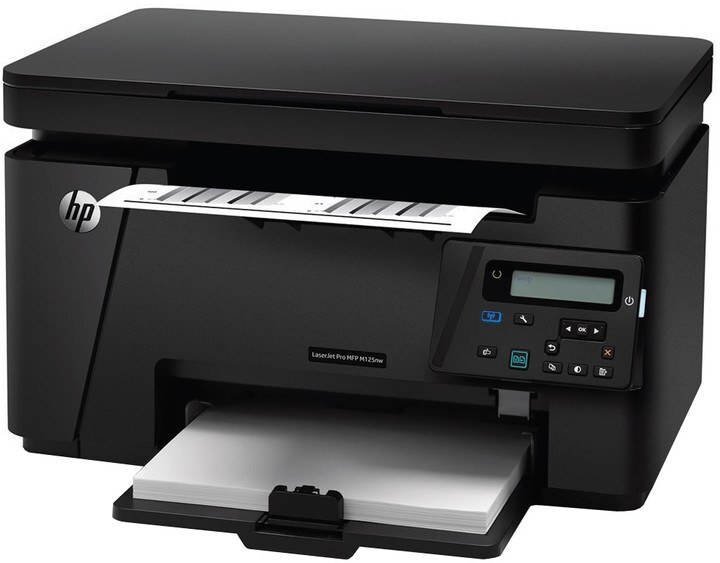
Networked and wireless, the LaserJet M125NW was the connected member of its line — Ethernet plus Wi-Fi in a compact mono multifunction, for homes where every device printed to one machine. It takes the HP 83A cartridge, listed here as the CF283A in singles and multi-packs, and steps up to the HP 83X (CF283X) high-yield build when a busier household starts emptying cartridges too quickly.
A shared printer lives a different life from a personal one. Phones, tablets and three laptops all send jobs to the M125NW, copies get made by whoever walks past, and nobody in the house thinks of themselves as "the printer person" — until the toner light comes on. That pattern argues for keeping a spare cartridge in the drawer and for the high-yield build, which stretches the interval between somebody having to deal with it.
Toner Cartridges for LaserJet M125NW
- CF283A — Black, single cartridge — Black — See product page
- CF283A — Black, 2 Pack — Black — See product page
- CF283A — Black, 3 Pack — Black — See product page
- CF283A — Black, 5 Pack — Black — See product page
- CF283A — Black, 10 Pack — Black — See product page
- 83A Black (CF283A), alternate single listing — Black — See product page
- CF283A — Black, 4 Pack — Black — See product page
- CF283A — Black, 8 Pack — Black — See product page
- CF283A — MICR Black — Black — See product page
- CF283A — Premium Quality Black, 4 Pack — Black — See product page
- CF283X — High Yield Black — Black — See product page
- CF283X — High Yield Black, 4 Pack — Black — See product page
- M125NW Black — high yield (CF283X) — Black — See product page
- 83A-MICR Black (CF283A) — Black — See product page
- 83A-MICR Black, 2 Pack (CF283A) — Black — See product page
- 83A-MICR Black, 3 Pack (CF283A) — Black — See product page
- 83A-MICR Black, 5 Pack (CF283A) — Black — See product page
- 83A-MICR Black, 10 Pack (CF283A) — Black — See product page
- M125NW-MICR Black (CF283A) — Black — See product page
- 83A 4 Black (CF283A) — Black — See product page
The same shelf also carries listings named for sibling machines in this family — they take the identical cartridge: M127 Black (CF283A), M127FN Black (CF283A), M127W Black (CF283A), M125 Black — high yield (CF283X), M201N Black — high yield (CF283X), M201DW Black — high yield (CF283X), M201 Black — high yield (CF283X) and M225 Black — high yield (CF283X), plus MICR listings named for the M125-MICR (CF283A), M127-MICR (CF283A), M127FN-MICR (CF283A), M127W-MICR (CF283A), M201-MICR (CF283A), M201N-MICR (CF283A), M201DW-MICR (CF283A) and M225-MICR (CF283A). Order by the code on your cartridge rather than by the model in a listing name — the code is what has to match.
Which cartridge should you buy?
Households that print a school run here and a boarding pass there will not outrun the standard cartridge, and it is the cheapest way in. Once the M125NW became the whole house's printer, the high-yield build usually wins: it roughly fits the rhythm of shared use, where page counts creep up without anyone noticing. Multi-packs simply move the reorder point further out — a five- or ten-pack in the cupboard ends the emergency purchase entirely. MICR builds exist for check printing only; everyone else should skip them. All compatible cartridges here carry a 1-year warranty and 1-year returns.
Chip, toner and everyday use
Because this machine sits on a network, its driver utilities let you check the toner level from any connected computer — worth a glance when pages start looking light, before blaming the cartridge. The chip on the cartridge reports that level and identifies the unit to the printer. When a replacement goes in, remove the sealing tape first, slide it in until it clicks, and let the printer finish recognizing it before queueing jobs. Yields are rated at about five percent coverage, so a household printing full-page photos of documents will see shorter life than the rating implies.
Frequently Asked Questions
What toner cartridge does the LaserJet M125NW use?
It uses the CF283A, or the high-yield CF283X when the standard cartridge empties too fast. Always match the code printed on your current cartridge before ordering — that code, not the listing name, decides the fit.
When is it time to replace the cartridge in the M125NW?
Replace it when pages stay faded or streaked even after you take the cartridge out and gently redistribute the toner, or when the toner-low alert refuses to clear. There is no need to swap at the first warning — that alert arrives early by design.
Where do I download drivers for the LaserJet M125NW?
From HP's official support website, by searching the exact model name. The full software package includes the utilities for checking toner levels and managing the printer across your network — the same tools that make a shared machine easy to keep an eye on.
Can everyone in the house use the same cartridge type?
Yes — there is only one cartridge bay and one black cartridge, whichever device sent the job. Printing, scanning and copying all draw on the same unit, which is why shared machines empty it faster than personal ones.
More printers that use the same cartridges
One cartridge design covers this whole corner of the HP range — every model on the list below takes it too: HP CF283A, LaserJet M125, LaserJet M125a MFP, LaserJet M125nw MFP, LaserJet M125rnw MFP, LaserJet M127, LaserJet M127 fn, LaserJet M127FN, LaserJet M127FN MFP, LaserJet M127FW, LaserJet M127FW MFP, LaserJet M127N, LaserJet M127N MFP, LaserJet M127W, LaserJet M201, LaserJet M201DW, LaserJet M201dw, LaserJet M201n MFP, LaserJet M225, LaserJet M225 MFP, LaserJet MFP M125, LaserJet MFP M127fw, LaserJet MFP M225dn, LaserJet MFP M225dw, LaserJet MFP M225nw, LaserJet Pro M125, LaserJet Pro M125NW, LaserJet Pro M127, LaserJet Pro M127FN, LaserJet Pro M127FW, LaserJet Pro M201, LaserJet Pro M201N, LaserJet Pro M225, LaserJet Pro MFP M125, LaserJet Pro MFP M125NW, LaserJet Pro MFP M127, LaserJet Pro MFP M127FN, LaserJet Pro MFP M127FW, LaserJet Pro MFP M201, LaserJet Pro MFP M225.