




LaserJet Pro M125
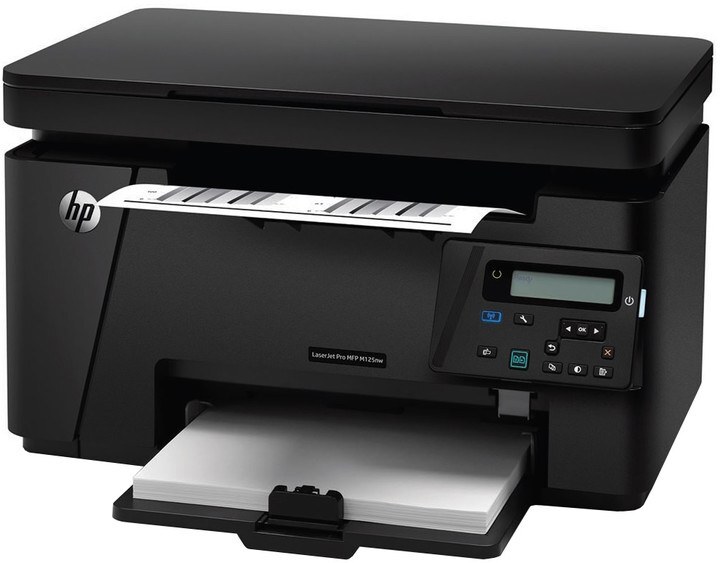
The HP LaserJet Pro M125 was HP's compact answer to home-office printing in 2014 — a small mono multifunction with print, scan and copy, built for tight spaces. It uses the HP 83A cartridge, the CF283A, with the high-yield CF283X (83X) as the longer-running option in the same bay.
A machine this size usually lives where the work is: the corner of a home office desk, a kitchen-side study, a small studio shelf. It was bought to end trips to a copy shop, and a decade on it still does that job for households whose printing is letters, schoolwork, forms and the odd contract. Its appetite is modest, but it is steady — which is why owners notice the cartridge mostly at the moment it runs out mid-job.
Toner Cartridges for LaserJet Pro M125
| Cartridge | Color | Page Yield |
|---|---|---|
| CF283A — Black, single cartridge | Black | See product page |
| CF283A — Black, 4 Pack | Black | See product page |
| CF283A — Black, 4 Pack (alternate listing) | Black | See product page |
| CF283A — Black, 8 Pack | Black | See product page |
| CF283A — Premium Quality Black, 4 Pack | Black | See product page |
| CF283A — MICR Black (check printing) | Black | See product page |
| CF283X — High Yield Black, single | Black | See product page |
| CF283X — High Yield Black, 4 Pack | Black | See product page |
Which cartridge should you buy?
Household printing comes in waves — quiet weeks, then a school project or a tax season that empties the tray daily. The standard CF283A is the right default for the quiet pattern. If your waves are frequent, the high-yield CF283X simply lasts longer between swaps, and its four-pack suits homes that would rather order once a year. The standard cartridge's four- and eight-packs serve the same logic at the standard yield. The MICR build is a specialist for printed checks; everything else on this page is the standard formulation. Each compatible cartridge is backed by a 1-year warranty and 1-year returns.
Chip, toner and everyday use
The printer keeps track of the cartridge through its chip, and the machine flashes a toner-low alert before the cartridge actually runs dry — that warning is your ordering cue, not an emergency. When the replacement goes in, remove its seal completely and rock it gently side to side first, so the toner settles evenly. Keep the spare sealed in a cool, dry place away from direct light, and remember yield figures assume light text coverage: a month of dense school projects will always outrun the estimate.
Frequently Asked Questions
How do I know when to order a new cartridge for the LaserJet Pro M125?
The printer flashes a toner-low alert before the CF283A runs dry. Order the replacement then — or step up to the CF283X — and keep the spare sealed in a cool, dry place so the machine never sits idle waiting for toner.
Will a remanufactured cartridge work in it?
Many third-party CF283A cartridges work in this printer, but quality varies by manufacturer. If one is rejected, reseat it or try another unit — chip recognition issues are the most common cause of a refusal.
How should I store a spare cartridge?
Keep spares sealed in their original packaging, in a cool, dry spot away from direct light. Install a cartridge only when the current one runs out, rather than swapping early.
More printers that use the same cartridges
The 83A cartridge feeds a whole generation of compact Pro machines — all of these take the same supply:
- HP CF283A
- LaserJet M125
- LaserJet M125NW
- LaserJet M125a MFP
- LaserJet M125nw MFP
- LaserJet M125rnw MFP
- LaserJet M127
- LaserJet M127 fn
- LaserJet M127FN
- LaserJet M127FN MFP
- LaserJet M127FW
- LaserJet M127FW MFP
- LaserJet M127N
- LaserJet M127N MFP
- LaserJet M127W
- LaserJet M201
- LaserJet M201DW
- LaserJet M201dw
- LaserJet M201n MFP
- LaserJet M225
- LaserJet M225 MFP
- LaserJet MFP M125
- LaserJet MFP M127fw
- LaserJet MFP M225dn
- LaserJet MFP M225dw
- LaserJet MFP M225nw
- LaserJet Pro M125NW
- LaserJet Pro M127
- LaserJet Pro M127FN
- LaserJet Pro M127FW
- LaserJet Pro M201
- LaserJet Pro M201N
- LaserJet Pro M225
- LaserJet Pro MFP M125
- LaserJet Pro MFP M125NW
- LaserJet Pro MFP M127
- LaserJet Pro MFP M127FN
- LaserJet Pro MFP M127FW
- LaserJet Pro MFP M201
- LaserJet Pro MFP M225