




LaserJet Pro M201
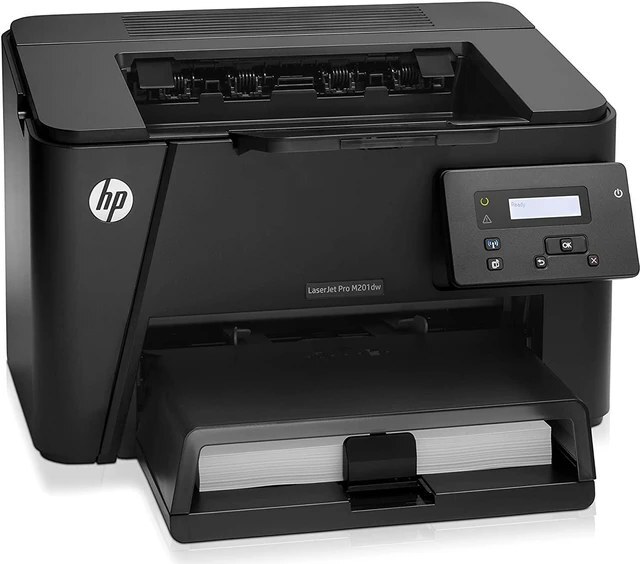
A desk-friendly A4 printer with one job: the LaserJet Pro M201 brought quick, single-function mono printing to small businesses under HP's Pro banner. It runs on a single black cartridge pair — the standard CF283A and its high-yield partner, the CF283X — so ordering toner for this machine is a two-option decision rather than a research project.
Printers like the M201 tend to disappear into the workday. It sits beside one desk or serves a small team, turns out letters, labels and reports, and only asks for attention when the cartridge runs dry. Owners who value that invisibility usually care about two things: that the replacement fits the first time, and that it lasts long enough to be forgotten again. This page is stocked with exactly that in mind.
Toner Cartridges for LaserJet Pro M201
The full shelf for this model is short — two cartridge codes, in singles, multipacks and a MICR build:
- standard black cartridge — CF283A — black; page yield: see product page
- high-yield black cartridge — CF283X — black; page yield: see product page
- black, 4 pack — CF283A — black; page yield: see product page
- black, 8 pack — CF283A — black; page yield: see product page
- high-yield black, 4 pack — CF283X — black; page yield: see product page
- MICR black cartridge — CF283A — black; page yield: see product page
- premium quality black, 4 pack — CF283A — black; page yield: see product page
- black, 4 pack (alternate listing) — CF283A — black; page yield: see product page
Which cartridge should you buy?
Match the cartridge to the stack of paper you go through. Light, occasional printing — a few pages a day — is standard-cartridge territory: the single listed under the family's short name, the HP 83A, keeps the least money sitting in a drawer. Busy desks should step up to the high-yield HP 83X, which carries more toner per unit and lowers the cost of each printed page; in a four-pack it becomes the no-thought option for a printer that never really rests. The MICR row is a specialist: choose it only if this M201 prints checks. Everything on the page is a compatible cartridge backed by a 1-year warranty and 1-year returns.
Chip, toner and everyday use
Each cartridge carries a chip the M201 reads on installation, so levels show on the host computer without guesswork. Store spares flat, sealed, and out of direct sun; toner powder keeps well at room temperature but clumps in heat and damp. When a cartridge nears its end, pages may fade on one side first — lifting the unit out and rocking it gently end to end spreads the remaining powder and usually buys a few more clean days. Yield figures for this family are estimates measured at the standard five-percent page coverage, so dense documents will always finish a cartridge sooner.
Frequently Asked Questions
Is there a color cartridge for the LaserJet Pro M201?
No. The M201 is a monochrome printer with a single black cartridge bay. Color output would need a different machine entirely — nothing on this page adds color to it.
How do I know whether to reorder the standard or the high-yield?
Look at how fast the last cartridge went. If a standard unit lasted you half a year, stay standard. If swaps feel like a monthly chore, the high-yield version cuts their frequency and usually costs less per page over its life.
Will a cartridge made for another HP model work in my M201?
Only cartridges coded for this family fit and register correctly. Look-alike units from other HP lines may slide partway in but will not be recognized — match the code on the cartridge you pull out.
What should I do with the empty cartridge?
Drop it into an office-supply recycling bin or a manufacturer take-back program. Empties should not go in household trash; the cartridge body is recyclable plastic and most programs accept it free.
More printers that use the same cartridges
This cartridge family is shared widely across HP's small mono range — the complete list runs in reverse order below:
- LaserJet Pro MFP M225
- LaserJet Pro MFP M201
- LaserJet Pro MFP M127FW
- LaserJet Pro MFP M127FN
- LaserJet Pro MFP M127
- LaserJet Pro MFP M125NW
- LaserJet Pro MFP M125
- LaserJet Pro M225
- LaserJet Pro M201N
- LaserJet Pro M127FW
- LaserJet Pro M127FN
- LaserJet Pro M127
- LaserJet Pro M125NW
- LaserJet Pro M125
- LaserJet MFP M225nw
- LaserJet MFP M225dw
- LaserJet MFP M225dn
- LaserJet MFP M127fw
- LaserJet MFP M125
- LaserJet M225 MFP
- LaserJet M225
- LaserJet M201n MFP
- LaserJet M201dw
- LaserJet M201DW
- LaserJet M201
- LaserJet M127W
- LaserJet M127N MFP
- LaserJet M127N
- LaserJet M127FW MFP
- LaserJet M127FW
- LaserJet M127FN MFP
- LaserJet M127FN
- LaserJet M127 fn
- LaserJet M127
- LaserJet M125rnw MFP
- LaserJet M125nw MFP
- LaserJet M125a MFP
- LaserJet M125NW
- LaserJet M125
- HP CF283A