




LaserJet MFP M225nw
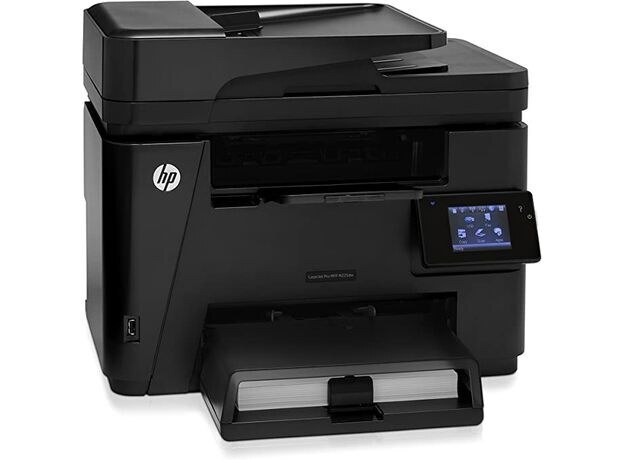
Networked plus wireless, the LaserJet MFP M225nw was the doubly connected M225: Ethernet and Wi-Fi on a compact monochrome multifunction. Its cartridges come from the HP CF283A line, the black cartridge HP also calls the 83A. Two compatible listings of it are sold here, and they are one and the same cartridge.
The nw model suits the office that cannot decide how it connects: a wired drop for the workgroup that prints all day, Wi-Fi for the laptop that visits twice a week. That mixed traffic keeps the machine steadily busy without any single heavy user, so toner use creeps rather than plunges, and a calendar-based spare check beats waiting for faded pages.
Toner Cartridges for LaserJet MFP M225nw
- HP 83A (CF283A) toner cartridge, black (Black; yield on the product page)
- HP 83A (CF283A) toner cartridge, black (alternate listing) (Black; yield on the product page)
Which cartridge should you buy?
Because this printer serves steady mixed traffic, the standard CF283A stocked on this page is the sensible default, swapped on a predictable rhythm. HP's materials for the model also name a high-yield CF283X for heavier stretches, but that cartridge is not sold on this page, so plan on the CF283A and a shelf spare if the office prints daily. The two listings above differ in nothing but their listing; both deliver the same cartridge with the same fit.
Chip, toner and everyday use
Replacing the cartridge is a two-minute job: open the cartridge door, pull the spent unit out by its handle, and slide the new one in until it clicks, then print a test page to confirm the seating. If output turns faded or streaky, the toner has usually settled or is running low; rocking the cartridge gently side to side redistributes it and buys time. Keep the next cartridge sealed until swap day, and remember yield ratings assume light standard coverage, not wall-to-wall text.
Frequently Asked Questions
What toner cartridge does the LaserJet MFP M225nw use?
It uses the CF283A black cartridge. Both listings on this page are that cartridge in compatible form, so matching the code on your old cartridge to either listing is enough.
How do I replace the toner cartridge in the LaserJet MFP M225nw?
Open the cartridge door, pull the spent cartridge straight out by its handle, and slide the new CF283A in until it clicks into place. Close the door and print a test page to confirm everything is seated.
Why is my LaserJet MFP M225nw printing faded or streaky pages?
Fading and streaks usually mean the cartridge is running low or its toner has settled. Rock it gently side to side to redistribute the toner, and replace it if the print quality does not recover.
Can one spare cartridge cover several of our office printers?
If the other machines are in the family list below, yes: they all take this same cartridge, which is why the CF283A is a practical single spare for a mixed fleet of compact LaserJets.
More printers that use the same cartridges
All of these models run on the same cartridge:
- HP CF283A
- LaserJet M125
- LaserJet M125NW
- LaserJet M125a MFP
- LaserJet M125nw MFP
- LaserJet M125rnw MFP
- LaserJet M127
- LaserJet M127 fn
- LaserJet M127FN
- LaserJet M127FN MFP
- LaserJet M127FW
- LaserJet M127FW MFP
- LaserJet M127N
- LaserJet M127N MFP
- LaserJet M127W
- LaserJet M201
- LaserJet M201DW
- LaserJet M201dw
- LaserJet M201n MFP
- LaserJet M225
- LaserJet M225 MFP
- LaserJet MFP M125
- LaserJet MFP M127fw
- LaserJet MFP M225dn
- LaserJet MFP M225dw
- LaserJet Pro M125
- LaserJet Pro M125NW
- LaserJet Pro M127
- LaserJet Pro M127FN
- LaserJet Pro M127FW
- LaserJet Pro M201
- LaserJet Pro M201N
- LaserJet Pro M225
- LaserJet Pro MFP M125
- LaserJet Pro MFP M125NW
- LaserJet Pro MFP M127
- LaserJet Pro MFP M127FN
- LaserJet Pro MFP M127FW
- LaserJet Pro MFP M201
- LaserJet Pro MFP M225