




LaserJet Pro MFP M225
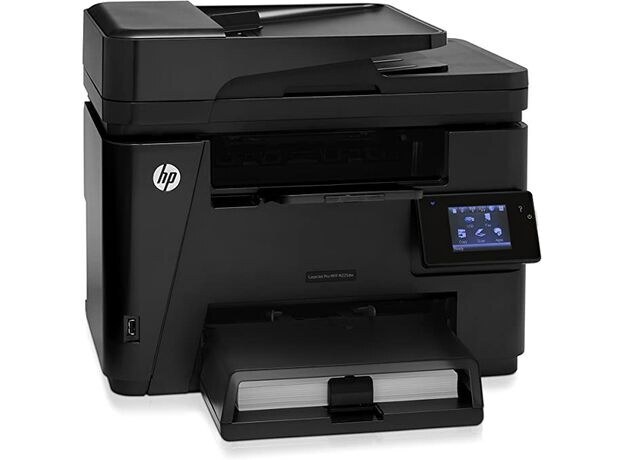
The LaserJet Pro MFP M225 sat at the top of its range — the Pro-branded flagship, with full mono multifunction capability and fax for small offices that lean on one machine hard. It feeds from HP's 83A shelf in two tiers: the standard CF283A and the high-yield 83X (CF283X) for the busiest stretches.
Flagship MFPs in small offices rarely get a quiet day: the same unit that prints the morning's paperwork also copies IDs, scans signed pages and still sends the occasional fax. That constant mixed duty wears through cartridges on a schedule set by the whole office, not one user — which is why the buying decision below is mostly about how much toner you keep in the building.
Toner Cartridges for LaserJet Pro MFP M225
| Cartridge | Color | Page Yield |
|---|---|---|
| CF283A Toner Cartridge — Black, 8 Pack | Black | See product page |
| CF283X Toner Cartridge — High Yield Black, 4 Pack | Black | See product page |
| CF283A Toner Cartridge — Black, 4 Pack | Black | See product page |
| CF283A Premium Quality Toner Cartridge — Black, 4 Pack | Black | See product page |
| HP 83A (CF283A) Toner Cartridge — 4 Black | Black | See product page |
| CF283A Toner Cartridge — Black (single) | Black | See product page |
| CF283X Toner Cartridge — High Yield Black (single) | Black | See product page |
| CF283A Toner Cartridge — MICR Black (single) | Black | See product page |
Which cartridge should you buy?
For a machine doing front-office duty, the high-yield CF283X is the natural default: fewer interruptions, and a lower cost per page across the year. The standard CF283A still makes sense as the shelf spare — cheaper to keep one in reserve, and it drops into the same slot. Offices that print their own checks should run the MICR cartridge for that work; its magnetic toner is what bank readers expect. Whichever tier you choose, compatible cartridges here carry a 1-year warranty and 1-year returns.
Chip, toner and everyday use
A low cartridge never blocks the whole machine: scanning keeps working because it uses no toner, while prints and copies show the shortage first as pale pages. When the warning appears, finish the current job, then swap the cartridge — lift the old one out by its handle, seat the new one until it clicks, and let the chip register the fresh level. Keep the next cartridge sealed in a cool drawer nearby; a flagship MFP earns nothing from a toner hunt across the office.
Frequently Asked Questions
Can I scan documents with the LaserJet Pro MFP M225 when the toner is low?
Yes. Scanning never draws toner, so it works normally even with a nearly empty CF283A installed. Only copies and prints consume the cartridge, which is why fading shows up there while scans stay unaffected.
When is it time to replace the cartridge in the M225?
When pages stay faded or streaked after you have redistributed the toner with a gentle rock, or when the low-toner alert will not clear. Swapping at the first warning wastes the toner that warning is designed to protect.
Where do I get drivers and software for the M225?
From HP's official support site, by searching the exact model name. The full software package includes the utilities for checking toner levels and managing the printer — worth installing on at least one office computer.
More printers that use the same cartridges
The rest of the family on the same cartridges — second half of the list first:
LaserJet M225 MFP, LaserJet MFP M125, LaserJet MFP M127fw, LaserJet MFP M225dn, LaserJet MFP M225dw, LaserJet MFP M225nw, LaserJet Pro M125, LaserJet Pro M125NW, LaserJet Pro M127, LaserJet Pro M127FN, LaserJet Pro M127FW, LaserJet Pro M201, LaserJet Pro M201N, LaserJet Pro M225, LaserJet Pro MFP M125, LaserJet Pro MFP M125NW, LaserJet Pro MFP M127, LaserJet Pro MFP M127FN, LaserJet Pro MFP M127FW, LaserJet Pro MFP M201, HP CF283A, LaserJet M125, LaserJet M125NW, LaserJet M125a MFP, LaserJet M125nw MFP, LaserJet M125rnw MFP, LaserJet M127, LaserJet M127 fn, LaserJet M127FN, LaserJet M127FN MFP, LaserJet M127FW, LaserJet M127FW MFP, LaserJet M127N, LaserJet M127N MFP, LaserJet M127W, LaserJet M201, LaserJet M201DW, LaserJet M201dw, LaserJet M201n MFP, LaserJet M225