




Color Laser Laser 3335dn
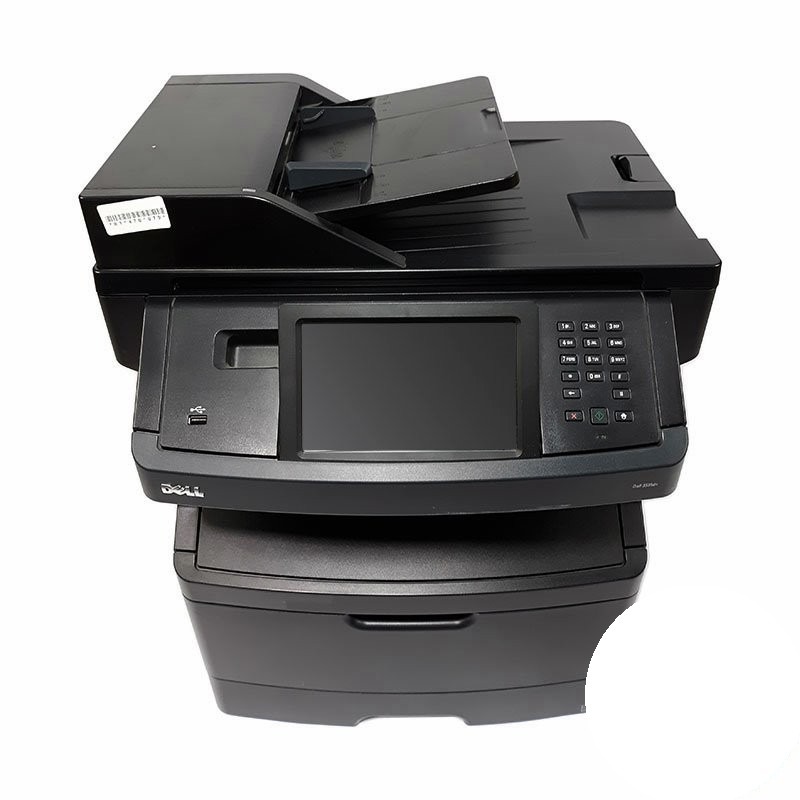
In a busy office the printer is infrastructure, and the Dell 3335dn is built like it: a 40-page-per-minute engine, automatic two-sided printing, wired networking and a big touchscreen for walk-up tasks. Print, scan, copy and fax all live in one unit the whole floor can rely on. Infrastructure needs predictable running costs, and those start with its cartridge — the high-yield 330-8985 black, which delivers roughly 14,000 pages per install and is stocked here as a single and in multipacks.
When a whole floor depends on one machine, surprise supply outages are not an option. A cartridge rated near 14,000 pages stretches the interval between swaps so far that toner becomes a line item you plan quarterly, not a problem you discover mid-meeting. The 3335dn's touchscreen supply screens help as well, showing levels before they become emergencies.
Toner Cartridges for Dell 3335dn
| Cartridge | Color | Page Yield |
|---|---|---|
| 330-8985 | Black | About 14,000 pages per cartridge |
| 330-8985 — 2 Pack | Black | About 14,000 pages per cartridge |
| 330-8985 — 3 Pack | Black | About 14,000 pages per cartridge |
| 330-8985 — 5 Pack | Black | About 14,000 pages per cartridge |
| 330-8985 — 10 Pack | Black | About 14,000 pages per cartridge |
Which cartridge should you buy?
The 330-8985 is the only cartridge this machine takes, so the decision is how many to hold. One cartridge already covers roughly 14,000 pages — enough for a small office for a long stretch. Floors that print and copy all day should hold the two- or three-pack so the swap is instant when the warning appears, and sites standardizing on this cartridge family across several machines save reordering effort with the five- and ten-packs. Either way, the yield is what does the economic work: the cartridge's cost is spread across thousands of pages.
Chip, toner and everyday use
The 3335dn reads each cartridge's chip to report its remaining level on the touchscreen, so the percentage you see is the chip's estimate, calculated at standard page coverage. Dense, graphic-heavy documents will run the number down faster than plain text. When you fit a replacement, let the machine finish recognizing it before starting a long run. And keep the spare where the machine's users can find it — on shared infrastructure, the best cartridge is the one that is actually on site.
Frequently Asked Questions
How many pages does a 3335dn cartridge print?
About 14,000 pages per 330-8985 cartridge at standard coverage. Real-world results vary with what you print — text pages go further, dense pages finish sooner.
What does the dn add over the base 3335?
Duplexing and networking: automatic two-sided printing and a wired network connection, so the machine is shared by the whole office and long documents use half the paper.
Can I check toner levels before the 3335dn runs out?
Yes — the supplies status is shown on the machine's touchscreen and through its driver, and the level is an estimate from the cartridge chip, so treat the low warning as your cue to fit or order the next cartridge.
Does the 3335dn use the same cartridge as the 3333?
It does. Both machines run on the 330-8985 black cartridge, so an office with a mix of 333x machines can stock one cartridge line for all of them.
More printers that use the same cartridges
The 330-8985 cartridge is the common supply across this Dell workgroup family: Color Laser Laser 2230D, Color Laser Laser 2330, Color Laser Laser 2330D, Color Laser Laser 2330DN, Color Laser Laser 2350, Color Laser Laser 2350D, Color Laser Laser 2350DN, Color Laser Laser 3333dn, Color Laser Laser 3335, Color Laser Laser 2230, Color Laser Laser 3333, Dell 330-2650, Dell 330-4130, Dell 330-5207, Dell 330-8985, Laser 2230, Laser 2230D, Laser 2230DN, Laser 2330, Laser 2330D, Laser 2330DN, Laser 2350, Laser 2350D, Laser 2350DN, Laser 2350dn, Laser 3330, Laser 3330DN, Laser 3333, Laser 3333DN, Laser 3335, Laser 3335DN, Multifunction 3333dn, Multifunction 3335dn.