




ImageClass MF4890DW
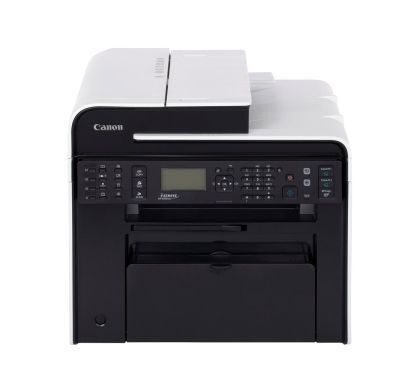
The Canon imageCLASS MF4890dw leaves nothing off the spec sheet: Wi-Fi, Ethernet and USB, a 50-sheet duplexing ADF, quiet mode and a tiltable 5-line LCD wrapped around a 26-ppm engine with automatic duplex printing. It is the top of the 48xx line, and it runs the Canon 128 cartridge — up to 2,100 pages in standard form, with a jumbo build available for the machine's heaviest document days.
Where the smaller models in this family serve one desk, the MF4890dw is built to be shared: the duplexing feeder digitizes a stack of two-sided pages in one pass, quiet mode keeps it welcome in an open office, and wireless printing means the whole team sends work to it. Shared machines eat toner on other people's schedules, which is why the supply question below matters more here than raw yield.
Toner Cartridges for ImageClass MF4890DW
| Cartridge | Color | Rated Yield |
|---|---|---|
| Canon 128 Black (128BK) | Black | 2,100 pages |
| Canon 128 Black for ImageClass MF4890dw | Black | 2,100 pages |
| Canon 128 Black | Black | 2,100 pages |
| Canon 128 Jumbo Black | Black | See product page |
| Canon 128 MICR Black | Black (MICR) | See product page |
| Canon 128 Black 2 Pack (128BK) | Black | 2,100 pages per cartridge |
| Canon 128 Black 2 Pack | Black | 2,100 pages per cartridge |
| Canon 128 Black 3 Pack (128BK) | Black | 2,100 pages per cartridge |
| Canon 128 Black 3 Pack | Black | 2,100 pages per cartridge |
| Canon 128 Black 5 Pack (128BK) | Black | 2,100 pages per cartridge |
| Canon 128 Black 5 Pack | Black | 2,100 pages per cartridge |
| Canon 128 Premium Quality Black 5 Pack | Black | 2,100 pages per cartridge |
| Canon 128 Black 10 Pack (128BK) | Black | 2,100 pages per cartridge |
Which cartridge should you buy?
On a shared printer, the jumbo build is usually the smart buy: it stretches the swap interval so the machine is less often caught empty mid-job, and the per-page cost drops with it. A stockroom shelf is the other half of the answer — the 3- and 5-packs, including the premium build, keep a sealed spare within reach of whoever gets the low-toner warning first. Single standard cartridges make sense for a lightly used satellite office, and the MICR listing covers the accounts desk if this machine also prints the checks.
Chip, toner and everyday use
However the job arrives — Wi-Fi, Ethernet or USB — the cartridge side is unchanged: the chip identifies the cartridge to the printer and reports remaining toner, and a compatible build for this family installs with no settings touched. Ratings assume about 5% coverage; a duplexing ADF encourages big scan-and-print jobs, and dense originals pull the real yield under the headline figure. When the warning shows, a gentle side-to-side rock redistributes what is left and buys time for the spare to be fitted. These compatible cartridges are covered by a 1-year warranty and 1-year returns.
Frequently Asked Questions
What toner does the MF4890dw take?
The Canon 128 cartridge, up to 2,100 pages in standard form. This page lists it as singles under both store lines, in a jumbo build, in multipacks up to ten, and as a MICR version.
Does duplex printing save toner?
It saves paper, not toner per printed side — each side of the sheet is imaged the same way. What duplexing does change is how much paper a shared office buys; toner planning still follows the page count and coverage of the jobs sent.
Can the same cartridge serve the other printers in our office?
If they are in the family list below, yes — machines such as the ImageClass MF4880DW draw on the same cartridge, which is why many offices standardize on it as their single spare. Check the code on the cartridge you pull out before assuming a match.
Is there a MICR cartridge for the MF4890dw?
Yes, a MICR build of this cartridge is listed in the table above. It is the version to use for check printing, where the magnetic toner lets bank scanners read the printed line.
More printers that use the same cartridges
This cartridge is shared across a broad band of Canon office models, listed here in a different order than most pages show:
i-SENSYS models: i-Sensys MF4410, i-Sensys MF4430, i-Sensys MF4450, i-Sensys MF4550D, i-Sensys MF4570DN, i-Sensys MF4580DN.
Satera models: Satera MF4410, Satera MF4430, Satera MF4450, Satera MF4470, Satera MF4480, Satera MF4550, Satera MF4570, Satera MF4580.
imageCLASS models: ImageClass MF4890, ImageClass MF4880DW, ImageClass MF4880, ImageClass MF4800, ImageClass MF4770N, ImageClass MF4770, ImageClass MF4580DN, ImageClass MF4580, ImageClass MF4570DW, ImageClass MF4570DN, ImageClass MF4570, ImageClass MF4550D, ImageClass MF4550, ImageClass MF4450, ImageClass MF4420N, ImageClass MF4420, ImageClass MF4412, ImageClass D560, ImageClass D550, ImageClass D530, ImageClass D520, ImageClass 4890DW.
FaxPhone models: FaxPhone L100, FaxPhone L190.