




i-Sensys MF4570DN
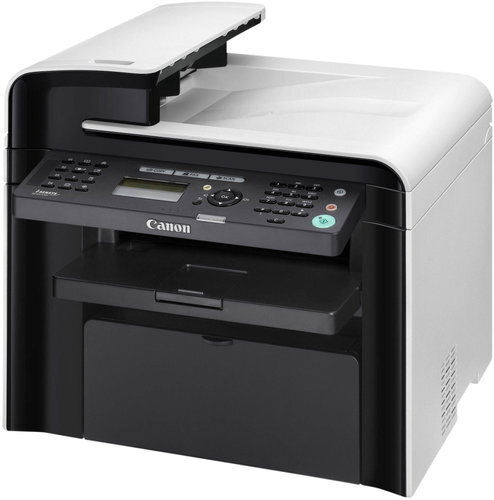
Ethernet changes everything on the i-Sensys MF4570dn. It is the first model in this European ladder with a network port, so instead of serving one cabled PC it shares its 26-ppm duplex output with the whole office. Originals move through a 50-sheet duplexing automatic document feeder that handles two-sided pages on its own. The supply side stays simple: one cartridge design, the Canon 128, rated at up to 2,100 pages.
A networked machine lives a different life from a personal one. Several people print to the MF4570dn across the day, two-sided originals arrive for copying in stacks, and nobody in particular owns the toner gauge. Volume is steadier and higher than a single-desk machine sees, and an empty cartridge is no longer one person's inconvenience — it stalls everyone. That is the context this model is bought for: a compact shared workhorse at the end of a network cable, feeding a small team.
Toner Cartridges for i-Sensys MF4570DN
| Cartridge | Color | Page Yield |
|---|---|---|
| Canon 128 — Black Toner Cartridge | Black | 2,100 pages |
| Canon 128 — Black Toner Cartridges, 3 Pack | Black | 2,100 pages per cartridge |
| Canon 128 — Black Toner Cartridges, 2 Pack | Black | 2,100 pages per cartridge |
| Canon 128 — Premium Quality Black Toner Cartridges, 5 Pack | Black | 2,100 pages per cartridge |
| Canon 128 — Jumbo Black Toner Cartridge | Black | See product page |
| Canon 128 — Black Toner Cartridges, 5 Pack | Black | 2,100 pages per cartridge |
| Canon 128 — MICR Black Toner Cartridge | Black | See product page |
Which cartridge should you buy?
Shared machines reward buying ahead. The installed cartridge may be rated at 2,100 pages, but with a whole office drawing on it, that figure arrives sooner than a lone user would expect — most workplaces keep the 3 pack or a 5 pack on the shelf and reorder when the last spare goes in. The Premium Quality 5 pack is the same idea with the premium build. Heavy, continuous use points to the Jumbo cartridge, whose rating is shown on its product page, while the MICR cartridge is the specialist option reserved for check stock. A lone standard cartridge only makes sense if this printer is a backup. All of these compatibles are covered by a 1-year warranty and 1-year returns.
Chip, toner and everyday use
When the time comes, the swap itself is the same one-minute, front-access job as on the rest of the range: old cartridge out, new cartridge rocked gently side to side, sealing strip removed, slide in until it clicks, and the chip is recognized automatically. On a shared machine, two small disciplines matter more than the swap: agree who checks toner status — before the big end-of-month run, not during it — and record the change somewhere, because "someone must have replaced it" is how offices end up with three empties and no spare. Ratings assume about 5% coverage per page, so statement runs with bold tables and logos will finish a cartridge sooner than plain letters would.
Frequently Asked Questions
What makes the MF4570dn different from the models below it?
The network port. It is the first rung of this ladder with Ethernet, and it pairs that with a 50-sheet duplexing ADF, so it is built to be shared rather than plugged into one PC.
Which toner does the i-Sensys MF4570dn take?
The Canon 128 cartridge — the same supply the rest of this compact range uses. A standard cartridge is rated at up to 2,100 pages.
Does the feeder scan two-sided originals by itself?
Yes. The 50-sheet automatic document feeder is a duplexing model, so it handles both sides of an original without manual flipping.
How many cartridges should a shared office keep?
At least one spare at all times. The 3 pack and 5 pack listings above exist precisely for shared machines like this one.
More printers that use the same cartridges
Standardizing is easy with this range, because the same Canon 128 also fits all of these: FaxPhone L100, ImageClass D520, ImageClass D560, ImageClass MF4420N, ImageClass MF4550D, ImageClass MF4570DW, ImageClass MF4770, ImageClass MF4880, ImageClass MF4890DW, Satera MF4450, Satera MF4550, i-Sensys MF4410, i-Sensys MF4550D, FaxPhone L190, ImageClass D530, ImageClass MF4412, ImageClass MF4450, ImageClass MF4570, ImageClass MF4580, ImageClass MF4770N, ImageClass MF4880DW, Satera MF4410, Satera MF4470, Satera MF4570, i-Sensys MF4430, i-Sensys MF4580DN, ImageClass 4890DW, ImageClass D550, ImageClass MF4420, ImageClass MF4550, ImageClass MF4570DN, ImageClass MF4580DN, ImageClass MF4800, ImageClass MF4890, Satera MF4430, Satera MF4480, Satera MF4580, i-Sensys MF4450.