




Satera MF4570
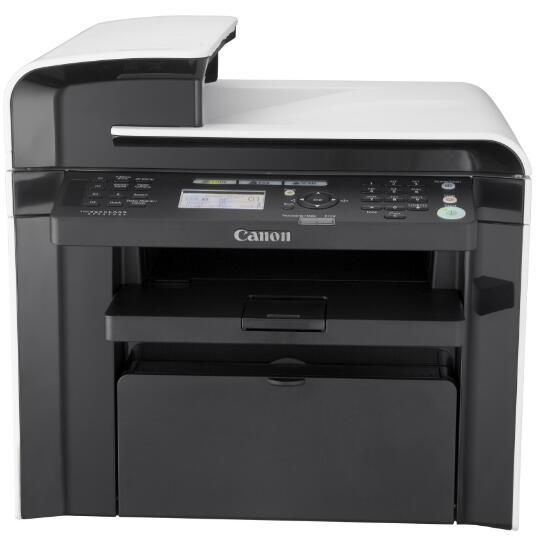
The Canon Satera MF4570 is the Japanese-badged twin of the MF4570 sold overseas: a 26-ppm monochrome laser 4-in-1 built around two-sided work. It prints double-sided automatically, connects by USB, and its 35-sheet duplexing automatic document feeder scans both faces of a page in one pass. Its supply is the Canon 128 toner cartridge, rated at up to 2,100 pages — the same cartridge its overseas twin uses.
Two-sided handling is this model's whole personality. Contracts, application forms and double-sided originals move through the feeder without anyone standing by to flip pages, and duplex printing trims paper consumption on longer documents. That makes the MF4570 a natural fit for a small office that scans as much as it prints — a reception desk digitizing paperwork, or an administrator working through stacks of signed forms. It stays a USB machine, serving the workstation it sits beside rather than a whole floor. If you know the ImageClass MF4570 from other markets, you already know this printer; only the badge and the sales channel differ.
Toner Cartridges for Satera MF4570
| Cartridge | Color | Page Yield |
|---|---|---|
| Canon 128 Toner Cartridges, 2 Pack | Black | 2,100 pages per cartridge |
| Canon 128 Toner Cartridge | Black | 2,100 pages |
| Canon 128 Toner Cartridges, 3 Pack | Black | 2,100 pages per cartridge |
| Canon 128 Jumbo Toner Cartridge | Black | See product page |
| Canon 128 MICR Toner Cartridge | Black (MICR) | See product page |
| Canon 128 Toner Cartridges, 5 Pack | Black | 2,100 pages per cartridge |
| Canon 128 Premium Quality Toner Cartridges, 5 Pack | Black | 2,100 pages per cartridge |
Which cartridge should you buy?
Match the pack to the paper flow. A home office that prints and scans in bursts will find a single Canon 128 lasts for months, and its duplexing habit stretches each cartridge further by putting two pages on every sheet. Busier desks should think in pairs: the 2 pack keeps a spare ready for the day a long scan-and-print job lands, while the Jumbo cartridge cuts down swap frequency for the heaviest users — its yield is listed on its product page. The MICR version exists for check printing only; ordinary documents gain nothing from it. Coverage here is straightforward: one year of warranty, and one year to return a cartridge that does not work out.
Chip, toner and everyday use
When you load a fresh cartridge, pull the sealing tape out completely and slide the cartridge home until it seats with a click; the machine reads its chip and resets the toner gauge. Half-removed tape is the classic cause of a brand-new cartridge printing blank streaks. Store unopened spares flat in a cool, dry spot away from windows — heat and sunlight age toner before it ever reaches the printer. Toward the end of a cartridge, a gentle side-to-side rock levels the remaining toner and can clean up fading pages. And remember that rated yields assume about 5% coverage: a day of bold, form-heavy printing draws the cartridge down noticeably faster than a day of plain letters.
Frequently Asked Questions
What toner does the Canon Satera MF4570 take?
The Canon 128 cartridge, rated at up to 2,100 pages. It is the same supply used across this whole Canon family.
Does the MF4570 scan two-sided originals automatically?
Yes. Its 35-sheet automatic document feeder is a duplexing feeder, so it captures both sides of each original in a single pass — no manual page-turning.
How is the Satera MF4570 different from the ImageClass MF4570?
In hardware terms, it is not: Satera is Canon's Japanese-market badge for the same 26-ppm duplex platform sold elsewhere as the ImageClass MF4570. Cartridges and day-to-day operation are identical.
Which cartridge suits a heavy scanning and printing month?
The Canon 128 Jumbo or a multi-pack. Both reduce how often work stops for a cartridge swap; compare their product pages for the current yield figures.
More printers that use the same cartridges
One cartridge, four Canon badges. The 128 keeps all of these machines supplied, grouped here by the name on the front panel:
Satera: Satera MF4410, Satera MF4430, Satera MF4450, Satera MF4470, Satera MF4480, Satera MF4550, Satera MF4580
i-Sensys: i-Sensys MF4410, i-Sensys MF4430, i-Sensys MF4450, i-Sensys MF4550D, i-Sensys MF4570DN, i-Sensys MF4580DN
FaxPhone: FaxPhone L100, FaxPhone L190
ImageClass: ImageClass 4890DW, ImageClass D520, ImageClass D530, ImageClass D550, ImageClass D560, ImageClass MF4412, ImageClass MF4420, ImageClass MF4420N, ImageClass MF4450, ImageClass MF4550, ImageClass MF4550D, ImageClass MF4570, ImageClass MF4570DN, ImageClass MF4570DW, ImageClass MF4580, ImageClass MF4580DN, ImageClass MF4770, ImageClass MF4770N, ImageClass MF4800, ImageClass MF4880, ImageClass MF4880DW, ImageClass MF4890, ImageClass MF4890DW