




COLOR LASERJET M554DN
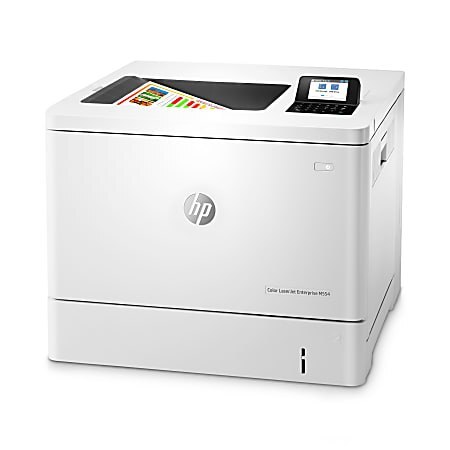
The Color LaserJet M554DN is HP's 2020-era answer for enterprise workgroups that need a dependable color printer and nothing they have to think about twice. It runs the HP 212A (W2120A) family — that black in standard yield, with W2121A cyan, W2123A magenta and W2122A yellow filling the color slots — and a high-yield line for heavier floors, headed by 212X (W2120X) black with W2121X cyan, W2123X magenta and W2122X yellow. The shelf below is compatible cartridges throughout, listed under this model and under each of its six siblings, because all seven machines burn the same four cartridges.
Workgroup printers are bought by departments and judged by one metric: whether the queue ever stops. The M554DN sits on the network, prints two-sided as a matter of routine, and asks for attention only when a cartridge ends — which the high-yield tier pushes gratifyingly far apart. Facilities teams like the shared shelf for a practical reason: one stock of spares covers the whole M554/M555/M578 group, so a cartridge pulled for one machine fits the next. Compatible cartridges here are backed by a 1-year warranty and 1-year returns.
Toner Cartridges for COLOR LASERJET M554DN
| Cartridge | Color | Page Yield |
|---|---|---|
| W2120A Black, 2 pack | Black | See product page |
| W2120A, W2121A, W2123A, W2122A 4 Color Set | Black, Cyan, Magenta, Yellow | See product page |
| W2120A Black | Black | See product page |
| W2121A Cyan | Cyan | See product page |
| W2123A Magenta | Magenta | See product page |
| W2122A Yellow | Yellow | See product page |
| W2120X Black, 2 pack | Black | See product page |
| W2120X, W2121X, W2123X, W2122X 4 Color Set | Black, Cyan, Magenta, Yellow | See product page |
| W2120X Black | Black | See product page |
| W2121X Cyan | Cyan | See product page |
| W2123X Magenta | Magenta | See product page |
| W2122X Yellow | Yellow | See product page |
Also stocked under the M555DN listings: W2120A Black, 2 pack, W2120A, W2121A, W2123A, W2122A 4 Color Set, W2120A Black, W2121A Cyan, W2123A Magenta, W2122A Yellow, W2120X Black, 2 pack, W2120X, W2121X, W2123X, W2122X 4 Color Set, W2120X Black, W2121X Cyan, W2123X Magenta, W2122X Yellow.
Also stocked under the M555X listings: W2120A Black, 2 pack, W2120A, W2121A, W2123A, W2122A 4 Color Set, W2120A Black, W2121A Cyan, W2123A Magenta, W2122A Yellow, W2120X Black, 2 pack, W2120X, W2121X, W2123X, W2122X 4 Color Set, W2120X Black, W2121X Cyan, W2123X Magenta, W2122X Yellow.
Also stocked under the M578C listings: W2120A Black, 2 pack, W2120A, W2121A, W2123A, W2122A 4 Color Set, W2120A Black, W2121A Cyan, W2123A Magenta, W2122A Yellow, W2120X Black, 2 pack, W2120X, W2121X, W2123X, W2122X 4 Color Set, W2120X Black, W2121X Cyan, W2123X Magenta, W2122X Yellow.
Also stocked under the M578DN listings: W2120A Black, 2 pack, W2120A, W2121A, W2123A, W2122A 4 Color Set, W2120A Black, W2121A Cyan, W2123A Magenta, W2122A Yellow, W2120X Black, 2 pack, W2120X, W2121X, W2123X, W2122X 4 Color Set, W2120X Black, W2121X Cyan, W2123X Magenta, W2122X Yellow.
Also stocked under the M578F listings: W2120A Black, 2 pack, W2120A, W2121A, W2123A, W2122A 4 Color Set, W2120A Black, W2121A Cyan, W2123A Magenta, W2122A Yellow, W2120X Black, 2 pack, W2120X, W2121X, W2123X, W2122X 4 Color Set, W2120X Black, W2121X Cyan, W2123X Magenta, W2122X Yellow.
Also stocked under the M578Z listings: W2120A Black, 2 pack, W2120A, W2121A, W2123A, W2122A 4 Color Set, W2120A Black, W2121A Cyan, W2123A Magenta, W2122A Yellow, W2120X Black, 2 pack, W2120X, W2121X, W2123X, W2122X 4 Color Set, W2120X Black, W2121X Cyan, W2123X Magenta, W2122X Yellow.
Which cartridge should you buy?
Department printing argues for the X tier almost by default. The high-yield black carries the document load — reports, invoices, contracts — and its longer life means fewer interruptions landing on somebody's afternoon; buying it as a 2 pack keeps the next swap already in the cabinet. Colors depend on the floor's habits: a department printing color daily should run X colors as well, while one that prints a color cover page now and then can hold standard colors and replace them singly as they fade. The four-color set is the tidy choice when a machine is commissioned or several slots run low together. Tiers mix freely across slots, so the shelf can be tuned per color instead of bought in lockstep.
Chip, toner and everyday use
In a workgroup, a cartridge change should be a one-minute, no-manual job, and on this machine it is: door open, empty unit out, seal strip pulled from the new unit, seated, door closed — the chip is read as the door shuts and the level display refreshes. If a toner alert outlives a correctly installed cartridge, open and close the door once or restart the printer to force a fresh reading before suspecting the cartridge. Spares for a shared fleet should live sealed and upright in one labeled cabinet; a cartridge stored cool and dry is ready the moment a slot runs dry, and rocking a fading unit gently buys time until someone makes the swap.
Frequently Asked Questions
Which toner cartridges work with the Color LaserJet M554DN?
W2120A black, W2121A cyan, W2122A yellow and W2123A magenta in standard yield, or W2120X, W2121X, W2122X and W2123X in high yield. Any slot takes either tier; the code on the cartridge you remove confirms what to put back.
Is the M554DN a color printer?
Yes — it prints in full color from four cartridges, and all four need to be installed for accurate color output. Black carries most everyday work, which is why it usually empties first, but a missing color will show up immediately in anything with graphics or charts.
Why does my M554DN still show a toner alert after I installed a new cartridge?
The printer normally clears the alert on its own once the new cartridge's chip is detected. If the message persists, open and close the toner door or restart the printer to refresh the sensor reading; that resolves it in nearly every case.
Should a workgroup buy the standard or high-yield cartridges?
High yield, in most cases. The X cartridges print more pages per unit, lower the cost per page and reduce how often the machine stops for a swap — the three things a shared department printer is judged on. Standard yield suits only genuinely light color slots.
More printers that use the same cartridges
Six more enterprise models run these identical cartridges, so fleet spares are interchangeable across all of them.
COLOR LASERJET M555DN, COLOR LASERJET M555X, COLOR LASERJET M578C, COLOR LASERJET M578DN, COLOR LASERJET M578F, COLOR LASERJET M578Z.