




COLOR LASERJET M578Z
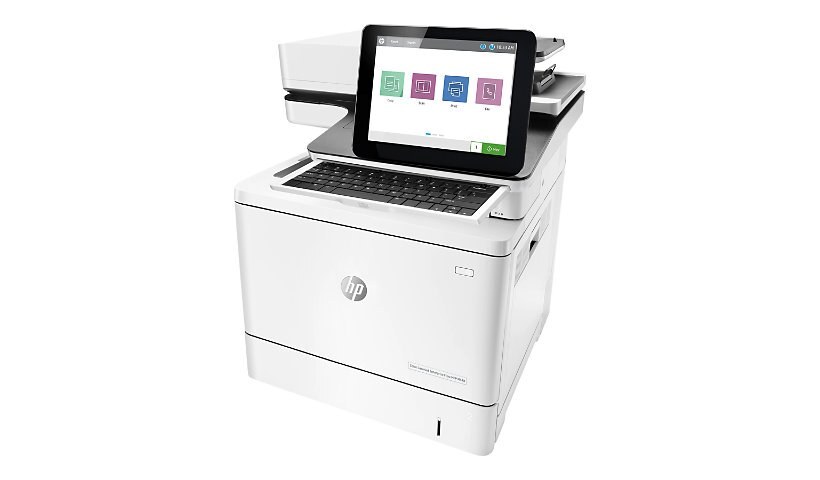
The Color LaserJet M578Z sits at the top of HP's enterprise color line - the flagship configuration for workgroups that want maximum capability from their shared machine. Its supply shelf is the 212 family in full: HP 212A (W2120A) black with W2121A cyan, W2122A yellow and W2123A magenta, and the high-yield line of HP 212X (W2120X) black, W2121X cyan, W2122X yellow and W2123X magenta. Every listing on this page is a compatible cartridge built to one of those codes, from single colors to full sets and black multipacks.
A flagship machine earns flagship treatment in the supply closet. This is the printer a workgroup points its biggest jobs at, and its downtime is the most expensive in the department - not in repair bills, but in stalled work. The stocking rule that fits it is simple: a spare black always on hand, colors reordered as their levels drop, and no slot ever left to surprise anyone. The breadth of this shelf, with both tiers and every pack shape, exists to make that rule easy to keep.
Toner Cartridges for Color LaserJet M578Z
| Cartridge | Color | Page Yield |
|---|---|---|
| HP 212A (W2120A) Black | Black | See product page |
| HP 212A (W2121A) Cyan | Cyan | See product page |
| HP 212A (W2123A) Magenta | Magenta | See product page |
| HP 212A (W2122A) Yellow | Yellow | See product page |
| HP 212A Black - 2 Pack (standard yield) | Black | See product page |
| HP 212A 4-Color Set (standard yield) | Black / Cyan / Magenta / Yellow | See product page |
| HP 212X (W2120X) Black | Black | See product page |
| HP 212X (W2121X) Cyan | Cyan | See product page |
| HP 212X (W2123X) Magenta | Magenta | See product page |
| HP 212X (W2122X) Yellow | Yellow | See product page |
| HP 212X Black - 2 Pack (high yield) | Black | See product page |
| HP 212X 4-Color Set (high yield) | Black / Cyan / Magenta / Yellow | See product page |
The same codes appear in the M578DN listings: 212A black double pack, 212A full four-color set, 212A black, 212A cyan, 212A magenta, 212A yellow, 212X black double pack, 212X full four-color set, 212X black, 212X cyan, 212X magenta, 212X yellow.
The same codes appear in the M578F listings: 212A black double pack, 212A full four-color set, 212A black, 212A cyan, 212A magenta, 212A yellow, 212X black double pack, 212X full four-color set, 212X black, 212X cyan, 212X magenta, 212X yellow.
The same codes appear in the M578Z listings: 212A black double pack, 212A full four-color set, 212A black, 212A cyan, 212A magenta, 212A yellow, 212X black double pack, 212X full four-color set, 212X black, 212X cyan, 212X magenta, 212X yellow.
The same codes appear in the M554DN listings: 212A black double pack, 212A full four-color set, 212A black, 212A cyan, 212A magenta, 212A yellow, 212X black double pack, 212X full four-color set, 212X black, 212X cyan, 212X magenta, 212X yellow.
The same codes appear in the M555DN listings: 212A black double pack, 212A full four-color set, 212A black, 212A cyan, 212A magenta, 212A yellow, 212X black double pack, 212X full four-color set, 212X black, 212X cyan, 212X magenta, 212X yellow.
The same codes appear in the M555X listings: 212A black double pack, 212A full four-color set, 212A black, 212A cyan, 212A magenta, 212A yellow, 212X black double pack, 212X full four-color set, 212X black, 212X cyan, 212X magenta, 212X yellow.
The same codes appear in the M578C listings: 212A black double pack, 212A full four-color set, 212A black, 212A cyan, 212A magenta, 212A yellow, 212X black double pack, 212X full four-color set, 212X black, 212X cyan, 212X magenta, 212X yellow.
Which cartridge should you buy?
Run the flagship on the tier its volume deserves. The high-yield 212X cartridges are the working default for a machine of this class: longer runs, lower cost per page, fewer swaps interrupting the queue. The 212X four-color set is the clean way to refresh the whole row at once, and the 212A black 2-pack or its X equivalent keeps black doubled up. Standard-yield 212A singles still have their place - a single faded color on a machine whose other slots are healthy - but for this printer they are the exception, not the plan.
Chip, toner and everyday use
Keep spares the way the cartridges keep themselves: sealed in the original packaging, upright, in a cool dry spot away from sunlight, with the seal unbroken until install day. When a cartridge goes in, remove all packing material, seat it until it clicks, and let the chip report in before the next job is sent. A cartridge that has sat for months benefits from a gentle rock end to end to redistribute the toner. Remember that rated yields assume about 5% page coverage, so presentation-heavy months will always outrun the estimate. Compatible cartridges on this page carry a 1-year warranty and 1-year returns.
Frequently Asked Questions
Which cartridges does the Color LaserJet M578Z use?
W2120A, W2121A, W2122A and W2123A at standard yield, and W2120X, W2121X, W2122X and W2123X at high yield. Checking the label on the old cartridge is the fastest way to confirm which of the eight you are replacing.
Can the M578Z print envelopes and labels?
Yes - feed envelopes or label sheets through the manual tray and choose the matching media size in the print dialog. Print one sheet first to check alignment before running the full batch.
How should a spare cartridge be stored?
Sealed in its original packaging, upright, in a cool dry place away from sunlight. Do not break the seal until you are ready to install; a cartridge stored that way is at full strength whenever the machine calls for it.
What stocking pattern suits a flagship machine?
Keep one spare black on hand at all times, reorder each color as its level drops rather than after it empties, and use high-yield cartridges as the default tier. That pattern is what keeps a top-end shared machine from ever waiting on toner.
More printers that use the same cartridges
The cartridge set on this page also fits: COLOR LASERJET M578DN, COLOR LASERJET M578F, COLOR LASERJET M554DN, COLOR LASERJET M555DN, COLOR LASERJET M555X, COLOR LASERJET M578C.