







 See Compatible Printers
 Read more about our ink!
Hewlett Packard
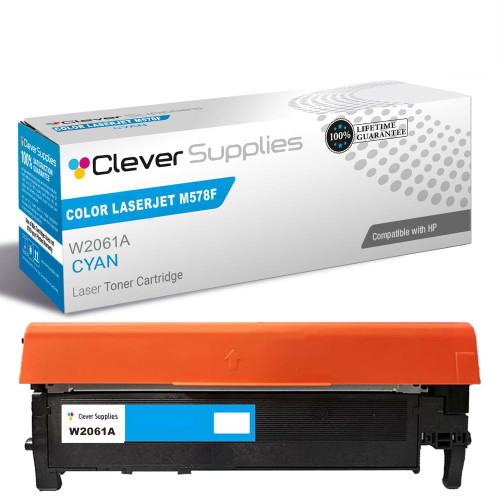
Compatible HP 212X (W2121X) Toner Cartridge Cyan
- Page Yield:
- Color: 10000
- Availability:
- In Stock
- Shipping:
- Free Shipping

Amazon Price:

- Page Yield:
- Color: 10000
- Availability:
- In Stock
- Shipping:
- Free Shipping
- Compatible Printers
- Specifications
- SKU:
- CS-HP-212X-CLJ-M578F-C
- Printer Brand:
- Hewlett Packard
- OEM Number:
- W2121X
- Ink Color:
- Cyan
- Page Yield:
- Color: 10000
- Printer Type:
- Laser Cartridge
- Condition:
- New Compatible
- Description
- Reviews



Ensure peak performance and long-lasting results with the HP 212X toner cartridge series, which includes HP 212X W2120X Black, W2121X Cyan, W2123X Magenta, and W2122X Yellow. These high-yield cartridges are built to handle heavy workloads while delivering crisp, clear text and vibrant color. Designed for efficiency, the HP 212X toner cartridge offers more pages per cartridge compared to standard yield options, making it a smart choice for busy offices and high-volume printing environments. Every print showcases excellent quality and consistent results. Compatible with HP printers such as COLOR LASERJET M554DN, COLOR LASERJET M555DN, COLOR LASERJET M555X, COLOR LASERJET M578C, COLOR LASERJET M578DN, COLOR LASERJET M578F, and COLOR LASERJET M578Z, the HP 212X cartridge series ensures easy installation and smooth integration with your printing setup. Count on HP 212X toner cartridge technology to deliver reliability, professional-grade output, and reduced downtime. These cartridges are engineered to help your business maintain productivity without compromising print quality.
Frequently Asked Questions
Which code feeds the blue in our weather maps?
W2121X, the cyan cartridge of the HP 212X family. Oceans, lakes, rivers and half the isobar work on a synoptic chart are drawn from the cyan channel, so for a mapping desk this is a primary color, not an accent. Reorder by the code on the spent unit's label.
Our maps are printing with gray, muddy water — what failed?
Cyan is fading. Water bodies lose their blue and slide toward gray-green sludge, and fine blue linework thins out first. The supplies page will confirm cyan as the low station; fitting a fresh W2121X restores the chart's readability before the next edition goes out.
How does the 10,000-page rating behave on map output?
Maps are moderate work: large pale washes of color rather than solid blocks, over mostly white sheets. That keeps consumption per page modest, so a mapping office typically gets a long service run from one cyan cartridge — with the five per cent rating as the yardstick, not a schedule.
Can the swap wait until between editions?
It should be planned that way. The change itself takes moments, but editions run on deadlines, and a mid-run swap risks one chart in the sequence printing at visibly different strength. Fit the fresh cartridge at the natural break and the whole edition matches itself.
What protection comes with this $97.76 unit?
A 1-year warranty stands behind the cartridge, and 1-year free returns cover one that arrives damaged or fades far too early. Orders ship from our Illinois, Pennsylvania, Georgia and California warehouses, with support staffed Monday through Friday, 9 AM to 5 PM CST. Terms are set out on the shipping and returns page.
In map work, which channel usually runs out first?
Yours — cyan. Any office whose signature output is water and sky will drink this channel ahead of the others, so it deserves its own watch: check the cyan gauge whenever charts are queued, and keep the spare dedicated rather than shared with general office colors.
What is the earliest sign on a chart that the cyan channel is fading?
The fine blue linework goes first: isobars, river lines and depth contours thin and break while the broad water washes still look passable. Lines ask more of the channel than pale fills do, so they confess earlier. When the linework starts to look tired, check the W2121X gauge before the next edition rather than after it.
Where does checking cyan belong in the routine for preparing a new edition?
On the preparation checklist itself, alongside paper and file checks. A glance at the supplies page while the edition is being assembled costs nothing and converts cyan from a mid-print discovery into a planned swap at the break. Desks that publish on a schedule cannot afford to learn about an empty W2121X from a printed chart.
The land areas on our maps are shifting color as well as the water — is that the same fault?
It can be. Greens on land are mixed from cyan and yellow, so a fading W2121X drags vegetation and relief shading off color at the same time as the water. If both sea and land have drifted, suspect cyan first; if only the greens have moved while the water stays true, compare the yellow gauge before ordering.
How do we stop the mapping desk's dedicated spare from being borrowed for general office printing?
Give it a labeled home of its own: the W2121X code and the words mapping reserve written on the shelf spot beside the chart printer. A spare that lives in general stock will be taken for the first ordinary emergency; a labeled, dedicated one survives until the edition that actually depends on it.
About This W2121X Cyan Cartridge
A weather map is only useful if its blues can be trusted at a glance. This cartridge keeps oceans blue and linework legible in the Color LaserJet Enterprise M554dn, edition after edition. For desks that publish on a schedule, cyan health is editorial quality control — and this is the unit that provides it.
The same cartridge bay runs right across this platform — Color LaserJet Enterprise M554dn, Color LaserJet Enterprise M555dn, Color LaserJet Enterprise M555x, Color LaserJet Enterprise M578c, Color LaserJet Enterprise M578dn, Color LaserJet Enterprise M578f and Color LaserJet Enterprise M578z all feed from it.
The neighbouring bays are covered by the black W2120X, the yellow W2122X and the magenta W2123X; for lighter-duty months there is the standard-yield W2121A, and the 212X four-color set renews every channel in a single box.
Related Items

Hewlett Packard
Compatible HP 212X (W2121X) Toner Cartridge Cyan



Hewlett Packard
Compatible HP 212X (W2121X) Toner Cartridge Cyan


Hewlett Packard
Compatible HP 212X (W2121X) Toner Cartridge Cyan


Hewlett Packard
Compatible HP 212X (W2121X) Toner Cartridge Cyan