






 See Compatible Printers
 Read more about our ink!
Hewlett Packard
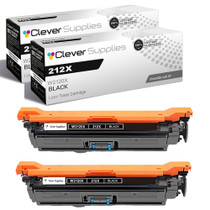
Compatible HP 212X (W2120X) Toner Cartridge 2 Black
- Page Yield:
- Black: 13000
- Availability:
- In Stock
- Shipping:
- Free Shipping

Amazon Price:

- Page Yield:
- Black: 13000
- Availability:
- In Stock
- Shipping:
- Free Shipping
- Compatible Printers
- Specifications
- SKU:
- CS-HP-212X-CLJ-M554DN-2Black
- Printer Brand:
- Hewlett Packard
- OEM Number:
- W2120X
- Ink Color:
- Black
- Page Yield:
- Black: 13000
- Printer Type:
- Laser Cartridge
- Condition:
- New Compatible
- Description
- Reviews



Ensure peak performance and long-lasting results with the HP 212X toner cartridge series, which includes HP 212X W2120X Black, W2121X Cyan, W2123X Magenta, and W2122X Yellow. These high-yield cartridges are built to handle heavy workloads while delivering crisp, clear text and vibrant color. Designed for efficiency, the HP 212X toner cartridge offers more pages per cartridge compared to standard yield options, making it a smart choice for busy offices and high-volume printing environments. Every print showcases excellent quality and consistent results. Compatible with HP printers such as COLOR LASERJET M554DN, COLOR LASERJET M555DN, COLOR LASERJET M555X, COLOR LASERJET M578C, COLOR LASERJET M578DN, COLOR LASERJET M578F, and COLOR LASERJET M578Z, the HP 212X cartridge series ensures easy installation and smooth integration with your printing setup. Count on HP 212X toner cartridge technology to deliver reliability, professional-grade output, and reduced downtime. These cartridges are engineered to help your business maintain productivity without compromising print quality.
Frequently Asked Questions
Why would a single-printer office order black two at a time?
Because the second cartridge is the insurance policy. This listing pairs two W2120X high-yield blacks from the HP 212X line: one works, one waits sealed on the shelf, and a low-toner warning becomes a two-minute swap instead of a two-day delivery wait.
How will I know the installed cartridge is truly finished?
Watch for the pattern: long documents fade at the page foot first, then fine print grays. The rock test buys a few dozen pages at most. With a spare in the building, there is no reason to nurse a dying unit — swap at the first honest fade and keep the run clean.
Does the shelf cartridge lose capacity while it waits?
No. The 13,000-page rating is spent by printing, not by time. A sealed W2120X stored flat in a cool cabinet delivers its full rating months after purchase, which is exactly what makes the two-at-a-time habit rational for a busy single printer.
What should trigger the reorder of the next pair?
The day the spare goes into the machine. That single rule — spare installed, order placed — keeps the shelf from ever standing empty and turns toner into a background process instead of a recurring emergency.
What stands behind this $177.03 purchase?
Both cartridges carry a 1-year warranty apiece, and 1-year free returns cover a unit that lands damaged or disappoints early. Orders ship from our Illinois, Pennsylvania, Georgia and California warehouses, and our team answers Monday through Friday, 9 AM to 5 PM CST. Read the details on the shipping and returns page.
Any storage rules for the waiting cartridge?
Keep it in its bag, lying flat, out of sun and away from the heater vent. That is the whole list — no rotation schedule, no shaking ritual, nothing to calendar. Offices that write the purchase month on the box find even that much housekeeping pays off at reorder time.
What does each black page in this pair actually cost?
The $177.03 covers two cartridges rated at 13,000 pages apiece — 26,000 pages in total, which works out to roughly seven-tenths of a cent per standard page. For a single-printer office that is the whole black budget in one line: no separate stocking decisions, no second code, just one pair at a time carrying the printer through two full cycles.
How do you make sure the mid-run swap grabs the right box?
The shelf of a color machine's office usually holds more than black. Before the swap, read the stamp on the waiting box and match it against the unit coming out — both should read W2120X. Ten seconds of checking at the shelf beats discovering a wrong cartridge with the machine open and a print run standing behind you.
If the first cartridge of the pair prints badly right away, what then?
Fit the second unit and keep working — that is the quiet advantage of owning the pair. A cartridge that arrives damaged or fails early is covered by 1-year free returns alongside its 1-year warranty, so the conversation with us happens after your printing is safe, with the suspect W2120X in hand and the printer already back in service.
What do you do with the empties across the pair's life?
Box each spent cartridge as it comes out and hold it until its replacement has settled in. When the second unit of the pair is eventually spent, both empties can leave together for recycling in a single trip. The rhythm keeps the office free of loose cartridges and the shelf holding exactly one thing: the sealed W2120X that is waiting its turn.
About This W2120X Black 2-Pack
The working cartridge plus its understudy. Each W2120X seats into the Color LaserJet Enterprise M554dn and platform siblings without ceremony, and the pair keeps a single-printer office printing through two full 13,000-page cycles. Buy the rhythm once, and toner stops interrupting the work. Fleet buyers meet the identical slot in COLOR LASERJET M555DN and COLOR LASERJET M555X and again in COLOR LASERJET M578C, COLOR LASERJET M578DN, COLOR LASERJET M578F and COLOR LASERJET M578Z — one cartridge covers the lot. Singles buyers are served by W2120X; the standard-yield W2120A twin pack offers the twin-pack idea in standard form, and the 212X four-color set covers every slot in a single purchase.
Related Items

Hewlett Packard
Compatible HP 212X (W2120X) Toner Cartridge 2 Black



Hewlett Packard
Compatible HP 212X (W2120X) Toner Cartridge 2 Black


Hewlett Packard
Compatible HP 212X (W2120X) Toner Cartridge 2 Black


Hewlett Packard
Compatible HP 212X (W2120X) Toner Cartridge Black