






 See Compatible Printers
 Read more about our ink!
Hewlett Packard
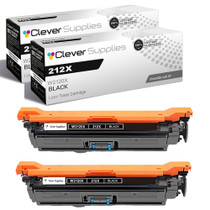
Compatible HP 212X (W2120X) Toner Cartridge 2 Black
- Page Yield:
- Black: 13000
- Availability:
- In Stock
- Shipping:
- Free Shipping

Amazon Price:

- Page Yield:
- Black: 13000
- Availability:
- In Stock
- Shipping:
- Free Shipping
- Compatible Printers
- Specifications
- SKU:
- CS-HP-212X-CLJ-M578F-2Black
- Printer Brand:
- Hewlett Packard
- OEM Number:
- W2120X
- Ink Color:
- Black
- Page Yield:
- Black: 13000
- Printer Type:
- Laser Cartridge
- Condition:
- New Compatible
- Description
- Reviews



Ensure peak performance and long-lasting results with the HP 212X toner cartridge series, which includes HP 212X W2120X Black, W2121X Cyan, W2123X Magenta, and W2122X Yellow. These high-yield cartridges are built to handle heavy workloads while delivering crisp, clear text and vibrant color. Designed for efficiency, the HP 212X toner cartridge offers more pages per cartridge compared to standard yield options, making it a smart choice for busy offices and high-volume printing environments. Every print showcases excellent quality and consistent results. Compatible with HP printers such as COLOR LASERJET M554DN, COLOR LASERJET M555DN, COLOR LASERJET M555X, COLOR LASERJET M578C, COLOR LASERJET M578DN, COLOR LASERJET M578F, and COLOR LASERJET M578Z, the HP 212X cartridge series ensures easy installation and smooth integration with your printing setup. Count on HP 212X toner cartridge technology to deliver reliability, professional-grade output, and reduced downtime. These cartridges are engineered to help your business maintain productivity without compromising print quality.
Frequently Asked Questions
What exactly are we buying in the 2 Black pack?
Two complete W2120X cartridges — the high-yield black of the HP 212X line — boxed as a pair. Each is a full unit with its own 13,000-page rating; the pack is a stocking format, not a special double cartridge, and either twin can be installed whenever its moment comes.
Our operation runs around the clock — why does a pair matter?
Because toner never runs out at a convenient hour. With the second cartridge already on site, a night-shift supervisor can swap in a full unit at 3 AM and keep dispatch, picking or check-in moving, instead of logging a stalled printer for the morning crew to discover.
How should the two cartridges be used — one now, one later?
Exactly that. Fit the first when the machine calls for it and keep the second sealed as the standing reserve. Every time the reserve goes into service, that is the signal to reorder the next pair, so the shelf cycles without ever sitting empty.
Does a cartridge waiting months as a reserve lose anything?
Nothing measurable. Toner is a dry powder in a sealed housing; stored flat in a cool, dry cabinet it prints at full density whenever it is finally fitted. Rotation is good practice — use the older box first — but there is no expiry clock ticking on the shelf.
What cover does the $177.03 pack carry?
Each cartridge in the pair is backed by a 1-year warranty, and 1-year free returns apply to a unit that arrives damaged or fades far too early. We dispatch from our Illinois, Pennsylvania, Georgia and California warehouses, and support answers Monday through Friday, 9 AM to 5 PM CST. The terms live on the shipping and returns page.
Where should the reserve live in a 24-hour building?
In the same cabinet as the printer's other consumables, labeled with its code and arrival date, where the night crew actually looks. A reserve stored across the site at night might as well be in another state; proximity is what turns a spare into uptime.
What does the pair work out to per page of rated life?
The arithmetic is reassuring: $177.03 buys two W2120X cartridges rated at 13,000 pages each, so the pair puts 26,000 rated pages on the shelf at well under a cent per page. For an operation that prints around the clock, that is the whole black-toner budget expressed as a single, predictable line.
When a second pair arrives, how should the shelf be organized so the rotation stays honest?
Date every box on arrival and load the shelf so the older pair is always the one within reach. Fit from the earliest stock first and let the newer pair wait behind it. The cartridges lose nothing by waiting, but a written date removes the guesswork about which box has been standing longest.
A supervisor swaps the cartridge at 3 AM — how does the morning crew verify the printer is truly back?
The fresh W2120X registers on the printer's supplies page, which the morning crew can check in seconds, and the spent unit should be waiting boxed and marked beside the machine as the physical record of the swap. A test page through the first job of the day closes the loop: dense black, job done.
Can one pair cover two different printers on the same night?
Yes — the two cartridges are independent units, and the same W2120X fits every machine on this platform, from the Color LaserJet Enterprise M554dn to the M578z. If two stations call on the same night, the pair splits without any penalty; the reorder that follows simply restores the two-cartridge reserve.
About This W2120X 2-Pack Black Set
Uptime, boxed in pairs. For sites whose printers work every shift the building does, the second cartridge is not stock — it is the difference between a two-minute swap and a stalled operation. Loaded into the Color LaserJet Enterprise M554dn, each unit delivers the same dense black and the same long service interval, day shift or night.
One bay design covers the range, and Color LaserJet Enterprise M554dn, Color LaserJet Enterprise M555dn, Color LaserJet Enterprise M555x, Color LaserJet Enterprise M578c, Color LaserJet Enterprise M578dn, Color LaserJet Enterprise M578f and Color LaserJet Enterprise M578z are all built around it.
For a one-off change there is the single W2120X; The standard-yield W2120A twin pack covers the same pairing for lighter months; and the 212X four-color set looks after color days.
Related Items

Hewlett Packard
Compatible HP 212X (W2120X) Toner Cartridge 2 Black



Hewlett Packard
Compatible HP 212X (W2120X) Toner Cartridge 2 Black


Hewlett Packard
Compatible HP 212X (W2120X) Toner Cartridge Black

Hewlett Packard
Compatible HP 212X (W2120X) Toner Cartridge 2 Black