







 See Compatible Printers
 Read more about our ink!
Hewlett Packard
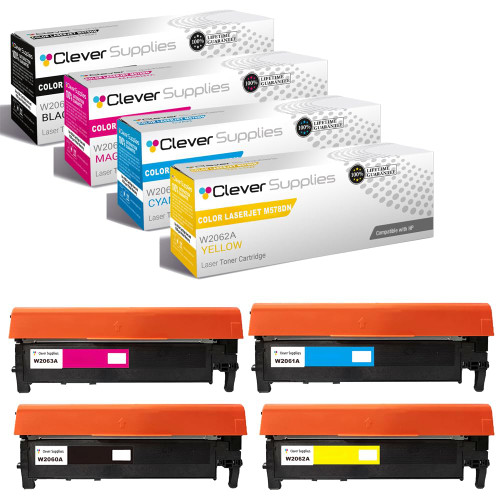
Compatible HP 212A (W2120A, W2121A, W2123A, W2122A) Toner Cartridge 4 Color Set

Amazon Price:

- Page Yield:
- Black: 4500
- Availability:
- In Stock
- Shipping:
- Free Shipping
- Compatible Printers
- Specifications
- SKU:
- CS-HP-212A-CLJ-M578DN-4Color-Set
- Printer Brand:
- Hewlett Packard
- OEM Number:
- W2120A, W2121A, W2123A, W2122A
- Ink Color:
- Black, Cyan, Magenta, Yellow
- Page Yield:
- Black: 4500
- Printer Type:
- Laser Cartridge
- Condition:
- New Compatible
- Description
- Reviews



Get vibrant, professional-quality prints with the HP 212A toner cartridge series, which includes HP 212A W2120A Black, W2121A Cyan, W2123A Magenta, and W2122A Yellow. These cartridges are designed to deliver sharp text and brilliant colors, making them ideal for high-impact business documents. Built for consistent performance, the HP 212A toner cartridge ensures every page meets high standards of clarity and detail. Whether you're printing presentations or detailed graphics, you can rely on these cartridges for outstanding color accuracy and smooth operation. Compatible with a wide range of HP printers, including COLOR LASERJET M554DN, COLOR LASERJET M555DN, COLOR LASERJET M555X, COLOR LASERJET M578C, COLOR LASERJET M578DN, COLOR LASERJET M578F, and COLOR LASERJET M578Z, the HP 212A series ensures seamless installation and optimal performance in each supported device. Rely on HP 212A toner cartridge technology to support high-volume printing needs with minimal interruptions. Designed for efficiency, these cartridges help reduce downtime and keep your office running smoothly, page after page.
Frequently Asked Questions
What exactly does the set contain?
One cartridge of each channel the platform runs on: black W2120A, cyan W2121A, magenta W2123A and yellow W2122A — the complete HP 212A set in a single box. Nothing is doubled and nothing is missing; it is a full-station refresh in one purchase.
When does buying all four at once make sense?
At a new machine's first refill, or when several channels approach empty together after a long season. Hotels see this pattern after a conference-heavy quarter: every gauge sits low at once, and one set resets the whole printer to a known-good color balance.
What yields should I expect from each member?
The black is rated at 5,500 pages; each color at 4,500, all under the standard coverage method. Guest-facing pieces — menus, event sheets, in-room cards — spend color faster than back-office text spends black, so the color trio will usually call for replacement first.
Must all four be installed together?
No. The stations are independent, so a set can be drawn down one cartridge at a time as each warning lands. Many properties install the black immediately and shelve the colors for their own warnings; sealed units wait without deteriorating.
What cover applies to the $271.35 set?
Every cartridge in the box carries a 1-year warranty, and 1-year free returns protect against a faulty unit. We ship from warehouses in Illinois, Pennsylvania, Georgia and California, whichever is nearest, and support answers Monday through Friday, 9 AM to 5 PM CST. Details live on the shipping and returns page.
How should the property store the uninstalled members?
Flat, sealed, in the office rather than the laundry-adjacent storeroom. Heat and humidity are the enemies; a cool drawer keeps a set ready for months, so the refresh can happen the morning a big event's printing begins.
Before a big event's printing begins, which channel should be checked first?
All four, but with the event's menu in mind. Guest-facing pieces — menus, event sheets, in-room cards — lean on the color trio harder than on black, so read the gauges for W2121A, W2122A and W2123A alongside the W2120A and fit anything sitting near empty before the run starts. The stations swap independently in about a minute, but a pre-check keeps even that minute out of the event morning.
What does this set's rated capacity add up to in total?
Nineteen thousand rated pages: the black's 5,500 plus three colors at 4,500 each. Against the $271.35 set price that blends out near one and a half cents per rated page at standard coverage. Guest pieces run denser than the standard, so treat the total as the envelope for planning and the machine's percentages as the day-to-day truth.
Can the set be split between two printers on the property?
Yes — the four members are ordinary single cartridges in one box, not a matched kit that must live together. The black can go into the back-office machine today while a color waits for the front-desk printer's own warning, and each unit fits any machine on this platform. Note on the box which member went where, and the remaining stock stays easy to read at a glance.
What happens to the four empties after a full refresh at a property?
Collect them in the set's own box as they come out, so housekeeping inherits one tidy carton instead of four loose units. Keep that box until the new set has carried a real event — a wedding packet or a conference run — without a color complaint. Once the refresh has been proven under guest-facing work, the four spent cartridges can leave together in a single batch.
About This 212A Four-Color Set
A complete color reset for properties whose printed pieces carry the brand: menus, signage and guest notices all draw on the same four channels. This set puts the full 212A family into machines like the Color LaserJet Enterprise M554dn in one order — black, cyan, magenta and yellow, each in its own station, each reporting its own level, together restoring the printer to first-day color. It is worth knowing the fit travels: COLOR LASERJET M555DN and COLOR LASERJET M555X accept this cartridge, and so do COLOR LASERJET M578C, COLOR LASERJET M578DN, COLOR LASERJET M578F and COLOR LASERJET M578Z. Its members lead separate lives as the black W2120A, the cyan W2121A, the yellow W2122A and the magenta W2123A; the 212X four-color set stretches the set further, and a twin pack of the W2120A black tops up the black side on its own schedule.
Related Items

Hewlett Packard
Compatible HP 212A (W2120A, W2121A, W2123A, W2122A) Toner Cartridge 4 Color Set



Hewlett Packard
Compatible HP 212A (W2120A, W2121A, W2123A, W2122A) Toner Cartridge 4 Color Set


Hewlett Packard
Compatible HP 212A (W2120A, W2121A, W2123A, W2122A) Toner Cartridge 4 Color Set


Hewlett Packard
Compatible HP 212A (W2120A, W2121A, W2123A, W2122A) Toner Cartridge 4 Color Set